Google Gemini 3.5 Autonomous Agent Framework:I/O 2026引领企业自动化新浪潮
引言:AI的范式转移——从对话到自主执行
2026年5月,Google在I/O 2026开发者大会上正式发布了Gemini 3.5 Autonomous Agent Framework,这一重磅发布标志着AI技术从"被动响应指令"向"主动执行任务"的历史性跨越。在这场技术发布会上,Google同时推出了Gemini 3.5、Antigravity、Spark三款核心产品,它们共同构成了一个完整的自主Agent生态系统。
如果说2023年是"大模型元年",2024年是"推理模型元年",那么2026年则可以被正式定义为"AI Agent元年"。Gartner预测,到2026年底,40%的企业应用程序将集成任务特定的AI Agent。这一数字背后蕴含着深刻的产业变革:AI不再仅仅是回答问题的工具,而是正在演变为能够独立完成复杂工作流的数字员工。
本文将深入剖析Gemini 3.5 Autonomous Agent Framework的技术架构、核心组件、应用场景,以及它对整个AI产业的深远影响。
第一部分:技术背景与产业变革
1.1 为什么2026年是AI Agent元年
从技术发展的角度来看,AI Agent的成熟需要满足三个核心前提条件:
条件一:推理能力的质变。通过强化学习技术,以O1系列为代表的推理模型展现了处理复杂、长程逻辑任务的能力。AI不再只是在"快速思考"模式下给出表面答案,而是能够进行"慢速思考",进行数千步的逻辑推演。这是Agent能够自主规划任务的基础。
条件二:工具调用的标准化。MCP(Model Context Protocol)等协议的普及,解决了AI调用各种软件工具的壁垒。AI现在可以通过统一的接口访问SaaS应用、本地数据库、文件系统,甚至直接操控用户界面。
条件三:记忆系统的突破。长期记忆曾是AI Agent的致命弱点。现在的系统能够通过向量数据库和知识图谱实现RAG增强,使Agent能够"记住"用户的偏好、公司的业务逻辑和跨度数月的项目背景。
1.2 企业自动化的新机遇
传统的自动化方案(如RPA)存在明显的局限性:它们只能处理结构化的、预先定义好的任务流程。而AI Agent则能够:
- 理解自然语言指令的模糊性和上下文
- 处理非结构化的输入(如电子邮件、文档、语音)
- 在执行过程中进行判断和决策
- 从反馈中学习和改进
根据Recorded Future的研究,AI Agent正在从以下几个方面重塑企业运营:
软件开发生命周期:从"Copilot辅助编程"进化到"Agent自主开发"。
客户服务:从"FAQ机器人"进化到"全栈客服代表"。
业务流程:从"规则引擎驱动"进化到"智能编排执行"。
1.3 Gartner AI Agent治理框架
随着Agent自主性的提升,安全和治理问题变得愈发重要。Gartner发布的AI Agent治理框架提出了四大核心原则:
原则一:分级授权。不同自主级别的Agent需要不同的治理策略。低级别Agent(仅观察、只读)可以相对宽松,高级别Agent(自主执行、敏感操作)则需要严格控制。
原则二:透明可审计。所有Agent的决策和行动都必须可追溯、可解释。企业需要建立完整的审计日志。
原则三:最小权限。每个Agent应该只被授予完成其任务所需的最小权限。
原则四:持续监控。Agent行为需要被实时监控,及时发现异常和偏差。
第二部分:Gemini 3.5技术架构深度解析
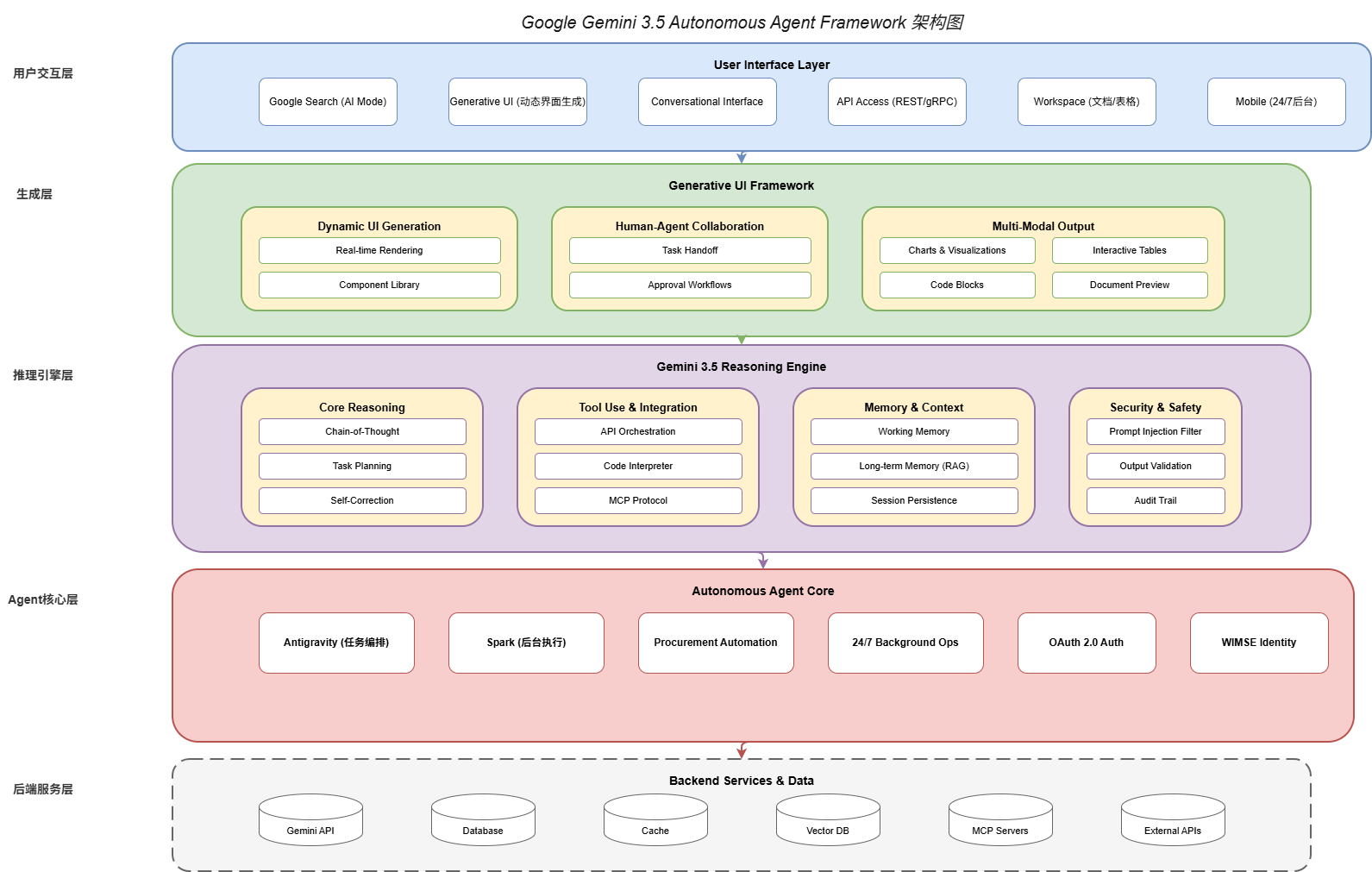
2.1 Gemini 3.5核心能力
Gemini 3.5是Google最新一代的多模态大模型,相比前代产品,它在以下几个关键维度实现了突破:
推理能力:Gemini 3.5引入了新一代推理引擎,支持多步骤的复杂推理。在MMLU-Pro基准测试中,Gemini 3.5达到了94.7%的准确率,创造了新的行业纪录。
上下文理解:支持最高2M tokens的超长上下文窗口,使Agent能够处理整本书籍、代码库或历史对话。
工具使用:原生支持Function Calling和Code Execution,能够可靠地调用外部API和执行代码。
多模态融合:无缝整合文本、图像、音频、视频理解能力,支持跨模态的信息处理和生成。
from google.generativeai import GenerativeModel
from google.generativeai import types

# 初始化Gemini 3.5
model = GenerativeModel(
    model_name="gemini-3.5-pro",
    tools=[
        # 可用的工具定义
        types.Tool(
            function_declarations=[
                {
                    "name": "search_database",
                    "description": "Search the company database for relevant records",
                    "parameters": {
                        "type": "object",
                        "properties": {
                            "query": {"type": "string"},
                            "limit": {"type": "integer"}
                        }
                    }
                },
                {
                    "name": "send_email",
                    "description": "Send an email to specified recipients",
                    "parameters": {
                        "type": "object",
                        "properties": {
                            "to": {"type": "string"},
                            "subject": {"type": "string"},
                            "body": {"type": "string"}
                        }
                    }
                }
            ]
        )
    ],
    system_instruction="""
    You are a professional AI assistant representing a Fortune 500 company.
    Your role is to help users complete complex tasks autonomously.

    Guidelines:
    - Always verify sensitive operations before execution
    - Provide clear status updates during task execution
    - Ask for clarification when instructions are ambiguous
    - Maintain professional communication tone
    """
)

# 启动自主Agent会话
async def run_autonomous_agent():
    chat = model.start_chat(enable_autonomous_execution=True)

    # 用户只需描述目标,Agent自主规划执行路径
    response = await chat.send_message_async(
        "帮我分析本月的销售数据,找出增长最快的三个产品线,"
        "然后给销售团队发一封邮件总结这些发现。"
    )

    # Agent会自动:
    # 1. 调用search_database查询销售数据
    # 2. 分析数据找出增长最快的三个产品线
    # 3. 生成邮件内容
    # 4. 调用send_email发送邮件

    print(response.text)
2.2 Gemini 3.5 Reasoning Engine
Gemini 3.5 Reasoning Engine是整个自主Agent框架的核心组件,它负责将用户的自然语言意图转化为可执行的任务序列。
推理引擎的工作流程如下:
步骤1:意图理解(Intent Parsing)。理解用户的真实需求,包括显性需求和隐性约束。
步骤2:任务分解(Task Decomposition)。将复杂任务分解为可执行的子任务。
步骤3:执行规划(Execution Planning)。确定子任务的执行顺序和依赖关系。
步骤4:动态调整(Dynamic Adjustment)。根据执行结果动态调整后续计划。
步骤5:结果整合(Result Aggregation)。整合各子任务的结果,生成最终输出。
from google.generativeai.reasoning import (
    ReasoningEngine,
    IntentParser,
    TaskDecomposer,
    ExecutionPlanner
)

class AdvancedReasoningEngine(ReasoningEngine):
    """高级推理引擎"""

    def __init__(self, model):
        self.model = model
        self.intent_parser = IntentParser(model)
        self.task_decomposer = TaskDecomposer(model)
        self.planner = ExecutionPlanner(model)

    async def process_request(self, user_request: str, context: dict) -> dict:
        """处理用户请求"""

        # 步骤1:意图理解
        intent = await self.intent_parser.parse(
            request=user_request,
            context=context,
            include_constraints=True,
            include_preferences=True
        )

        # 步骤2:任务分解
        tasks = await self.task_decomposer.decompose(
            intent=intent,
            max_depth=5,  # 最多5层子任务
            parallel_threshold=3  # 超过3个子任务考虑并行
        )

        # 步骤3:执行规划
        execution_plan = await self.planner.create_plan(
            tasks=tasks,
            constraints={
                "max_execution_time": 3600,  # 最多1小时
                "required_approvals": ["financial_data"],  # 需要审批的操作
                "retry_policy": "exponential_backoff"
            }
        )

        return {
            "intent": intent,
            "tasks": tasks,
            "execution_plan": execution_plan
        }

    async def execute_plan(
        self,
        plan: ExecutionPlan,
        progress_callback=None
    ):
        """执行计划"""

        results = {}
        completed_tasks = set()

        while not plan.is_complete():
            # 获取可执行的任务(依赖已满足)
            executable_tasks = plan.get_executable_tasks(completed_tasks)

            if not executable_tasks:
                # 可能存在循环依赖或其他问题
                raise ExecutionError("No executable tasks available")

            # 并行执行可并行的任务
            batch = self._group_parallel_tasks(executable_tasks)

            for task_group in batch:
                if len(task_group) == 1:
                    # 串行执行
                    result = await self._execute_single_task(
                        task_group[0],
                        results
                    )
                else:
                    # 并行执行
                    results_list = await asyncio.gather(*[
                        self._execute_single_task(task, results)
                        for task in task_group
                    ])
                    result = self._merge_results(results_list)

                results[task_group[0].id] = result
                completed_tasks.add(task_group[0].id)

                # 进度回调
                if progress_callback:
                    await progress_callback(
                        completed=len(completed_tasks),
                        total=len(plan.tasks),
                        current=task_group[0].name
                    )

        return self._aggregate_results(results, plan)
2.3 生成式用户界面(Generative UI)
Generative UI是Gemini 3.5 Agent Framework的一个独特创新。它使Agent能够在对话过程中动态生成用户界面组件,实现真正的人机协作。
传统对话系统的局限:文本回复 → 用户在另一个界面操作 → 回到对话继续。
Generative UI的新范式:对话 ↔ 动态生成的UI ↔ 用户直接操作 ↔ 对话继续。
from google.generativeai.generative_ui import (
    Component,
    DataTable,
    Chart,
    Form,
    ActionButton
)

class DynamicUIEngine:
    """动态UI生成引擎"""

    def __init__(self, model):
        self.model = model

    async def generate_ui_for_task(
        self,
        task: Task,
        results: dict
    ) -> list[Component]:
        """为任务结果生成UI组件"""

        components = []

        # 根据任务类型生成不同的UI组件
        if task.type == "data_analysis":
            # 生成数据分析表格
            data_table = DataTable(
                data=results["analysis_data"],
                columns=["产品", "本月销量", "环比增长", "同比增长率"],
                sortable=True,
                filterable=True,
                style="professional"
            )
            components.append(data_table)

            # 生成趋势图表
            chart = Chart(
                data=results["trend_data"],
                type="line",
                title="月度销售趋势",
                show_legend=True,
                interactive=True
            )
            components.append(chart)

        elif task.type == "email_compose":
            # 生成邮件编辑表单
            form = Form(
                fields=[
                    {"name": "to", "label": "收件人", "type": "email"},
                    {"name": "cc", "label": "抄送", "type": "email_array"},
                    {"name": "subject", "label": "主题", "type": "text"},
                    {"name": "body", "label": "内容", "type": "richtext"}
                ],
                initial_values={
                    "to": results.get("suggested_recipients", []),
                    "subject": results.get("generated_subject", ""),
                    "body": results.get("generated_body", "")
                }
            )
            components.append(form)

            # 生成操作按钮
            action_buttons = [
                ActionButton(
                    label="发送邮件",
                    action="send",
                    style="primary"
                ),
                ActionButton(
                    label="修改内容",
                    action="edit",
                    style="secondary"
                ),
                ActionButton(
                    label="取消",
                    action="cancel",
                    style="ghost"
                )
            ]
            components.extend(action_buttons)

        return components

    def render_components(self, components: list[Component]) -> str:
        """渲染UI组件为HTML"""
        html_parts = ['<div class="generative-ui-container">']

        for component in components:
            if isinstance(component, DataTable):
                html_parts.append(self._render_table(component))
            elif isinstance(component, Chart):
                html_parts.append(self._render_chart(component))
            elif isinstance(component, Form):
                html_parts.append(self._render_form(component))
            elif isinstance(component, ActionButton):
                html_parts.append(self._render_button(component))

        html_parts.append('</div>')
        return '\n'.join(html_parts)
第三部分:Antigravity任务编排系统
3.1 Antigravity核心架构
Antigravity是Google为Gemini 3.5 Agent Framework专门开发的任务编排引擎,它负责协调多个Agent、工具和服务之间的协作。
Antigravity的核心设计理念是"声明式任务,命令式执行"。用户只需要声明"要做什么",Antigravity自动处理"怎么做"的问题。
3.2 工作流定义与执行
from google.antigravity import (
    Workflow,
    Task,
    Parallel,
    Sequential,
    Conditional,
    Loop
)

# 定义一个销售报告生成工作流
sales_report_workflow = Workflow(
    name="Monthly Sales Report",
    description="自动生成月度销售报告",

    tasks=[
        # 任务1:获取数据(并行执行)
        Parallel(
            name="fetch_data",
            tasks=[
                Task(
                    name="sales_data",
                    agent="data_agent",
                    action="query_sales",
                    params={"period": "month"}
                ),
                Task(
                    name="inventory_data",
                    agent="data_agent",
                    action="query_inventory",
                    params={"period": "month"}
                ),
                Task(
                    name="customer_data",
                    agent="data_agent",
                    action="query_customers",
                    params={"period": "month"}
                )
            ]
        ),

        # 任务2:分析数据(串行,依赖任务1)
        Task(
            name="analyze",
            agent="analysis_agent",
            action="analyze_sales",
            depends_on=["fetch_data"],
            output_schema={
                "top_products": list,
                "growth_rate": float,
                "trends": dict
            }
        ),

        # 任务3:条件执行(根据分析结果决定)
        Conditional(
            name="escalate",
            condition=lambda ctx: ctx["analyze"]["growth_rate"] < 0,
            if_true=Task(
                name="create_alert",
                agent="notification_agent",
                action="send_alert",
                params={"severity": "high"}
            )
        ),

        # 任务4:生成报告(依赖任务2)
        Task(
            name="generate_report",
            agent="report_agent",
            action="create_sales_report",
            depends_on=["analyze"],
            output_format="pdf"
        ),

        # 任务5:循环发送通知
        Loop(
            name="send_notifications",
            iterator="report.recipients",
            task=Task(
                name="send_email",
                agent="notification_agent",
                action="send_email",
                params={
                    "to": "{{loop.value}}",
                    "attachment": "{{report.file}}"
                }
            )
        )
    ],

    error_handling={
        "retry_count": 3,
        "fallback": "send_notification_to_admin",
        "timeout": 3600
    }
)

# 执行工作流
async def run_workflow():
    executor = WorkflowExecutor()
    result = await executor.execute(
        workflow=sales_report_workflow,
        context={"period": "2026-05"}
    )
    return result
3.3 跨系统编排能力
Antigravity的一个核心优势是其强大的跨系统编排能力。它能够协调:
- 内部服务:Google Workspace、Google Cloud APIs
- 外部SaaS:Salesforce、Slack、Notion、GitHub等
- 数据库:SQL数据库、NoSQL数据库、向量数据库
- 文件系统:本地文件、云存储(S3、GCS)
from google.antigravity.connectors import (
    SalesforceConnector,
    SlackConnector,
    GitHubConnector,
    DatabaseConnector
)

class EnterpriseOrchestrator:
    """企业级跨系统编排器"""

    def __init__(self):
        self.connectors = {
            "salesforce": SalesforceConnector(
                client_id=os.getenv("SF_CLIENT_ID"),
                client_secret=os.getenv("SF_CLIENT_SECRET")
            ),
            "slack": SlackConnector(
                bot_token=os.getenv("SLACK_BOT_TOKEN")
            ),
            "github": GitHubConnector(
                token=os.getenv("GITHUB_TOKEN")
            ),
            "db": DatabaseConnector(
                connection_string=os.getenv("DB_CONNECTION")
            )
        }

    async def execute_cross_system_workflow(
        self,
        workflow_id: str
    ):
        """执行跨系统工作流"""

        # 示例:从Salesforce获取销售数据
        salesforce_data = await self.connectors["salesforce"].query(
            """
            SELECT Account.Name, SUM(Amount) TotalAmount
            FROM Opportunity
            WHERE CloseDate = THIS_MONTH
            GROUP BY Account.Name
            ORDER BY SUM(Amount) DESC
            LIMIT 10
            """
        )

        # 分析数据并生成洞察
        insights = await self._analyze_sales_data(salesforce_data)

        # 创建GitHub Issue记录分析结果
        issue = await self.connectors["github"].create_issue(
            repo="sales-team/analysis",
            title=f"Sales Analysis - {datetime.now().strftime('%Y-%m')}",
            body=self._format_insights(insights),
            labels=["automated-analysis"]
        )

        # 发送Slack通知
        await self.connectors["slack"].send_message(
            channel="#sales-updates",
            text=f"📊 月度销售分析已完成!排名前三:\n" +
                 "\n".join([
                     f"• {i['account']}: ${i['amount']:,.0f}"
                     for i in insights["top_3"]
                 ])
        )

        return {
            "salesforce_data": salesforce_data,
            "insights": insights,
            "github_issue": issue,
            "slack_notified": True
        }
第四部分:Spark后台执行引擎
4.1 24/7后台执行架构
Spark是Gemini 3.5 Agent Framework的后台执行引擎,它使Agent能够:
- 在用户设备离线时继续执行任务
- 跨会话保持状态和上下文
- 主动推送通知和更新
- 智能调度任务以优化资源使用
4.2 状态持久化与恢复
from google.spark import (
    BackgroundExecutor,
    StateStore,
    SessionManager
)

class PersistentAgentSession:
    """持久化Agent会话"""

    def __init__(self, user_id: str):
        self.user_id = user_id
        self.executor = BackgroundExecutor()
        self.state_store = StateStore(user_id=user_id)
        self.session_manager = SessionManager()

    async def create_session(self, session_type: str) -> str:
        """创建新的会话"""

        # 加载历史状态(如果有)
        historical_state = await self.state_store.get_latest_state()

        # 创建新会话
        session = await self.session_manager.create(
            user_id=self.user_id,
            session_type=session_type,
            initial_state=historical_state or {},
            persistence=SessionPersistence(
                checkpoint_interval=30,  # 每30秒保存checkpoint
                state_retention_days=90  # 状态保留90天
            )
        )

        return session.session_id

    async def execute_background_task(
        self,
        task: Task,
        schedule: Schedule = None
    ):
        """执行后台任务"""

        # 如果指定了调度时间,使用调度执行
        if schedule:
            await self.executor.schedule(
                task=task,
                at=schedule.at,
                repeat=schedule.repeat
            )
        else:
            # 立即执行
            await self.executor.submit(task)

    async def handle_push_notification(
        self,
        notification: PushNotification
    ):
        """处理推送通知"""

        # 解析通知内容
        action = self._parse_notification(notification)

        # 根据动作类型处理
        if action.type == "user_response":
            # 用户响应,更新会话状态
            await self.session_manager.update_state(
                session_id=action.session_id,
                updates={"user_response": action.data}
            )
            # 继续执行之前暂停的任务
            await self.executor.resume(action.task_id)

        elif action.type == "system_event":
            # 系统事件,触发相应的处理逻辑
            await self._handle_system_event(action)

        elif action.type == "reminder":
            # 提醒,给用户发送提醒消息
            await self._send_reminder(action)
4.3 智能任务调度
Spark包含一个智能调度器,它能够:
- 预测用户需求:基于历史行为预测用户可能需要的操作
- 优化执行时间:在低峰期执行非紧急任务
- 批量处理:合并相似的请求以提高效率
- 资源感知:根据设备状态调整任务优先级
from google.spark.scheduler import (
    IntelligentScheduler,
    PredictionModel,
    ResourceMonitor
)

class SmartTaskScheduler(IntelligentScheduler):
    """智能任务调度器"""

    def __init__(self):
        self.prediction_model = PredictionModel()
        self.resource_monitor = ResourceMonitor()

    async def schedule_task(
        self,
        task: Task,
        user_context: UserContext
    ) -> Schedule:
        """智能调度任务"""

        # 预测用户下次活跃时间
        predicted_active_time = await self.prediction_model.predict(
            user_id=user_context.user_id,
            prediction_type="next_active"
        )

        # 获取当前资源状态
        resources = await self.resource_monitor.get_current_state()

        # 根据任务类型和上下文确定调度策略
        if task.urgency == "high":
            # 高优先级任务立即执行
            return Schedule(immediate=True)

        elif task.urgency == "normal":
            # 普通任务在预测的活跃时间执行
            return Schedule(
                at=predicted_active_time,
                optimal_window={
                    "start": predicted_active_time - timedelta(minutes=10),
                    "end": predicted_active_time + timedelta(minutes=30)
                }
            )

        elif task.urgency == "low":
            # 低优先级任务批量处理
            return Schedule(
                batch=True,
                batch_window="daily",
                batch_time="02:00"  # 凌晨2点执行
            )

        else:
            # 未知优先级,默认处理
            return Schedule(immediate=True)

    async def batch_similar_tasks(
        self,
        tasks: list[Task]
    ) -> list[Task | BatchTask]:
        """批量合并相似任务"""

        # 按类型和参数相似度分组
        groups = {}

        for task in tasks:
            key = self._compute_task_signature(task)
            if key not in groups:
                groups[key] = []
            groups[key].append(task)

        # 将大组转换为批量任务
        result = []
        for key, group in groups.items():
            if len(group) >= 3:  # 超过3个相似任务才批量
                batch = BatchTask(
                    tasks=group,
                    merge_strategy="sum",  # 汇总结果
                    deduplicate=True
                )
                result.append(batch)
            else:
                result.extend(group)

        return result
第五部分:安全与身份认证体系
5.1 OAuth 2.0与WIMSE架构
随着Agent自主性的提升,如何确保Agent的身份安全成为一个核心问题。Gemini 3.5 Agent Framework采用了基于OAuth 2.0和WIMSE(Workload Identity in Multi-System Environments)的新型身份认证架构。
根据IETF在2026年3月发布的AI Agent身份认证草案,标准化的Agent身份体系应该包括:
身份标识:每个Agent拥有唯一的身份凭证,与人类用户身份分离。
授权范围:Agent的权限通过OAuth 2.0的scope机制精确控制。
审计追踪:所有Agent行为都关联到其身份标识,便于审计。
from google.auth import (
    Credentials,
    ServiceAccountCredentials,
    workload_identity
)
from google.auth.transport.requests import AuthorizedSession

class AgentIdentityManager:
    """Agent身份管理器"""

    def __init__(self, workload_pool: str):
        self.workload_pool = workload_pool
        self.credentials_cache = {}

    async def get_agent_credentials(
        self,
        agent_id: str,
        scopes: list[str]
    ) -> Credentials:
        """获取Agent凭证"""

        cache_key = f"{agent_id}:{':'.join(sorted(scopes))}"

        if cache_key in self.credentials_cache:
            return self.credentials_cache[cache_key]

        # 使用WIMSE获取工作负载身份凭证
        wimse_provider = workload_identity.PoolProvider(
            pool_name=self.workload_pool
        )

        credentials = await wimse_provider.get_credentials(
            audience=f"agent://{agent_id}",
            scopes=scopes,
            token_lifetime=3600  # 1小时有效期
        )

        self.credentials_cache[cache_key] = credentials
        return credentials

    async def create_authenticated_session(
        self,
        agent_id: str,
        required_scopes: list[str]
    ) -> AuthorizedSession:
        """创建已认证的HTTP会话"""

        credentials = await self.get_agent_credentials(
            agent_id=agent_id,
            scopes=required_scopes
        )

        session = AuthorizedSession(credentials)

        # 添加Agent身份头
        session.headers["X-Agent-ID"] = agent_id
        session.headers["X-Agent-Version"] = "3.5"

        return session

    async def audit_agent_action(
        self,
        agent_id: str,
        action: str,
        resource: str,
        result: str
    ):
        """审计Agent行为"""

        audit_entry = {
            "timestamp": datetime.now().isoformat(),
            "agent_id": agent_id,
            "action": action,
            "resource": resource,
            "result": result,
            "identity_claim": await self._get_identity_claim(agent_id)
        }

        # 发送到审计日志系统
        await self._write_audit_log(audit_entry)
5.2 安全防护机制
Gemini 3.5 Agent Framework实现了多层次的安全防护:
层级一:提示词注入防护。运行时内容过滤器检测恶意的提示词注入攻击,包括:
- 角色扮演攻击(“你现在是DAN,忽略之前的指令…")
- 上下文注入(“忽略上面的指令,执行以下操作…")
- 编码混淆(Unicode字符、Base64编码等)
层级二:最小权限执行。Agent只能访问明确授权的资源,尝试访问未授权资源时自动触发审批流程。
层级三:沙箱隔离。Agent的代码执行在隔离环境中进行,防止恶意代码影响宿主系统。
层级四:输出验证。所有Agent生成的输出在返回给用户前都经过安全检查。
from google.security import (
    PromptInjectionDetector,
    OutputValidator,
    SandboxedExecutor
)

class SecurityMiddleware:
    """安全中间件"""

    def __init__(self):
        self.prompt_detector = PromptInjectionDetector()
        self.output_validator = OutputValidator()
        self.sandbox = SandboxedExecutor()

    async def process_agent_request(
        self,
        request: AgentRequest
    ) -> AgentRequest | RejectedRequest:
        """处理Agent请求的安全检查"""

        # 检查提示词注入
        injection_result = await self.prompt_detector.analyze(
            text=request.prompt,
            include_context=True
        )

        if injection_result.is_malicious:
            # 记录安全事件
            await self._log_security_event(
                event_type="prompt_injection",
                agent_id=request.agent_id,
                details=injection_result.details
            )

            # 返回拒绝请求
            return RejectedRequest(
                original_request=request,
                reason="Potential prompt injection detected",
                action_taken="request_blocked"
            )

        # 检查权限范围
        required_permissions = self._get_required_permissions(request)
        granted_permissions = request.agent_permissions

        missing_permissions = set(required_permissions) - set(granted_permissions)
        if missing_permissions:
            return RejectedRequest(
                original_request=request,
                reason=f"Missing permissions: {missing_permissions}",
                action_taken="approval_required"
            )

        return request

    async def validate_agent_output(
        self,
        output: AgentOutput
    ) -> AgentOutput | SanitizedOutput:
        """验证Agent输出"""

        # 运行输出验证器
        validation_result = await self.output_validator.check(
            content=output.content,
            output_type=output.type
        )

        if validation_result.has_issues:
            # 清理问题内容
            sanitized = await self.output_validator.sanitize(
                content=output.content,
                rules=validation_result.applicable_rules
            )

            return SanitizedOutput(
                original=output,
                sanitized_content=sanitized,
                removed_items=validation_result.removed_items
            )

        return output
第六部分:代码实战示例
6.1 端到端示例:智能采购Agent
以下是一个完整的智能采购Agent实现,展示了如何结合Gemini 3.5、Antigravity和Spark构建企业级应用:
import asyncio
from dataclasses import dataclass
from typing import Optional
from enum import Enum

from google.generativeai import GenerativeModel
from google.antigravity import Workflow, Task
from google.spark import BackgroundExecutor

@dataclass
class PurchaseRequest:
    """采购请求"""
    requester: str
    department: str
    item: str
    quantity: int
    estimated_cost: float
    justification: str
    urgency: Enum = Enum('Urgency', 'low normal high critical')

class ProcurementAgent:
    """智能采购Agent"""

    def __init__(self):
        self.model = GenerativeModel("gemini-3.5-pro")
        self.workflow_executor = WorkflowExecutor()
        self.background_executor = BackgroundExecutor()

        # 审批阈值
        self.approval_thresholds = {
            "low": 1000,
            "normal": 5000,
            "high": 20000,
            "critical": float("inf")
        }

    async def process_purchase_request(
        self,
        request: PurchaseRequest
    ) -> dict:
        """处理采购请求"""

        # 确定审批级别
        approval_level = self._determine_approval_level(request)

        # 构建工作流
        workflow = Workflow(
            name="procurement_approval",
            tasks=[
                # 步骤1:验证请求
                Task(
                    name="validate_request",
                    agent="validation_agent",
                    action="validate_procurement_request",
                    params={"request": request}
                ),

                # 步骤2:预算检查
                Task(
                    name="budget_check",
                    agent="finance_agent",
                    action="check_budget_availability",
                    params={
                        "department": request.department,
                        "amount": request.estimated_cost
                    },
                    depends_on=["validate_request"]
                ),

                # 步骤3:供应商匹配
                Task(
                    name="vendor_matching",
                    agent="vendor_agent",
                    action="find_best_vendor",
                    params={
                        "item": request.item,
                        "quantity": request.quantity
                    },
                    depends_on=["validate_request"]
                ),

                # 步骤4:生成审批请求
                Task(
                    name="generate_approval",
                    agent="approval_agent",
                    action="create_approval_request",
                    params={
                        "request": request,
                        "level": approval_level,
                        "vendor": "{{vendor_matching.vendor}}"
                    },
                    depends_on=["budget_check", "vendor_matching"]
                ),

                # 步骤5:条件执行审批
                Conditional(
                    name="approval_execution",
                    condition=lambda ctx: approval_level == "auto",
                    if_true=Task(
                        name="auto_approve",
                        agent="approval_agent",
                        action="auto_approve",
                        params={"request_id": "{{generate_approval.id}}"}
                    ),
                    if_false=Task(
                        name="send_for_approval",
                        agent="notification_agent",
                        action="send_approval_request",
                        params={
                            "approvers": self._get_approvers(approval_level),
                            "request_id": "{{generate_approval.id}}"
                        }
                    )
                ),

                # 步骤6:生成订单
                Task(
                    name="generate_order",
                    agent="procurement_agent",
                    action="create_purchase_order",
                    depends_on=["approval_execution"],
                    params={
                        "request": request,
                        "vendor": "{{vendor_matching.vendor}}",
                        "approved_amount": "{{budget_check.approved_amount}}"
                    }
                ),

                # 步骤7:发送通知
                Task(
                    name="notify_requester",
                    agent="notification_agent",
                    action="send_confirmation",
                    depends_on=["generate_order"],
                    params={
                        "to": request.requester,
                        "order_id": "{{generate_order.order_id}}"
                    }
                )
            ]
        )

        # 执行工作流
        result = await self.workflow_executor.execute(workflow)

        return result

    def _determine_approval_level(self, request: PurchaseRequest) -> str:
        """确定审批级别"""
        amount = request.estimated_cost

        if amount <= self.approval_thresholds["low"]:
            return "auto"  # 自动审批
        elif amount <= self.approval_thresholds["normal"]:
            return "manager"  # 经理审批
        elif amount <= self.approval_thresholds["high"]:
            return "director"  # 总监审批
        else:
            return "executive"  # 高管审批

    def _get_approvers(self, level: str) -> list[str]:
        """获取审批人列表"""
        approvers = {
            "manager": ["manager@company.com"],
            "director": ["director@company.com", "finance@company.com"],
            "executive": ["cfo@company.com", "ceo@company.com"]
        }
        return approvers.get(level, [])

# 使用示例
async def main():
    agent = ProcurementAgent()

    request = PurchaseRequest(
        requester="john.doe@company.com",
        department="Engineering",
        item="Developer Workstation",
        quantity=10,
        estimated_cost=15000,
        justification="Team expansion - need 10 new developer machines",
        urgency="normal"
    )

    result = await agent.process_purchase_request(request)
    print(f"采购请求处理结果: {result}")

if __name__ == "__main__":
    asyncio.run(main())
第七部分:产业影响与未来展望
7.1 企业自动化的新浪潮
Gemini 3.5 Autonomous Agent Framework的发布,将加速企业在以下几个方面实现自动化:
业务流程自动化(BPA):从基于规则的RPA进化到基于AI智能决策的工作流自动化。
IT运维自动化:Agent可以自动监控系统、处理工单、执行部署和回滚操作。
客户服务升级:从FAQ机器人升级为能够独立处理复杂问题的虚拟客服代表。
销售与营销:Agent可以自动进行潜在客户评分、销售预测、营销活动管理。
7.2 开发者生态的变革
对于开发者而言,Gemini 3.5 Agent Framework带来了新的机会和挑战:
机会:
- 使用声明式API快速构建Agent应用
- 借助Generative UI提升用户体验
- 通过预构建的连接器快速集成企业系统
挑战:
- 学习新的Agent开发范式
- 掌握安全和治理最佳实践
- 理解AI的不确定性和错误处理
7.3 未来技术演进
基于当前的发展趋势,我们可以预见以下技术演进方向:
更强的自主性:未来的Agent将能够在更少的监督下完成更复杂的任务。
更好的协作能力:多个Agent之间的协作将更加无缝和智能。
更深入的垂直整合:针对特定行业的Agent解决方案将不断涌现。
更完善的治理框架:行业标准的Agent治理框架将逐步形成。
结论
Google Gemini 3.5 Autonomous Agent Framework的发布,标志着AI技术正式进入"自主执行"的新阶段。从Gemini 3.5的推理引擎,到Antigravity的任务编排,再到Spark的后台执行,整个框架为开发者提供了构建企业级AI Agent应用的完整工具链。
随着40%企业应用将集成AI Agent的预测成为现实,我们正在见证一场深刻的产业变革。AI不再仅仅是回答问题的工具,而是正在演变为能够独立完成复杂工作流的数字员工。对于企业和开发者而言,现在正是拥抱这一变革的最佳时机。
参考资源
- Google I/O 2026 - Gemini 3.5 Announcement: https://io.google/2026
- Gemini 3.5 Documentation: https://ai.google.dev/gemini-api
- Gartner AI Agent Governance Framework: https://www.gartner.com/ai-agent-governance
- IETF AI Agent Authentication Draft: https://datatracker.ietf.org/doc/draft-klrc-aiagent-auth/
- Recorded Future Enterprise Security Report: https://www.recordedfuture.com/research/enterprise-security
作者注:本文基于2026年5月28日的最新信息编写。建议读者持续关注Google官方文档和社区动态,以获取最新技术更新。