The Rise of Multimodal Agents: From Vision-Language Models to Autonomous GUI Operation
From Pixels to Action: How Multimodal Agents Reshape GUI Automation
Background
At the end of 2023, when GPT-4V first demonstrated the ability to understand screenshots, the entire AI community realized that large language models were no longer confined to the text world. Soon after, models like Claude 3 and Gemini joined this visual revolution. The emergence of these Vision-Language Models (VLMs) gave rise to a new research direction—multimodal agents.
Traditionally, AI agents could only interact with systems through APIs or command lines. While efficient, this approach has a clear limitation: it requires the system to provide structured interfaces. However, much software in the real world only offers Graphical User Interfaces (GUIs). From enterprise-level ERP systems to personal computer notepads, from mobile apps to web services, the GUI remains the primary way humans interact with the digital world.
The advent of multimodal agents has fundamentally changed this situation. By directly “watching” screenshots and performing actions, agents can operate any software just like a human—regardless of whether it provides an API. This means:
- Legacy system automation no longer requires reverse engineering or scripting
- Cross-platform operations become unified, no longer limited to specific operating systems
- Human operation patterns can be fully recorded and reproduced
This article will delve into the technical principles of multimodal agents, system architecture design, and provide a complete implementation solution based on Golang.
Technical Principles
Core Capabilities of Vision-Language Models
The technical foundation of multimodal agents is the Vision-Language Model (VLM). Unlike text-only models, VLMs can simultaneously understand image and text information. Their core architecture includes three key components:
- Vision Encoder: Converts images into feature vectors. Typically uses pre-trained ViT (Vision Transformer) or CLIP vision encoders
- Language Model: Processes text input and generates responses. Can be large language models like GPT, LLaMA
- Multimodal Fusion Layer: Aligns visual features with text features to achieve cross-modal understanding
When an agent “sees” a screenshot, the processing flow is as follows:
Screenshot → Vision Encoder → Feature Vector → Multimodal Fusion → Language Model → Action Instructions
User Instruction → Text Encoder → Feature Vector →
From Understanding to Action
Understanding screen content is only the first step. The real challenge is converting understanding into precise actions. This requires solving three key technical issues:
1. Element Localization: Given an instruction (e.g., “click the search button”), the agent needs to accurately identify which area of the screen corresponds to the “search button.” This is usually achieved through coordinate regression, where the model outputs a bounding box coordinate.
2. Action Generation: After identifying the target, the agent needs to generate a specific sequence of actions. Action types typically include:
- Mouse click (coordinates x, y)
- Keyboard input (text content)
- Scroll (direction and distance)
- Drag (start coordinates, target coordinates)
3. State Tracking: After an action, the interface changes, and the agent needs to continuously monitor state changes, forming an “observe-think-act” loop.
Key Technical Challenges
Viewpoint Invariance: The same interface behaves differently at different resolutions and zoom levels. The agent needs scale invariance.
Dynamic Content: Animations, loading states, and real-time updated content increase recognition difficulty.
Action Precision: Pixel-level localization requires high accuracy, especially on dense interfaces.
System Architecture Design
Based on the above technical principles, we design a complete multimodal agent system. This system adopts a modular architecture, where each component can be independently extended and optimized.
[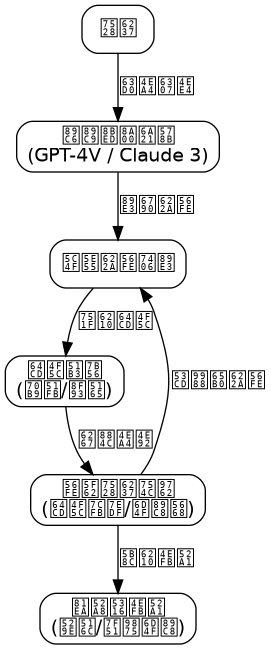](/images/blog/the-rise-of-multimodal-agents-from-vision-language-models-to-autonomous-gui-operation-20260614080412.png)
┌─────────────────────────────────────────────────────────┐
│ Multimodal Agent System Architecture │
├─────────────────────────────────────────────────────────┤
│ ┌─────────┐ ┌──────────┐ ┌──────────┐ ┌────────┐ │
│ │ Vision │ │Instruction│ │Decision │ │Executor│ │
│ │ Input │ │Parser │ │Engine │ │ │ │
│ │ Module │ │ │ │ │ │ │ │
│ └────┬────┘ └────┬─────┘ └────┬─────┘ └───┬────┘ │
│ │ │ │ │ │
│ ┌────▼────┐ ┌────▼─────┐ ┌────▼─────┐ ┌───▼────┐ │
│ │ Screen │ │ Intent │ │ Planner │ │ Action │ │
│ │ Capture │ │Recognition│ │Action │ │Executor│ │
│ │Image Proc│ │Context Mgmt│ │Selector │ │ │ │
│ └─────────┘ └──────────┘ └──────────┘ └────────┘ │
│ │
│ ┌─────────────────────────────────────────────────┐ │
│ │ Core Service Layer │ │
│ │ ┌──────────┐ ┌──────────┐ ┌────────────────┐ │ │
│ │ │Model │ │Cache │ │Logging & │ │ │
│ │ │Service │ │Service │ │Monitoring Svc │ │ │
│ │ └──────────┘ └──────────┘ └────────────────┘ │ │
│ └─────────────────────────────────────────────────┘ │
└─────────────────────────────────────────────────────────┘
Module Responsibilities
Vision Input Module: Responsible for capturing screenshots, supporting multiple platforms (Windows, macOS, Linux). Provides screenshot preprocessing functions including scaling, noise reduction, and format conversion.
Instruction Parser: Receives user natural language instructions, extracts intent, parameters, and constraints through NLP technology. Maintains dialogue context and supports multi-turn interactions.
Decision Engine: The core component of the system. It encodes screenshots and instructions, then calls the VLM model to generate an action plan. Contains two sub-modules: the planner and the action selector.
Executor: Converts action instructions generated by the decision engine into system-level operations. Supports cross-platform input simulation, ensuring precise and reliable actions.
Core Service Layer: Provides basic services such as model inference, caching acceleration, and logging.
Core Implementation (Golang)
Below we use Golang to implement a simplified but functionally complete multimodal agent core system. The code adopts a modular design, focusing on the implementation of the decision engine and executor.
1. Data Model Definition
// types.go - System Core Data Types

package agent

import "time"

// Action Type Enumeration
type ActionType int

const (
    ActionClick ActionType = iota
    ActionInput
    ActionScroll
    ActionDrag
    ActionKeyPress
    ActionWait
)

// Screen Element Location Information
type ElementLocation struct {
    X      int     // Element center X coordinate
    Y      int     // Element center Y coordinate
    Width  int     // Element width
    Height int     // Element height
    Label  string  // Element text label (if any)
    Type   string  // Element type (button, input, link, etc.)
}

// Single Step Action Instruction
type Action struct {
    Type     ActionType        // Action type
    Target   *ElementLocation  // Target element location
    Text     string            // Input text (for Input action)
    ScrollDelta int            // Scroll distance (positive down, negative up)
    Duration time.Duration     // Action duration
}

// Agent State
type AgentState struct {
    Screenshot []byte          // Current screenshot
    Actions    []Action        // Executed action history
    Context    map[string]interface{} // Context information
    Step       int             // Current step number
}

// Decision Result
type Decision struct {
    Actions     []Action       // Sequence of actions to execute
    Confidence  float64        // Confidence level
    Explanation string         // Decision explanation
}

// User Instruction
type Instruction struct {
    Text      string
    Timestamp time.Time
    SessionID string
}
2. Vision Input Module
// capture.go - Screen Capture Module

package agent

import (
    "image"
    "image/png"
    "bytes"
    "github.com/kbinani/screenshot" // Cross-platform screenshot library
)

// ScreenCapturer is responsible for capturing screen content
type ScreenCapturer struct {
    DisplayIndex int    // Display index
    ScaleFactor  float64 // Scaling factor
}

// NewScreenCapturer creates a new screen capturer
func NewScreenCapturer(displayIndex int, scaleFactor float64) *ScreenCapturer {
    return &ScreenCapturer{
        DisplayIndex: displayIndex,
        ScaleFactor:  scaleFactor,
    }
}

// Capture captures the current screen and returns PNG byte data
func (sc *ScreenCapturer) Capture() ([]byte, error) {
    // Get display bounds
    bounds := screenshot.GetDisplayBounds(sc.DisplayIndex)

    // Capture screen
    img, err := screenshot.CaptureRect(bounds)
    if err != nil {
        return nil, err
    }

    // Resize image if scaling is needed
    if sc.ScaleFactor != 1.0 {
        img = sc.resizeImage(img)
    }

    // Encode as PNG
    buf := new(bytes.Buffer)
    if err := png.Encode(buf, img); err != nil {
        return nil, err
    }

    return buf.Bytes(), nil
}

// resizeImage scales the image to the target size
func (sc *ScreenCapturer) resizeImage(img *image.RGBA) *image.RGBA {
    // Simplified implementation: using nearest-neighbor interpolation
    bounds := img.Bounds()
    newWidth := int(float64(bounds.Dx()) * sc.ScaleFactor)
    newHeight := int(float64(bounds.Dy()) * sc.ScaleFactor)

    resized := image.NewRGBA(image.Rect(0, 0, newWidth, newHeight))

    // Per-pixel sampling
    for y := 0; y < newHeight; y++ {
        for x := 0; x < newWidth; x++ {
            srcX := int(float64(x) / sc.ScaleFactor)
            srcY := int(float64(y) / sc.ScaleFactor)
            resized.Set(x, y, img.At(srcX, srcY))
        }
    }

    return resized
}
3. Decision Engine Implementation
// decision_engine.go - Core Decision Engine

package agent

import (
    "encoding/json"
    "fmt"
    "strings"
)

// DecisionEngine is a VLM-based decision engine
type DecisionEngine struct {
    modelService *ModelService  // VLM model service
    contextSize  int            // Context window size
}

// NewDecisionEngine creates a decision engine
func NewDecisionEngine(modelService *ModelService, contextSize int) *DecisionEngine {
    return &DecisionEngine{
        modelService: modelService,
        contextSize:  contextSize,
    }
}

// Decide makes a decision based on the current state and instruction
func (de *DecisionEngine) Decide(state *AgentState, instruction *Instruction) (*Decision, error) {
    // Build prompt
    prompt := de.buildPrompt(state, instruction)

    // Call VLM model
    response, err := de.modelService.Infer(state.Screenshot, prompt)
    if err != nil {
        return nil, fmt.Errorf("model inference failed: %w", err)
    }

    // Parse model output
    decision, err := de.parseResponse(response)
    if err != nil {
        return nil, fmt.Errorf("failed to parse model response: %w", err)
    }

    return decision, nil
}

// buildPrompt constructs the VLM prompt
func (de *DecisionEngine) buildPrompt(state *AgentState, instruction *Instruction) string {
    var sb strings.Builder

    // System prompt
    sb.WriteString("You are a GUI operation assistant. Based on the current screenshot and user instruction, generate precise mouse and keyboard actions.\n")
    sb.WriteString("Please output the action sequence in JSON format. Each action includes: type (action type), target (target coordinates and size), text (input text)\n\n")

    // User instruction
    sb.WriteString(fmt.Sprintf("User instruction: %s\n\n", instruction.Text))

    // Action history (context)
    if len(state.Actions) > 0 {
        sb.WriteString("Executed action history:\n")
        start := max(0, len(state.Actions)-de.contextSize)
        for i := start; i < len(state.Actions); i++ {
            action := state.Actions[i]
            sb.WriteString(fmt.Sprintf("  %d. %s\n", i+1, de.actionToString(&action)))
        }
        sb.WriteString("\n")
    }

    // Output format requirements
    sb.WriteString("Please output the action sequence in JSON format, for example:\n")
    sb.WriteString(`[{"type":"click","target":{"x":100,"y":200,"width":50,"height":30}}]`)

    return sb.String()
}

// parseResponse parses the model response
func (de *DecisionEngine) parseResponse(response string) (*Decision, error) {
    // Clean response text, extract JSON part
    jsonStr := de.extractJSON(response)
    if jsonStr == "" {
        return nil, fmt.Errorf("no valid JSON output found")
    }

    // Parse action sequence
    var actions []Action
    if err := json.Unmarshal([]byte(jsonStr), &actions); err != nil {
        return nil, fmt.Errorf("JSON parsing failed: %w", err)
    }

    // Build decision result
    decision := &Decision{
        Actions:     actions,
        Confidence:  0.85, // Simplified; actual value should come from model
        Explanation: "Action sequence generated based on screen analysis",
    }

    return decision, nil
}

// extractJSON extracts JSON string from text
func (de *DecisionEngine) extractJSON(text string) string {
    start := strings.Index(text, "[")
    if start == -1 {
        return ""
    }

    end := strings.LastIndex(text, "]")
    if end == -1 || end <= start {
        return ""
    }

    return text[start : end+1]
}

// actionToString converts an action to a readable string
func (de *DecisionEngine) actionToString(action *Action) string {
    switch action.Type {
    case ActionClick:
        return fmt.Sprintf("Click (%d, %d)", action.Target.X, action.Target.Y)
    case ActionInput:
        return fmt.Sprintf("Input '%s' at (%d, %d)", action.Text, action.Target.X, action.Target.Y)
    case ActionScroll:
        return fmt.Sprintf("Scroll %d", action.ScrollDelta)
    default:
        return "Unknown action"
    }
}
4. Executor Implementation
// executor.go - Action Executor

package agent

import (
    "fmt"
    "time"
    "github.com/go-vgo/robotgo" // Cross-platform input simulation library
)

// ActionExecutor executes specific GUI operations
type ActionExecutor struct {
    clickSpeed time.Duration  // Click interval
    inputDelay time.Duration  // Input delay
}

// NewActionExecutor creates an executor
func NewActionExecutor(clickSpeed, inputDelay time.Duration) *ActionExecutor {
    return &ActionExecutor{
        clickSpeed: clickSpeed,
        inputDelay: inputDelay,
    }
}

// Execute executes a sequence of actions
func (ae *ActionExecutor) Execute(actions []Action) error {
    for i, action := range actions {
        if err := ae.executeSingle(&action); err != nil {
            return fmt.Errorf("failed to execute step %d: %w", i+1, err)
        }
    }
    return nil
}

// executeSingle executes a single action
func (ae *ActionExecutor) executeSingle(action *Action) error {
    switch action.Type {
    case ActionClick:
        return ae.click(action.Target)
    case ActionInput:
        return ae.inputText(action)
    case ActionScroll:
        return ae.scroll(action.ScrollDelta)
    case ActionDrag:
        return ae.drag(action)
    case ActionKeyPress:
        return ae.keyPress(action)
    case ActionWait:
        time.Sleep(action.Duration)
        return nil
    default:
        return fmt.Errorf("unsupported action type: %v", action.Type)
    }
}

// click performs a click operation
func (ae *ActionExecutor) click(target *ElementLocation) error {
    // Calculate click position (element center)
    clickX := target.X + target.Width/2
    clickY := target.Y + target.Height/2

    // Move mouse to target position
    robotgo.MoveMouse(clickX, clickY)
    time.Sleep(ae.clickSpeed)

    // Execute click
    robotgo.Click()

    return nil
}

// inputText inputs text
func (ae *ActionExecutor) inputText(action *Action) error {
    // First click the target input box
    if action.Target != nil {
        if err := ae.click(action.Target); err != nil {
            return err
        }
        time.Sleep(ae.inputDelay)
    }

    // Input text
    robotgo.TypeStr(action.Text)

    return nil
}

// scroll performs a scroll operation
func (ae *ActionExecutor) scroll(delta int) error {
    robotgo.ScrollMouse(delta, "down")
    return nil
}

// drag performs a drag operation
func (ae *ActionExecutor) drag(action *Action) error {
    // Simplified implementation: only supports dragging from current position to target
    if action.Target == nil {
        return fmt.Errorf("drag operation requires a target position")
    }

    robotgo.MoveMouse(action.Target.X, action.Target.Y)
    time.Sleep(ae.clickSpeed)

    robotgo.MouseToggle("down")
    time.Sleep(50 * time.Millisecond)

    // Drag to new position (assumed stored in Text field, format "x,y")
    var endX, endY int
    if _, err := fmt.Sscanf(action.Text, "%d,%d", &endX, &endY); err != nil {
        robotgo.MouseToggle("up")
        return fmt.Errorf("failed to parse drag target coordinates: %w", err)
    }

    robotgo.DragMouse(endX, endY)
    robotgo.MouseToggle("up")

    return nil
}

// keyPress performs a key press operation
func (ae *ActionExecutor) keyPress(action *Action) error {
    robotgo.KeyTap(action.Text)
    return nil
}
5. Main Controller
// agent.go - Agent Main Controller

package agent

import (
    "fmt"
    "log"
    "time"
)

// MultiModalAgent is the main controller for the multimodal agent
type MultiModalAgent struct {
    capturer   *ScreenCapturer
    engine     *DecisionEngine
    executor   *ActionExecutor
    state      *AgentState
    maxRetries int           // Maximum retry count
}

// NewAgent creates a new Agent instance
func NewAgent(capturer *ScreenCapturer, engine *DecisionEngine, executor *ActionExecutor, maxRetries int) *MultiModalAgent {
    return &MultiModalAgent{
        capturer:   capturer,
        engine:     engine,
        executor:   executor,
        state:      &AgentState{Context: make(map[string]interface{})},
        maxRetries: maxRetries,
    }
}

// ExecuteTask executes a user task
func (a *MultiModalAgent) ExecuteTask(instruction *Instruction) error {
    log.Printf("Starting task: %s", instruction.Text)

    // Initialize state
    a.state.Step = 0
    a.state.Actions = nil

    for a.state.Step < a.maxRetries {
        // 1. Capture current screen
        screenshot, err := a.capturer.Capture()
        if err != nil {
            return fmt.Errorf("screen capture failed: %w", err)
        }
        a.state.Screenshot = screenshot

        // 2. Decision
        decision, err := a.engine.Decide(a.state, instruction)
        if err != nil {
            return fmt.Errorf("decision failed: %w", err)
        }

        log.Printf("Decision complete: planning to execute %d actions", len(decision.Actions))

        // 3. Execute actions
        if err := a.executor.Execute(decision.Actions); err != nil {
            log.Printf("Execution failed: %v", err)
            a.state.Step++
            continue
        }

        // 4. Record action history
        a.state.Actions = append(a.state.Actions, decision.Actions...)

        // 5. Check task completion
        if a.isTaskComplete(decision) {
            log.Println("Task execution complete")
            return nil
        }

        // Wait for interface response
        time.Sleep(500 * time.Millisecond)
        a.state.Step++
    }

    return fmt.Errorf("task execution exceeded maximum retries %d", a.maxRetries)
}

// isTaskComplete checks if the task is complete
func (a *MultiModalAgent) isTaskComplete(decision *Decision) bool {
    // Simplified implementation: if decision confidence is very high, consider task complete
    // Actual applications should incorporate more judgment conditions
    return decision.Confidence > 0.95
}
6. Model Service Interface
// model_service.go - VLM Model Service Interface

package agent

import (
    "encoding/base64"
    "encoding/json"
    "fmt"
    "net/http"
    "strings"
)

// ModelService encapsulates VLM model calls
type ModelService struct {
    endpoint string
    apiKey   string
    client   *http.Client
}

// NewModelService creates a model service
func NewModelService(endpoint, apiKey string) *ModelService {
    return &ModelService{
        endpoint: endpoint,
        apiKey:   apiKey,
        client:   &http.Client{},
    }
}

// Infer performs model inference
func (ms *ModelService) Infer(imageData []byte, prompt string) (string, error) {
    // Convert image to base64
    imageBase64 := base64.StdEncoding.EncodeToString(imageData)

    // Build request body
    requestBody := map[string]interface{}{
        "model": "gpt-4-vision-preview",
        "messages": []map[string]interface{}{
            {
                "role": "user",
                "content": []map[string]interface{}{
                    {
                        "type": "text",
                        "text": prompt,
                    },
                    {
                        "type": "image_url",
                        "image_url": map[string]string{
                            "url": fmt.Sprintf("data:image/png;base64,%s", imageBase64),
                        },
                    },
                },
            },
        },
        "max_tokens": 1000,
    }

    // Serialize request body
    jsonData, err := json.Marshal(requestBody)
    if err != nil {
        return "", fmt.Errorf("request serialization failed: %w", err)
    }

    // Send HTTP request
    req, err := http.NewRequest("POST", ms.endpoint, strings.NewReader(string(jsonData)))
    if err != nil {
        return "", fmt.Errorf("failed to create request: %w", err)
    }

    req.Header.Set("Content-Type", "application/json")
    req.Header.Set("Authorization", fmt.Sprintf("Bearer %s", ms.apiKey))

    resp, err := ms.client.Do(req)
    if err != nil {
        return "", fmt.Errorf("request failed: %w", err)
    }
    defer resp.Body.Close()

    // Parse response
    var result map[string]interface{}
    if err := json.NewDecoder(resp.Body).Decode(&result); err != nil {
        return "", fmt.Errorf("response parsing failed: %w", err)
    }

    // Extract text content
    choices, ok := result["choices"].([]interface{})
    if !ok || len(choices) == 0 {
        return "", fmt.Errorf("invalid model response")
    }

    choice := choices[0].(map[string]interface{})
    message := choice["message"].(map[string]interface{})
    content := message["content"].(string)

    return content, nil
}
Performance Optimization
The main performance bottlenecks faced by multimodal agent systems include:
1. Model Inference Latency
VLM model inference typically takes several seconds or even tens of seconds, which is unacceptable for real-time interaction.
Optimization Strategies:
- Model Quantization: Quantize FP16 models to INT8, improving inference speed by 2-4 times
- Caching Mechanism: Build a cache for recurring interface elements to avoid repeated inference
- Asynchronous Inference: Use goroutines to implement inference pipelines, processing multiple requests in parallel
// cache.go - Simple Cache Implementation

package agent

import (
    "sync"
    "time"
)

type CacheEntry struct {
    Decision   *Decision
    ExpireTime time.Time
}

type DecisionCache struct {
    mu       sync.RWMutex
    entries  map[string]*CacheEntry
    ttl      time.Duration
}

func NewDecisionCache(ttl time.Duration) *DecisionCache {
    return &DecisionCache{
        entries: make(map[string]*CacheEntry),
        ttl:     ttl,
    }
}

// Get retrieves a cached decision
func (dc *DecisionCache) Get(key string) (*Decision, bool) {
    dc.mu.RLock()
    defer dc.mu.RUnlock()

    entry, exists := dc.entries[key]
    if !exists || time.Now().After(entry.ExpireTime) {
        return nil, false
    }

    return entry.Decision, true
}

// Set stores a decision in the cache
func (dc *DecisionCache) Set(key string, decision *Decision) {
    dc.mu.Lock()
    defer dc.mu.Unlock()

    dc.entries[key] = &CacheEntry{
        Decision:   decision,
        ExpireTime: time.Now().Add(dc.ttl),
    }
}
2. Screenshot Processing Optimization
High-resolution screenshot processing consumes significant resources.
Optimization Strategies:
- Area Cropping: Capture only the changed area instead of the full screen
- Downsampling: Scale screenshots to the model’s supported input size
- Incremental Updates: Use difference detection algorithms to process only changed pixels
3. Action Execution Optimization
Simulated input operations require precise timing control.
Optimization Strategies:
- Action Merging: Merge consecutive clicks and inputs into batch operations
- Preloading: Pre-calculate all action coordinates before execution
- Failure Retry: Implement intelligent retry mechanisms that adjust strategies based on error types
4. Concurrent Processing
Use Golang’s goroutines and channels to achieve efficient concurrent processing:
// worker.go - Concurrent Worker Pool

package agent

type Task struct {
    Instruction *Instruction
    ResultChan  chan error
}

type WorkerPool struct {
    tasks   chan Task
    workers int
    agent   *MultiModalAgent
}

func NewWorkerPool(agent *MultiModalAgent, workers int) *WorkerPool {
    pool := &WorkerPool{
        tasks:   make(chan Task, 100),
        workers: workers,
        agent:   agent,
    }

    // Start worker goroutines
    for i := 0; i < workers; i++ {
        go pool.worker(i)
    }

    return pool
}

func (wp *WorkerPool) worker(id int) {
    for task := range wp.tasks {
        err := wp.agent.ExecuteTask(task.Instruction)
        task.ResultChan <- err
    }
}

func (wp *WorkerPool) Submit(instruction *Instruction) <-chan error {
    resultChan := make(chan error, 1)
    wp.tasks <- Task{
        Instruction: instruction,
        ResultChan:  resultChan,
    }
    return resultChan
}
Production Practices
Deployment Architecture
In production environments, multimodal agent systems typically use distributed deployment:
- Frontend Layer: WebSocket service receives user instructions and pushes agent status in real-time
- Scheduling Layer: Load balancer distributes tasks to multiple agent instances
- Execution Layer: Multiple agent instances run on different virtual machines, each operating an independent GUI environment
- Model Layer: VLM models are deployed on GPU clusters, providing inference services via gRPC
Monitoring and Alerting
Key monitoring metrics:
- Task Success Rate: Alert when below 90%
- Average Decision Time: Alert when exceeding 5 seconds
- Action Accuracy: Verified through replay; trigger model retraining when below 80%
- Resource Usage: CPU/GPU/Memory usage monitoring
Security Considerations
Multimodal agents directly operate GUIs, so security risks cannot be ignored:
- Permission Control: Agents should run in sandbox environments with restricted access to sensitive resources
- Operation Auditing: Log all operations, supporting replay and audit
- Anomaly Detection: Detect abnormal operation patterns to prevent malicious instruction execution
- Data Masking: Sensitive information in screenshots (passwords, personal data) should be automatically masked
Practical Application Cases
Case 1: Automated Data Entry An enterprise needed to enter report data from PDFs into a web system. Traditional methods require manual entry, which is inefficient. Using a multimodal agent:
- The agent opens the PDF reader, identifies table data
- Switches to the web system, locates input fields
- Fills in data field by field, verifying input correctness
- Handles validation errors, re-entering incorrect fields
Case 2: Cross-Platform Workflow A typical cross-platform task: download an attachment from email → process data in Excel → send a report via WeChat. The agent can:
- Log into the email web interface, find and download the attachment
- Open Excel, perform data cleaning and formatting
- Open WeChat, select a contact, and send the file
Conclusion
Multimodal agents represent a fundamental transformation in how AI interacts with humans. From initial text conversations to understanding image content and directly operating GUIs, the boundaries of agent capabilities continue to expand.
Reviewing the core points of this article:
At the technical level, the core of multimodal agents is the combination of vision-language models and action executors. By understanding screenshots, agents can “see” and “operate” any software interface just like a human. This requires systems with high-precision element localization, reliable action execution, and intelligent state tracking capabilities.
At the architectural level, modular design allows each component to evolve independently. The separation of vision input, decision engine, and executor enables the system to flexibly adapt to different models and backends. Golang’s concurrency features provide natural support for high-throughput task processing.
At the practical level, performance optimization and security assurance are key to production deployment. Caching mechanisms, concurrent processing, and incremental updates effectively reduce latency; permission control, operation auditing, and anomaly detection ensure system security and controllability.
However, current technology still faces many challenges:
- Generalization Ability: Model performance on unseen interfaces remains unstable
- Action Precision: Pixel-level localization is prone to errors on small screens or dense interfaces
- Inference Cost: Each action requires calling a large model, resulting in high costs
- Security Boundaries: How to ensure agents do not perform dangerous operations remains an open question
Looking ahead, as VLM model capabilities improve and costs decrease, multimodal agents will evolve from automation tools into true digital assistants. They will be able to understand more complex tasks, adapt to more diverse interfaces, and form genuine collaborative relationships with humans. This transformation from pixels to action is redefining the boundaries of human-computer interaction.