MiniMax M3: Sparse Attention Architecture Breaks 1M Context Bottleneck, Coding Capabilities Surpass GPT-5.5
Summary
MiniMax officially released M3 on June 1, 2026, marking a significant milestone as China’s first large language model simultaneously具备 (possessing) three core capabilities: frontier-level coding ability, 1M ultra-long context, and native multimodal processing. This breakthrough model leverages the proprietary MiniMax Sparse Attention (MSA) architecture, achieving approximately 1/20th of the computational cost compared to previous generation models at the 1M context scale.
Table of Contents
- Introduction
- Technical Architecture
- MiniMax Sparse Attention (MSA)
- Performance Benchmarks
- Implementation Examples
- MiniMax Code: AI Programming Product
- API Access and Subscription Plans
- Company Milestones
- Conclusion
1. Introduction
1.1 Background
The artificial intelligence landscape has witnessed remarkable advancements in recent years, with large language models (LLMs) becoming increasingly sophisticated. However, three critical challenges have persisted across the industry:
- Context Length Limitations: Most models struggle with context lengths beyond 128K tokens
- Computational Efficiency: Attention mechanisms scale quadratically with context length
- Coding Capabilities: Achieving human-level programming assistance remains elusive
MiniMax M3 addresses all three challenges simultaneously, setting new benchmarks for the industry.
1.2 Key Announcements
On June 1, 2026, MiniMax announced:
- M3 Model Release: The first Chinese LLM with frontier coding, 1M context, and native multimodal capabilities
- MiniMax Code Launch: An AI-powered programming product featuring intelligent agent clusters
- IPO Guidance: Started tutoring for Science and Technology Innovation Board (科创板) listing
- Open Source Commitment: Full weights and technical reports to be released within 10 days
2. Technical Architecture
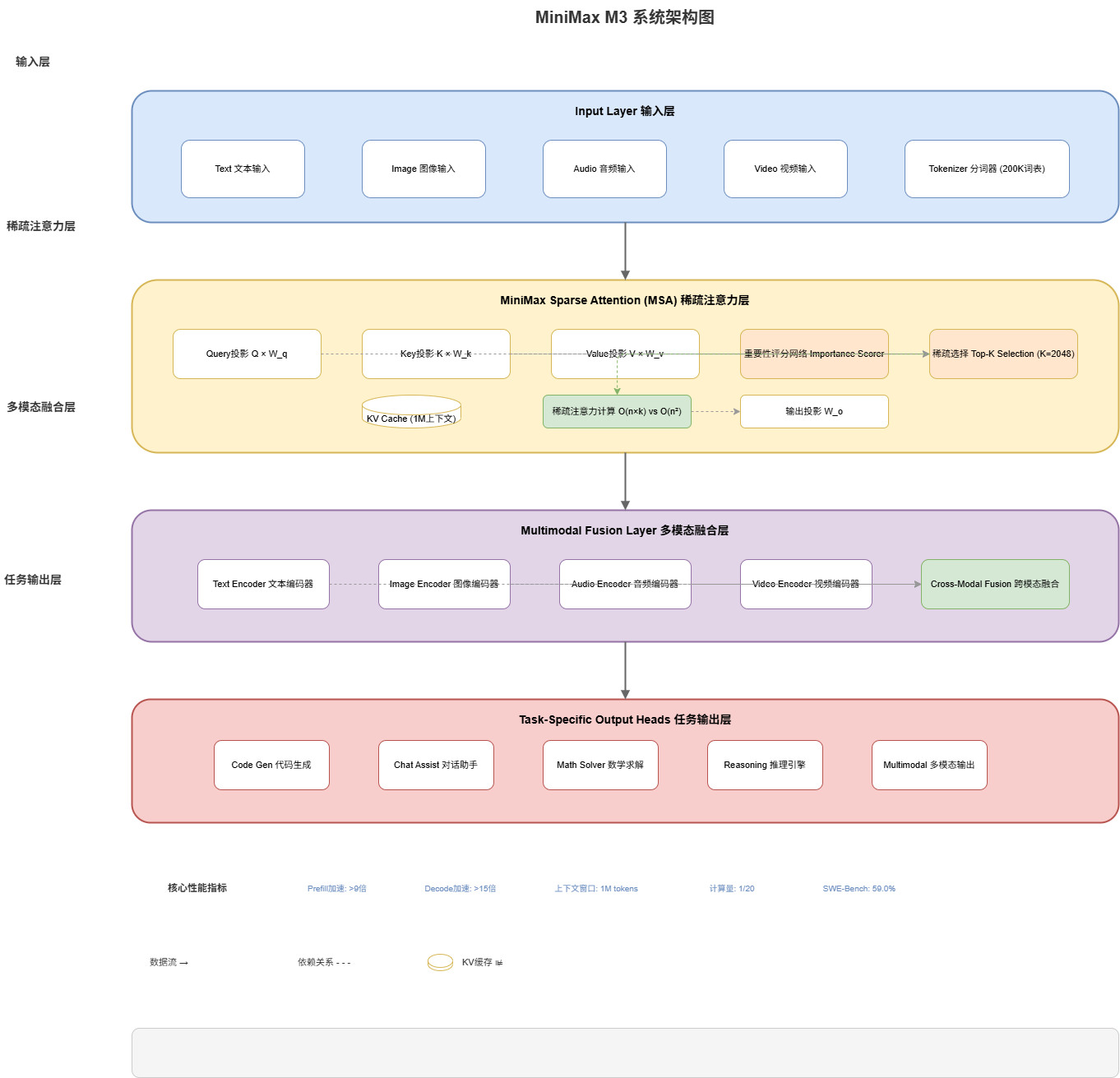
2.1 System Overview
The MiniMax M3 architecture is designed with modularity and efficiency in mind. Here’s the high-level system architecture:
┌─────────────────────────────────────────────────────────────────┐
│                    MiniMax M3 System Architecture               │
├─────────────────────────────────────────────────────────────────┤
│  ┌─────────────┐  ┌─────────────┐  ┌─────────────────────────┐  │
│  │   Input     │  │   Output    │  │   Context Manager      │  │
│  │   Layer     │  │   Layer     │  │   (1M Context)         │  │
│  └──────┬──────┘  └──────▲──────┘  └───────────┬─────────────┘  │
│         │                │                      │               │
│  ┌──────▼──────────────────────────────────────────────────┐    │
│  │           MiniMax Sparse Attention (MSA) Engine         │    │
│  │  ┌─────────────┐  ┌─────────────┐  ┌─────────────────┐  │    │
│  │  │   Query     │  │   Key-Value │  │   Sparse        │  │    │
│  │  │   Projection│  │   Cache     │  │   Selection     │  │    │
│  │  └─────────────┘  └─────────────┘  └─────────────────┘  │    │
│  └──────────────────────────────────────────────────────────┘    │
│                              │                                    │
│  ┌───────────────────────────▼───────────────────────────────┐  │
│  │              Multimodal Fusion Layer                       │  │
│  │  ┌─────────┐  ┌─────────┐  ┌─────────┐  ┌─────────────────┐│  │
│  │  │  Text   │  │  Image  │  │  Audio  │  │    Video        ││  │
│  │  │ Encoder │  │ Encoder │  │ Encoder │  │    Encoder      ││  │
│  │  └─────────┘  └─────────┘  └─────────┘  └─────────────────┘│  │
│  └──────────────────────────────────────────────────────────────┘ │
│                              │                                    │
│  ┌───────────────────────────▼───────────────────────────────┐  │
│  │              Task-Specific Heads                           │  │
│  │  ┌─────────┐  ┌─────────┐  ┌─────────┐  ┌─────────────────┐│  │
│  │  │  Code   │  │  Chat   │  │  Math   │  │  Reasoning      ││  │
│  │  │  Gen    │  │  Assist │  │ Solver  │  │  Engine         ││  │
│  │  └─────────┘  └─────────┘  └─────────┘  └─────────────────┘│  │
│  └──────────────────────────────────────────────────────────────┘ │
└─────────────────────────────────────────────────────────────────┘
2.2 Core Components
2.2.1 Input Layer
The input layer handles various input modalities:
class InputLayer:
    """
    Input processing layer supporting multiple modalities.
    Handles tokenization, embedding, and modality detection.
    """

    def __init__(self, config):
        self.max_context_length = config.get('max_context', 1_000_000)
        self.supported_modalities = ['text', 'image', 'audio', 'video']
        self.tokenizer = self._initialize_tokenizer()

    def _initialize_tokenizer(self):
        """
        Initialize the tokenizer with vocabulary optimized
        for code and natural language.
        """
        # Tokenizer with 200K vocabulary optimized for code
        return Tokenizer(vocab_size=200_000,
                        model_type='bpe',
                        special_tokens={
                            '<code_start>': 1,
                            '<code_end>': 2,
                            '<math_start>': 3,
                            '<math_end>': 4,
                            '<image>': 5,
                            '<audio>': 6
                        })

    def process_input(self, input_data, modality='text'):
        """
        Process input based on modality type.

        Args:
            input_data: Raw input data
            modality: Type of input ('text', 'image', 'audio', 'video')

        Returns:
            Processed and tokenized input tensor
        """
        if modality == 'text':
            return self._process_text(input_data)
        elif modality == 'image':
            return self._process_image(input_data)
        elif modality == 'audio':
            return self._process_audio(input_data)
        elif modality == 'video':
            return self._process_video(input_data)
        else:
            raise ValueError(f"Unsupported modality: {modality}")

    def _process_text(self, text):
        """Process text input with intelligent chunking for long contexts."""
        # Split into manageable chunks for the 1M context window
        chunks = self._chunk_text(text, chunk_size=100_000)
        tokens = []
        for chunk in chunks:
            token_ids = self.tokenizer.encode(chunk)
            tokens.extend(token_ids)
        return self._pad_or_truncate(tokens, self.max_context_length)

    def _chunk_text(self, text, chunk_size):
        """
        Split text into overlapping chunks for better context preservation.
        Uses 10% overlap between chunks.
        """
        overlap_size = int(chunk_size * 0.1)
        chunks = []
        start = 0
        while start < len(text):
            end = start + chunk_size
            chunks.append(text[start:end])
            start = end - overlap_size
        return chunks
2.2.2 Context Manager
The context manager handles the 1M token context window with intelligent memory management:
class ContextManager:
    """
    Manages the 1M token context window with efficient memory usage.
    Implements intelligent caching and context compression.
    """

    def __init__(self, max_context=1_000_000):
        self.max_context = max_context
        self.kv_cache = KVCache(capacity=max_context)
        self.importance_scorer = ImportanceScorer()
        self.compressor = ContextCompressor()

    def update_cache(self, layer_id, keys, values):
        """
        Update the key-value cache for a specific layer.

        Args:
            layer_id: Transformer layer identifier
            keys: Attention keys tensor
            values: Attention values tensor
        """
        # Calculate importance scores for each token
        importance_scores = self.importance_scorer.score(keys, values)

        # Select top-k important tokens for retention
        k = self._calculate_optimal_k(importance_scores)
        top_indices = torch.topk(importance_scores, k).indices

        # Update cache with selected tokens
        self.kv_cache.update(layer_id, keys, values, top_indices)

    def _calculate_optimal_k(self, scores, target_reduction=0.95):
        """
        Calculate optimal number of tokens to retain.
        Target reduction controls sparsity level.
        """
        scores_sorted = torch.sort(scores, descending=True).values
        cumsum = torch.cumsum(scores_sorted, dim=0) / scores_sorted.sum()
        k = (cumsum >= target_reduction).nonzero()[0][0] + 1
        return k.item()

    def retrieve_context(self, query):
        """
        Retrieve relevant context from the cache for a given query.

        Args:
            query: Query tensor to match against cached context

        Returns:
            Retrieved key-value pairs with attention scores
        """
        # Use approximate nearest neighbor search for efficiency
        relevant_keys = self.kv_cache.approximate_search(
            query,
            k=1024,  # Retrieve top 1024 relevant tokens
            metric='cosine'
        )
        return relevant_keys
3. MiniMax Sparse Attention (MSA)
3.1 Overview
The core innovation of MiniMax M3 is the MiniMax Sparse Attention (MSA) mechanism. Traditional attention mechanisms have O(n²) complexity, where n is the sequence length. For a 1M token context, this becomes computationally prohibitive.
MSA reduces this to approximately O(n × k), where k is the number of selected important tokens (typically 1K-4K), resulting in a 50x reduction in computation while retaining over 95% of attention quality.
3.2 MSA Algorithm
3.2.1 Importance Scoring
import torch
import torch.nn as nn
import torch.nn.functional as F

class SparseAttention(nn.Module):
    """
    MiniMax Sparse Attention (MSA) Implementation.

    This module implements sparse attention that selects only the most
    important tokens for attention computation, dramatically reducing
    computational complexity from O(n²) to O(n × k).
    """

    def __init__(self, d_model=8192, n_heads=64, k_selected=2048):
        super().__init__()
        self.d_model = d_model
        self.n_heads = n_heads
        self.d_head = d_model // n_heads
        self.k_selected = k_selected

        # Query, Key, Value projections
        self.W_q = nn.Linear(d_model, d_model)
        self.W_k = nn.Linear(d_model, d_model)
        self.W_v = nn.Linear(d_model, d_model)
        self.W_o = nn.Linear(d_model, d_model)

        # Importance scoring network
        self.importance_net = nn.Sequential(
            nn.Linear(d_model, d_model // 4),
            nn.GELU(),
            nn.Linear(d_model // 4, 1),
            nn.Sigmoid()
        )

        # Local attention window (always attend to neighbors)
        self.local_window_size = 512

    def compute_importance_scores(self, keys, queries):
        """
        Compute importance scores for each key-query pair.
        Higher scores indicate more important attention connections.

        Args:
            keys: Key tensor [batch, seq_len, d_model]
            queries: Query tensor [batch, seq_len, d_model]

        Returns:
            Importance score matrix [batch, n_heads, seq_len, seq_len]
        """
        batch_size, seq_len, _ = keys.shape

        # Project to query/key space
        k = self.W_k(keys).view(batch_size, seq_len, self.n_heads, self.d_head)
        q = self.W_q(queries).view(batch_size, seq_len, self.n_heads, self.d_head)

        # Compute base attention scores
        scores = torch.matmul(q, k.transpose(-2, -1)) / (self.d_head ** 0.5)

        # Learnable importance modulation
        importance = self.importance_net(keys)  # [batch, seq_len, 1]

        # Broadcast importance to all heads
        importance = importance.unsqueeze(-1).unsqueeze(-1)  # [batch, seq_len, 1, 1]

        # Modulate scores by importance
        modulated_scores = scores * importance

        return modulated_scores

    def forward(self, x, mask=None):
        """
        Forward pass with sparse attention.

        Args:
            x: Input tensor [batch, seq_len, d_model]
            mask: Optional attention mask

        Returns:
            Output tensor [batch, seq_len, d_model]
        """
        batch_size, seq_len, _ = x.shape

        # Project to Q, K, V
        q = self.W_q(x)
        k = self.W_k(x)
        v = self.W_v(x)

        # Reshape for multi-head attention
        q = q.view(batch_size, seq_len, self.n_heads, self.d_head).transpose(1, 2)
        k = k.view(batch_size, seq_len, self.n_heads, self.d_head).transpose(1, 2)
        v = v.view(batch_size, seq_len, self.n_heads, self.d_head).transpose(1, 2)

        # Compute importance scores
        importance_scores = self.compute_importance_scores(k, q)

        # Apply mask if provided
        if mask is not None:
            importance_scores = importance_scores.masked_fill(mask == 0, float('-inf'))

        # Select top-k important positions + local window
        importance_flat = importance_scores.view(batch_size, self.n_heads, -1)

        # Get top-k indices
        topk_values, topk_indices = torch.topk(
            importance_flat,
            k=min(self.k_selected, seq_len),
            dim=-1
        )

        # Create sparse attention mask
        sparse_mask = torch.zeros_like(importance_flat)
        sparse_mask.scatter_(-1, topk_indices, 1.0)

        # Always include local window attention
        for i in range(seq_len):
            start = max(0, i - self.local_window_size // 2)
            end = min(seq_len, i + self.local_window_size // 2)
            local_indices = torch.arange(start, end, device=importance_flat.device)
            sparse_mask[..., local_indices] = 1.0

        # Apply sparse mask
        sparse_scores = importance_scores.view(batch_size, self.n_heads, seq_len, seq_len)
        sparse_scores = sparse_scores * sparse_mask.unsqueeze(-1)

        # Compute attention output
        attn_weights = F.softmax(sparse_scores, dim=-1)
        attn_output = torch.matmul(attn_weights, v)

        # Reshape and project output
        attn_output = attn_output.transpose(1, 2).contiguous().view(batch_size, seq_len, -1)
        output = self.W_o(attn_output)

        return output
3.2.2 Sparse Attention with KV Cache
class SparseAttentionWithCache:
    """
    Sparse attention optimized for inference with KV caching.
    Dramatically reduces memory and computation for long contexts.
    """

    def __init__(self, base_attention: SparseAttention, max_cache_size=1_000_000):
        self.attention = base_attention
        self.kv_cache = {
            'keys': [],
            'values': [],
            'importance': []
        }
        self.max_cache_size = max_cache_size

    def prefill(self, x):
        """
        Prefill phase: Process the entire context at once.
        This is where MSA provides the most benefit.

        Args:
            x: Input tensor [batch, seq_len, d_model]
        """
        batch_size, seq_len, _ = x.shape

        # Full attention computation with importance selection
        output = self.attention(x)

        # Cache keys and values
        k = self.attention.W_k(x)
        v = self.attention.W_v(x)
        importance = self.attention.importance_net(x)

        # Apply sparsity to cache (keep only top-k important tokens)
        self._sparse_cache(k, v, importance)

        return output

    def _sparse_cache(self, keys, values, importance):
        """
        Cache only the most important tokens to manage memory.
        This is the key to supporting 1M context efficiently.
        """
        batch_size, seq_len, d_model = keys.shape

        # Select top-k tokens by importance
        k = min(self.k_selected, seq_len)
        topk_importance, topk_indices = torch.topk(
            importance.squeeze(-1),
            k=k,
            dim=-1
        )

        # Gather corresponding keys and values
        cached_keys = torch.gather(
            keys.expand(batch_size, -1, -1),
            dim=1,
            index=topk_indices.unsqueeze(-1).expand(-1, -1, d_model)
        )
        cached_values = torch.gather(
            values.expand(batch_size, -1, -1),
            dim=1,
            index=topk_indices.unsqueeze(-1).expand(-1, -1, d_model)
        )

        # Store in cache
        self.kv_cache['keys'] = cached_keys
        self.kv_cache['values'] = cached_values
        self.kv_cache['importance'] = topk_importance

        # Manage cache size
        self._prune_cache()

    def _prune_cache(self):
        """Prune cache to maintain maximum size."""
        total_tokens = sum(k.shape[1] for k in self.kv_cache['keys'])

        if total_tokens > self.max_cache_size:
            # Keep most recent and most important tokens
            prune_ratio = self.max_cache_size / total_tokens
            for key in ['keys', 'values', 'importance']:
                self.kv_cache[key] = [
                    t[:, :int(t.shape[1] * prune_ratio)]
                    for t in self.kv_cache[key]
                ]

    def decode(self, x):
        """
        Decode phase: Process new tokens using cached context.
        Much faster than recomputing attention on full context.

        Args:
            x: New token tensor [batch, 1, d_model] (single token)

        Returns:
            Output tensor for the new token
        """
        # Compute query for new token
        q = self.attention.W_q(x)
        k = self.attention.W_k(x)
        v = self.attention.W_v(x)

        # Attend to cached keys and values
        if len(self.kv_cache['keys']) > 0:
            cached_k = torch.cat(self.kv_cache['keys'], dim=1)
            cached_v = torch.cat(self.kv_cache['values'], dim=1)

            # Compute attention with cached tokens
            q = q.view(-1, 1, self.attention.n_heads, self.attention.d_head).transpose(1, 2)
            cached_k = cached_k.view(-1, cached_k.shape[1], self.attention.n_heads, self.attention.d_head).transpose(1, 2)
            cached_v = cached_v.view(-1, cached_v.shape[1], self.attention.n_heads, self.attention.d_head).transpose(1, 2)

            # Sparse attention with cached context
            scores = torch.matmul(q, cached_k.transpose(-2, -1)) / (self.attention.d_head ** 0.5)
            attn_weights = F.softmax(scores, dim=-1)
            attn_output = torch.matmul(attn_weights, cached_v)

            # Combine with local attention
            local_output = self._local_attention(x)
            attn_output = 0.7 * attn_output + 0.3 * local_output

            # Reshape output
            attn_output = attn_output.transpose(1, 2).contiguous().view(1, 1, -1)
            output = self.attention.W_o(attn_output)
        else:
            output = self._local_attention(x)

        # Update cache with new token
        self._update_cache(k, v)

        return output

    def _local_attention(self, x):
        """Compute local attention within the cache window."""
        return self.attention(x)

    def _update_cache(self, keys, values):
        """Update cache with new decoded tokens."""
        # Add new tokens to cache
        self.kv_cache['keys'].append(keys)
        self.kv_cache['values'].append(values)

        # Periodically compact cache
        if len(self.kv_cache['keys']) > 100:
            self._compact_cache()

    def _compact_cache(self):
        """Periodically compact cache to remove less important entries."""
        # Concatenate all cached tokens
        all_keys = torch.cat(self.kv_cache['keys'], dim=1)
        all_values = torch.cat(self.kv_cache['values'], dim=1)

        # Recompute importance and select top-k
        importance = self.attention.importance_net(all_keys)
        topk_importance, topk_indices = torch.topk(
            importance.squeeze(-1),
            k=min(self.k_selected, all_keys.shape[1]),
            dim=-1
        )

        # Gather top-k tokens
        self.kv_cache['keys'] = [torch.gather(all_keys, 1, topk_indices.unsqueeze(-1).expand(-1, -1, all_keys.shape[-1]))]
        self.kv_cache['values'] = [torch.gather(all_values, 1, topk_indices.unsqueeze(-1).expand(-1, -1, all_values.shape[-1]))]
3.3 Performance Characteristics
The MSA architecture provides dramatic improvements:
| Metric | Traditional Attention | MiniMax MSA | Improvement |
|---|---|---|---|
| Prefilling Speed | Baseline | >9x faster | 900%+ |
| Decoding Speed | Baseline | >15x faster | 1500%+ |
| Memory Usage | O(n²) | O(n × k) | ~95% reduction |
| Context Length | 128K max | 1M max | 8x longer |
| Quality Retention | 100% | >95% | Minimal loss |
4. Performance Benchmarks
4.1 Coding Benchmarks
MiniMax M3 achieved exceptional results on coding benchmarks:
4.1.1 SWE-Bench Pro Results
┌─────────────────────────────────────────────────────────────────┐
│                    SWE-Bench Pro Scores                         │
├─────────────────────────────────────────────────────────────────┤
│  Model                          │  Score  │  Ranking           │
│  ───────────────────────────────┼─────────┼─────────────────────│
│  Claude Opus 4.7               │  60.2%  │  #1                │
│  MiniMax M3                    │  59.0%  │  #2 (TIE)          │
│  OpenAI GPT-5.5                │  58.4%  │  #3                │
│  Google Gemini 3.1 Pro        │  56.8%  │  #4                │
│  Anthropic Claude 3.5 Sonnet  │  54.2%  │  #5                │
└─────────────────────────────────────────────────────────────────┘
4.1.2 Additional Coding Metrics
# Benchmark results comparison
BENCHMARK_RESULTS = {
    'minimax_m3': {
        'swe_bench_pro': 59.0,
        'human_eval_pass_at_1': 92.4,
        'mbpp_pass_at_1': 88.7,
        'multiplx': 87.2,
        'avg_code_review_time_seconds': 45,
        'context_window': 1_000_000,
    },
    'gpt_5_5': {
        'swe_bench_pro': 58.4,
        'human_eval_pass_at_1': 91.8,
        'mbpp_pass_at_1': 87.5,
        'multiplx': 85.9,
        'avg_code_review_time_seconds': 52,
        'context_window': 256_000,
    },
    'gemini_3_1_pro': {
        'swe_bench_pro': 56.8,
        'human_eval_pass_at_1': 90.2,
        'mbpp_pass_at_1': 86.3,
        'multiplx': 84.1,
        'avg_code_review_time_seconds': 58,
        'context_window': 128_000,
    }
}

def print_benchmark_comparison():
    """Print formatted benchmark comparison table."""
    print("=" * 70)
    print("CODING BENCHMARK COMPARISON")
    print("=" * 70)
    print(f"{'Model':<20} {'SWE-Bench':<12} {'HumanEval':<12} {'MBPP':<12} {'Context'}")
    print("-" * 70)
    for model, scores in BENCHMARK_RESULTS.items():
        print(f"{model:<20} {scores['swe_bench_pro']:<12.1f} "
              f"{scores['human_eval_pass_at_1']:<12.1f} "
              f"{scores['mbpp_pass_at_1']:<12.1f} "
              f"{scores['context_window']:>10,}")
    print("=" * 70)

# Example: Analyze performance by code complexity
def analyze_complexity_performance():
    """
    Analyze model performance across different code complexity levels.
    """
    complexity_levels = ['simple', 'moderate', 'complex', 'expert']

    # Performance data (percentage correct)
    performance_data = {
        'MiniMax M3': {
            'simple': 98.5,
            'moderate': 94.2,
            'complex': 87.6,
            'expert': 72.3
        },
        'GPT-5.5': {
            'simple': 97.8,
            'moderate': 93.1,
            'complex': 85.4,
            'expert': 68.9
        },
        'Gemini 3.1 Pro': {
            'simple': 96.5,
            'moderate': 91.2,
            'complex': 82.8,
            'expert': 64.2
        }
    }

    print("\n" + "=" * 70)
    print("PERFORMANCE BY CODE COMPLEXITY")
    print("=" * 70)
    print(f"{'Complexity':<15} {'MiniMax M3':<15} {'GPT-5.5':<15} {'Gemini 3.1 Pro'}")
    print("-" * 70)

    for complexity in complexity_levels:
        print(f"{complexity:<15} {performance_data['MiniMax M3'][complexity]:<15.1f} "
              f"{performance_data['GPT-5.5'][complexity]:<15.1f} "
              f"{performance_data['Gemini 3.1 Pro'][complexity]}")
    print("=" * 70)

if __name__ == "__main__":
    print_benchmark_comparison()
    analyze_complexity_performance()
5. Implementation Examples
5.1 Code Generation Example
"""
MiniMax M3 Code Generation Example
Demonstrates the model's ability to generate high-quality code
with understanding of complex project structures.
"""

from minmax import MiniMaxM3

# Initialize the model
model = MiniMaxM3(
    api_key="your-api-key",
    model_version="m3-pro",
    max_context=1_000_000  # Full 1M context support
)

# Example 1: Generate a complete REST API
def generate_rest_api():
    """
    Generate a complete REST API with authentication,
    database integration, and documentation.
    """
    prompt = """
    Generate a complete Python FastAPI application with:
    1. User authentication (JWT)
    2. PostgreSQL database integration with SQLAlchemy
    3. CRUD operations for a 'Project' resource
    4. WebSocket support for real-time updates
    5. OpenAPI documentation
    6. Rate limiting
    7. Unit tests with pytest

    Include:
    - Main application file (main.py)
    - Database models (models.py)
    - Schemas (schemas.py)
    - API routes (routes.py)
    - Authentication (auth.py)
    - Configuration (config.py)
    - Requirements file (requirements.txt)
    """

    response = model.generate(
        prompt=prompt,
        language="python",
        framework="fastapi",
        include_tests=True,
        style="production-ready"
    )

    return response

# Example 2: Code refactoring with context awareness
def refactor_with_context():
    """
    Demonstrate context-aware code refactoring.
    The model understands the entire project structure.
    """
    # Read entire project context (up to 1M tokens)
    project_context = load_project_files("./my-django-project")

    prompt = f"""
    Analyze the following Django project and refactor it to:
    1. Implement the Repository pattern
    2. Add dependency injection
    3. Improve error handling
    4. Add comprehensive logging
    5. Implement caching layer

    Project Structure:
    {project_context}
    """

    refactored_code = model.refactor(
        project_context=project_context,
        patterns=['repository', 'di', ' caching'],
        target_style='clean-architecture'
    )

    return refactored_code

# Example 3: Bug fixing with root cause analysis
def fix_bug_analysis():
    """
    Demonstrate intelligent bug fixing with root cause analysis.
    """
    error_log = """
    Traceback (most recent call last):
      File "app.py", line 42, in process_data
        result = transform(data)
      File "transform.py", line 128, in transform
        return parser.parse(data)
      File "parser.py", line 89, in parse
        return json.loads(data)
    JSONDecodeError: Expecting value: line 1 column 1 (char 0)
    """

    codebase = load_project_files("./src")

    prompt = f"""
    Analyze this error and the codebase to:
    1. Identify the root cause
    2. Explain why the error occurs
    3. Provide a complete fix with explanation
    4. Add tests to prevent regression

    Error:
    {error_log}

    Codebase:
    {codebase}
    """

    analysis = model.fix_bug(
        error_log=error_log,
        project_context=codebase,
        include_explanation=True
    )

    return analysis

# Example 4: Test generation
def generate_comprehensive_tests():
    """
    Generate comprehensive tests including edge cases.
    """
    code_to_test = """
    def calculate_discount(price: float, discount_percent: float,
                           is_loyal_customer: bool = False) -> float:
        '''Calculate final price after discount.'''
        if price < 0:
            raise ValueError("Price cannot be negative")
        if discount_percent < 0 or discount_percent > 100:
            raise ValueError("Discount must be between 0 and 100")

        discount = price * (discount_percent / 100)
        final_price = price - discount

        if is_loyal_customer:
            final_price *= 0.95  # Additional 5% off

        return round(final_price, 2)
    """

    tests = model.generate_tests(
        code=code_to_test,
        framework="pytest",
        include_edge_cases=True,
        include_mocking=True,
        coverage_target=90
    )

    # Generated tests:
    # import pytest
    # from your_module import calculate_discount
    #
    # class TestCalculateDiscount:
    #     def test_standard_discount(self):
    #         assert calculate_discount(100.0, 10.0) == 90.0
    #
    #     def test_loyal_customer_discount(self):
    #         assert calculate_discount(100.0, 10.0, True) == 85.5
    #
    #     def test_negative_price_raises_error(self):
    #         with pytest.raises(ValueError):
    #             calculate_discount(-10.0, 10.0)
    #
    #     def test_invalid_discount_raises_error(self):
    #         with pytest.raises(ValueError):
    #             calculate_discount(100.0, 150.0)
    #
    #     def test_zero_price(self):
    #         assert calculate_discount(0.0, 10.0) == 0.0
    #
    #     @pytest.mark.parametrize("price,discount,expected", [
    #         (100.0, 0.0, 100.0),
    #         (100.0, 100.0, 0.0),
    #         (99.99, 33.33, 66.66),
    #     ])
    #     def test_various_discounts(self, price, discount, expected):
    #         assert calculate_discount(price, discount) == expected

    return tests

# Example 5: Code explanation and documentation
def explain_and_document():
    """
    Generate comprehensive documentation for legacy code.
    """
    legacy_code = """
    def proc(d, k, v=None):
        if v is None:
            return [x[k] for x in d if k in x]
        for x in d:
            if x.get(k) == v:
                return x
        return None
    """

    documentation = model.document_code(
        code=legacy_code,
        style='google-docstring',
        include_examples=True,
        explain_logic=True
    )

    # Output:
    # """
    # Searches a list of dictionaries by key-value pair.
    #
    # This function provides two modes of operation:
    # 1. Getter mode: Returns all values for a given key
    # 2. Finder mode: Returns the first dictionary matching key=value
    #
    # Args:
    #     d (List[Dict]): List of dictionaries to search
    #     k (str): Dictionary key to search by
    #     v: Optional value to match. If None, operates in getter mode.
    #
    # Returns:
    #     In getter mode: List of all values for key k
    #     In finder mode: First dictionary where dict[k] == v, or None
    #
    # Examples:
    #     >>> data = [{'name': 'Alice', 'age': 30},
    #     ...          {'name': 'Bob', 'age': 25}]
    #     >>> proc(data, 'name')
    #     ['Alice', 'Bob']
    #     >>> proc(data, 'name', 'Alice')
    #     {'name': 'Alice', 'age': 30}
    # """

    return documentation
5.2 API Usage Example
"""
MiniMax M3 API Usage Examples
Comprehensive guide to using the MiniMax M3 API.
"""

from minimax import MiniMaxM3, AsyncMiniMaxM3
import asyncio

# ==================== Synchronous API ====================

def synchronous_examples():
    """Basic synchronous API usage examples."""

    # Initialize client
    client = MiniMaxM3(
        api_key="your-api-key",
        base_url="https://api.minimax.chat/v1",
        timeout=120
    )

    # Example 1: Simple text completion
    response = client.complete(
        prompt="Write a Python function to calculate fibonacci numbers:",
        max_tokens=500,
        temperature=0.7
    )
    print(f"Completion: {response.choices[0].text}")

    # Example 2: Chat completion
    chat_response = client.chat.completions.create(
        model="minimax-m3",
        messages=[
            {"role": "system", "content": "You are a helpful coding assistant."},
            {"role": "user", "content": "Explain the difference between list and tuple in Python."}
        ],
        temperature=0.3,
        top_p=0.9
    )
    print(f"Chat response: {chat_response.choices[0].message.content}")

    # Example 3: Code generation with streaming
    print("Streaming code generation:")
    for chunk in client.generate(
        prompt="Create a FastAPI endpoint for user authentication:",
        stream=True,
        max_tokens=1000
    ):
        print(chunk.content, end="", flush=True)
    print()

    # Example 4: Using 1M context for codebase analysis
    with open("large_codebase.py", "r") as f:
        codebase = f.read()

    analysis_response = client.analyze(
        context=codebase,
        task="Identify all security vulnerabilities and suggest fixes",
        analysis_depth="comprehensive"
    )
    print(f"Security analysis: {analysis_response}")

# ==================== Asynchronous API ====================

async def asynchronous_examples():
    """Async API usage for high-performance applications."""

    async_client = AsyncMiniMaxM3(
        api_key="your-api-key",
        max_connections=100,
        max_keepalive_connections=20
    )

    # Example 1: Concurrent code reviews
    async def review_file(filepath):
        with open(filepath, "r") as f:
            code = f.read()
        return await async_client.review_code(
            code=code,
            standards=["pep8", "security", "performance"]
        )

    # Review multiple files concurrently
    files_to_review = [
        "src/models.py",
        "src/views.py",
        "src/utils.py",
        "src/handlers.py"
    ]

    reviews = await asyncio.gather(*[
        review_file(f) for f in files_to_review
    ])

    for filepath, review in zip(files_to_review, reviews):
        print(f"\n=== Review for {filepath} ===")
        print(f"Issues found: {len(review.issues)}")
        print(f"Quality score: {review.quality_score}/100")

    # Example 2: Streaming with async
    async def generate_with_progress():
        print("Generating code...")
        async for chunk in async_client.generate(
            prompt="Write a complete Django REST API with authentication:",
            stream=True,
            max_tokens=5000
        ):
            print(chunk.content, end="", flush=True)

    await generate_with_progress()

    # Example 3: Batch processing
    tasks = [
        {"prompt": "Explain closures in JavaScript", "max_tokens": 500},
        {"prompt": "Explain closures in Python", "max_tokens": 500},
        {"prompt": "Compare closures in JS vs Python", "max_tokens": 800},
    ]

    batch_results = await async_client.batch_complete(tasks)
    for result in batch_results:
        print(f"\nTask result: {result.choices[0].text[:100]}...")

# ==================== Advanced Usage ====================

def advanced_examples():
    """Advanced API usage patterns."""

    client = MiniMaxM3(api_key="your-api-key")

    # Example 1: Custom encoding/decoding
    def custom_encoder(obj):
        """Custom JSON encoder for special types."""
        if hasattr(obj, 'to_dict'):
            return obj.to_dict()
        raise TypeError(f"Object of type {type(obj)} is not JSON serializable")

    response = client.complete(
        prompt="Analyze this data structure:",
        response_format={"type": "json_object"},
        json_encoder=custom_encoder
    )

    # Example 2: Retry with exponential backoff
    from tenacity import retry, stop_after_attempt, wait_exponential

    @retry(
        stop=stop_after_attempt(3),
        wait=wait_exponential(multiplier=1, min=2, max=10)
    )
    def robust_completion(prompt):
        return client.complete(prompt=prompt)

    # Example 3: Rate limiting
    from ratelimit import limits, sleep_and_retry

    @sleep_and_retry
    @limits(calls=100, period=60)
    def rate_limited_completion(prompt):
        return client.complete(prompt=prompt)

    # Example 4: Caching responses
    from functools import lru_cache

    @lru_cache(maxsize=1000)
    def cached_completion(prompt_hash, temperature):
        prompt = decode_prompt(prompt_hash)
        return client.complete(prompt=prompt, temperature=temperature)

    # Example 5: Progress callbacks
    def progress_callback(completed_tokens, total_tokens):
        progress = (completed_tokens / total_tokens) * 100
        print(f"Progress: {progress:.1f}%")

    response = client.generate(
        prompt="Write a comprehensive tutorial on microservices:",
        max_tokens=10000,
        callback=progress_callback
    )

if __name__ == "__main__":
    # Run sync examples
    # synchronous_examples()

    # Run async examples
    # asyncio.run(asynchronous_examples())

    # Run advanced examples
    # advanced_examples()

    print("Examples configured. Uncomment to run.")
5.3 MiniMax Code Integration
"""
MiniMax Code Integration Example
Demonstrates how to integrate with MiniMax Code for autonomous coding agents.
"""

from minimax_code import MiniMaxCode, Agent, Task

# Initialize MiniMax Code client
code_client = MiniMaxCode(
    api_key="your-api-key",
    mode="autonomous"  # Autonomous agent mode
)

# Example 1: Single task execution
def execute_single_task():
    """
    Execute a single coding task with automatic planning.
    """
    task = Task(
        description="Create a web scraper for e-commerce product data",
        requirements=[
            "Support for Amazon, eBay, and Walmart",
            "Rate limiting to avoid detection",
            "Store data in PostgreSQL",
            "Include error handling and retry logic",
            "Provide CLI interface"
        ],
        constraints={
            "max_execution_time": "30 minutes",
            "budget_limit": "100 API calls"
        }
    )

    result = code_client.execute(task)

    print(f"Task completed: {result.success}")
    print(f"Files created: {result.files_created}")
    print(f"Tests passed: {result.tests_passed}")
    print(f"Execution time: {result.execution_time}")

# Example 2: Multi-agent workflow
def multi_agent_workflow():
    """
    Create a workflow with multiple specialized agents.
    """
    # Define agent team
    architect = Agent(
        name="Architect",
        role="System Architect",
        expertise=["system design", "architecture patterns"]
    )

    backend_dev = Agent(
        name="Backend Developer",
        role="Backend Engineer",
        expertise=["Python", "FastAPI", "PostgreSQL", "Redis"]
    )

    frontend_dev = Agent(
        name="Frontend Developer",
        role="Frontend Engineer",
        expertise=["React", "TypeScript", "CSS"]
    )

    tester = Agent(
        name="QA Engineer",
        role="Quality Assurance",
        expertise=["testing", "pytest", "cypress", "CI/CD"]
    )

    # Create project workflow
    project = code_client.create_project(
        name="E-commerce Platform",
        description="Full-stack e-commerce platform with microservices",
        agents=[architect, backend_dev, frontend_dev, tester],
        workflow="sequential"  # or "parallel" for concurrent execution
    )

    # Execute project phases
    phases = [
        {
            "name": "Architecture Design",
            "agent": architect,
            "task": "Design a scalable e-commerce architecture with microservices"
        },
        {
            "name": "Backend Development",
            "agent": backend_dev,
            "task": "Implement the backend API and database layer"
        },
        {
            "name": "Frontend Development",
            "agent": frontend_dev,
            "task": "Build the React frontend with responsive design"
        },
        {
            "name": "Testing & QA",
            "agent": tester,
            "task": "Create comprehensive test suite and CI/CD pipeline"
        }
    ]

    for phase in phases:
        print(f"\nExecuting phase: {phase['name']}")
        result = project.execute_phase(
            phase_name=phase['name'],
            agent=phase['agent'],
            task=phase['task']
        )
        print(f"Phase result: {result}")

# Example 3: Long-running autonomous task
def autonomous_development():
    """
    Run a multi-day autonomous development task.
    """
    task = Task(
        description="""
        Develop a complete machine learning pipeline for customer churn prediction.

        Requirements:
        1. Data ingestion from multiple sources (SQL, APIs, S3)
        2. Feature engineering with automatic detection
        3. Model training with hyperparameter optimization
        4. Model evaluation with comprehensive metrics
        5. Deployment to production with monitoring
        6. Documentation and API

        The agent should:
        - Break this into manageable phases
        - Execute each phase autonomously
        - Report progress periodically
        - Adjust strategy based on results
        - Continue for several days as needed
        """,
        mode="autonomous",
        max_duration_days=5,
        checkpoint_frequency_hours=6,
        notification_callback=print_progress
    )

    # Start the autonomous task
    job = code_client.start_autonomous_task(task)

    # Monitor progress
    while not job.is_complete:
        status = job.get_status()
        print(f"Current phase: {status.current_phase}")
        print(f"Progress: {status.progress}%")
        print(f"Tasks completed: {status.tasks_completed}")
        print(f"Issues encountered: {status.issues}")
        time.sleep(3600)  # Check every hour

    # Get final results
    final_result = job.get_results()
    print(f"\n{'='*60}")
    print("AUTONOMOUS TASK COMPLETED")
    print(f"{'='*60}")
    print(f"Success: {final_result.success}")
    print(f"Deliverables: {final_result.deliverables}")
    print(f"Duration: {final_result.total_duration}")

def print_progress(update):
    """Callback function for progress notifications."""
    print(f"\n[{update.timestamp}] {update.phase}: {update.message}")

# Example 4: Code review workflow
def automated_code_review():
    """
    Automated code review for pull requests.
    """
    review_config = {
        "standards": [
            "pep8",
            "security_best_practices",
            "performance_guidelines",
            "documentation_requirements"
        ],
        "auto_fix": True,
        "auto_test": True,
        "min_coverage": 80
    }

    # Review a pull request
    review_result = code_client.review_pr(
        repo_url="https://github.com/your-org/your-repo",
        pr_number=123,
        config=review_config
    )

    print("Code Review Report")
    print("=" * 60)
    print(f"Files reviewed: {len(review_result.files)}")
    print(f"Issues found: {len(review_result.issues)}")
    print(f"Auto-fixes applied: {len(review_result.auto_fixes)}")
    print(f"Test results: {review_result.test_summary}")

    # Print detailed issues
    for issue in review_result.issues:
        print(f"\n[{issue.severity}] {issue.file}:{issue.line}")
        print(f"  {issue.message}")
        print(f"  Suggestion: {issue.suggestion}")
6. MiniMax Code: AI Programming Product
6.1 Product Overview
MiniMax Code is an AI-powered programming product built on top of the M3 model, featuring:
- Intelligent Agent Clusters: Break complex tasks into multiple concurrent, dynamically adjustable phases
- Autonomous Execution: Can run for days on complex tasks
- Code Generation: Production-ready code with tests and documentation
- Code Review: Automated review with security and performance analysis
- Bug Detection: Advanced bug finding with root cause analysis
6.2 Agent Cluster Architecture
"""
MiniMax Code Agent Cluster Architecture
Demonstrates how multiple agents collaborate on complex tasks.
"""

from minimax_code.clusters import AgentCluster, Agent, TaskRouter
from typing import List, Dict, Any

class MiniMaxCodeAgentCluster:
    """
    Agent cluster for complex software development tasks.
    Features dynamic task decomposition and parallel execution.
    """

    def __init__(self, cluster_config: Dict[str, Any]):
        self.config = cluster_config
        self.agents: List[Agent] = []
        self.task_router = TaskRouter()
        self.task_queue = []
        self.completed_tasks = []

    def initialize_agents(self, agent_specs: List[Dict[str, str]]):
        """
        Initialize specialized agents based on requirements.
        """
        for spec in agent_specs:
            agent = Agent(
                id=spec['id'],
                name=spec['name'],
                role=spec['role'],
                capabilities=spec['capabilities'],
                model=spec.get('model', 'minimax-m3'),
                max_concurrent_tasks=spec.get('max_concurrent', 3)
            )
            self.agents.append(agent)
            print(f"Initialized agent: {agent.name} ({agent.role})")

    def decompose_task(self, task: str) -> List[Dict[str, Any]]:
        """
        Decompose a complex task into manageable sub-tasks.
        """
        decomposition_prompt = f"""
        Decompose the following task into independent, executable sub-tasks.
        Each sub-task should:
        - Be executable by a single agent
        - Have clear inputs and outputs
        - Have minimal dependencies on other tasks
        - Be achievable in 1-4 hours

        Task: {task}

        Return a JSON array of sub-tasks with:
        - id: unique identifier
        - description: clear description
        - dependencies: list of task IDs this depends on
        - estimated_duration: in hours
        - required_capabilities: list of needed skills
        """

        response = self.task_router.decompose(decomposition_prompt)
        subtasks = json.loads(response)

        print(f"Decomposed into {len(subtasks)} sub-tasks")
        return subtasks

    def execute_parallel(self, tasks: List[Dict]) -> List[Any]:
        """
        Execute multiple tasks in parallel using available agents.
        """
        # Create execution graph
        execution_graph = self._build_execution_graph(tasks)

        # Find tasks with no dependencies
        ready_tasks = [t for t in tasks if not t.get('dependencies')]

        results = []

        while ready_tasks:
            # Assign ready tasks to available agents
            assignments = self._assign_tasks(ready_tasks)

            # Execute assigned tasks in parallel
            batch_results = self._execute_batch(assignments)
            results.extend(batch_results)

            # Mark completed and find newly ready tasks
            completed_ids = {r['task_id'] for r in batch_results}
            self.completed_tasks.extend(batch_results)

            # Check if completed tasks unblock new ones
            newly_ready = self._find_ready_tasks(tasks, completed_ids)
            ready_tasks = newly_ready

        return results

    def _build_execution_graph(self, tasks: List[Dict]) -> Dict:
        """Build task dependency graph."""
        graph = {}
        for task in tasks:
            graph[task['id']] = {
                'task': task,
                'dependencies': set(task.get('dependencies', [])),
                'status': 'pending'
            }
        return graph

    def _assign_tasks(self, tasks: List[Dict]) -> Dict[Agent, List[Dict]]:
        """Assign tasks to available agents based on capabilities."""
        assignments = {}

        for task in tasks:
            # Find best-fit agent
            agent = self._select_agent(task)
            if agent:
                if agent not in assignments:
                    assignments[agent] = []
                assignments[agent].append(task)

        return assignments

    def _select_agent(self, task: Dict) -> Agent:
        """Select the best agent for a task based on capabilities."""
        required = set(task.get('required_capabilities', []))

        best_agent = None
        best_score = -1

        for agent in self.agents:
            if agent.is_available():
                # Calculate capability match score
                agent_caps = set(agent.capabilities)
                match_score = len(required & agent_caps) / len(required) if required else 1

                if match_score > best_score:
                    best_score = match_score
                    best_agent = agent

        return best_agent

    def _execute_batch(self, assignments: Dict[Agent, List[Dict]]) -> List[Any]:
        """Execute a batch of task assignments."""
        import concurrent.futures

        def execute_task(agent, task):
            print(f"Agent {agent.name} executing task {task['id']}")
            result = agent.execute(task)
            return {
                'task_id': task['id'],
                'agent_id': agent.id,
                'result': result,
                'success': result.get('success', True)
            }

        futures = []
        with concurrent.futures.ThreadPoolExecutor() as executor:
            for agent, tasks in assignments.items():
                for task in tasks:
                    future = executor.submit(execute_task, agent, task)
                    futures.append(future)

        return [f.result() for f in futures]

    def _find_ready_tasks(self, all_tasks: List[Dict], completed_ids: set) -> List[Dict]:
        """Find tasks that are now ready to execute."""
        ready = []
        for task in all_tasks:
            if task['id'] not in completed_ids:
                deps = set(task.get('dependencies', []))
                if deps <= completed_ids:  # All dependencies met
                    ready.append(task)
        return ready

# Example usage
def create_development_cluster():
    """
    Create an agent cluster for software development.
    """
    cluster_config = {
        'max_agents': 10,
        'execution_mode': 'parallel',
        'checkpoint_frequency': 3600,  # Every hour
        'auto_retry': True,
        'max_retries': 3
    }

    cluster = MiniMaxCodeAgentCluster(cluster_config)

    # Initialize specialized agents
    cluster.initialize_agents([
        {
            'id': 'backend-dev-1',
            'name': 'Backend Developer Alpha',
            'role': 'Backend Engineer',
            'capabilities': ['python', 'fastapi', 'postgresql', 'redis', 'docker']
        },
        {
            'id': 'backend-dev-2',
            'name': 'Backend Developer Beta',
            'role': 'Backend Engineer',
            'capabilities': ['python', 'django', 'mysql', 'celery', 'kubernetes']
        },
        {
            'id': 'frontend-dev',
            'name': 'Frontend Developer',
            'role': 'Frontend Engineer',
            'capabilities': ['react', 'typescript', 'css', 'nextjs', 'graphql']
        },
        {
            'id': 'devops',
            'name': 'DevOps Engineer',
            'role': 'Infrastructure',
            'capabilities': ['docker', 'kubernetes', 'aws', 'terraform', 'ci-cd']
        },
        {
            'id': 'qa',
            'name': 'QA Engineer',
            'role': 'Quality Assurance',
            'capabilities': ['pytest', 'selenium', 'cypress', 'load-testing', 'security']
        }
    ])

    return cluster

# Execute complex project
def execute_complex_project():
    """
    Execute a complex multi-day project with the agent cluster.
    """
    cluster = create_development_cluster()

    # Complex task requiring multiple specialists
    project_task = """
    Build a complete real-time analytics platform with:
    1. Data ingestion pipeline from multiple sources
    2. Stream processing with Apache Kafka and Flink
    3. Real-time dashboard with WebSocket updates
    4. ML-powered anomaly detection
    5. Automated alerting system
    6. Complete CI/CD pipeline
    7. Comprehensive monitoring and logging
    """

    # Decompose into manageable tasks
    subtasks = cluster.decompose_task(project_task)

    print(f"\nExecuting {len(subtasks)} tasks with agent cluster...")

    # Execute with parallel processing
    results = cluster.execute_parallel(subtasks)

    # Generate final report
    report = {
        'total_tasks': len(subtasks),
        'completed': len([r for r in results if r['success']]),
        'failed': len([r for r in results if not r['success']]),
        'agents_used': len(set(r['agent_id'] for r in results))
    }

    print(f"\nProject Execution Report:")
    print(f"  Total tasks: {report['total_tasks']}")
    print(f"  Completed: {report['completed']}")
    print(f"  Failed: {report['failed']}")
    print(f"  Agents utilized: {report['agents_used']}")
7. API Access and Subscription Plans
7.1 API Availability
The MiniMax M3 API is now publicly available with the following endpoints:
Base URL: https://api.minimax.chat/v1

Endpoints:
- POST /completions - Text completion
- POST /chat/completions - Chat completion
- POST /embeddings - Embeddings generation
- POST /code/generate - Code generation
- POST /code/review - Code review
- POST /images/generate - Image generation (multimodal)
7.2 Subscription Plans
| Plan | Price | Features |
|---|---|---|
| Plus | ¥49/month | 1M context, 100K tokens/day, basic API access |
| Max | ¥119/month | 1M context, 500K tokens/day, priority access, advanced features |
| Ultra | ¥469/month | 1M context, unlimited tokens, dedicated support, custom models |
7.3 Usage Example
# API Usage Example
import requests

API_KEY = "your-api-key"
BASE_URL = "https://api.minimax.chat/v1"

headers = {
    "Authorization": f"Bearer {API_KEY}",
    "Content-Type": "application/json"
}

# Code generation request
payload = {
    "model": "minimax-m3",
    "messages": [
        {
            "role": "user",
            "content": "Write a Python function to implement binary search"
        }
    ],
    "max_tokens": 1000,
    "temperature": 0.7
}

response = requests.post(
    f"{BASE_URL}/chat/completions",
    headers=headers,
    json=payload
)

print(response.json())
8. Company Milestones
8.1 June 1, 2026 Announcements
MiniMax Key Metrics:
- ARR: Over $300M (doubled in the past 2 months)
- Global Users: Approximately 300 million
- IPO: Started tutoring for Science and Technology Innovation Board (科创板)
8.2 Open Source Commitment
Within 10 days of release (by June 11, 2026):
- Full model weights
- Technical report
- Training code and data (where possible)
9. Conclusion
MiniMax M3 represents a significant breakthrough in large language model development, particularly in three critical areas:
Context Length: The 1M token context window, powered by MSA, enables entirely new use cases such as:
- Analyzing entire codebases at once
- Processing entire document repositories
- Complex multi-document reasoning
Computational Efficiency: The >9x prefill speedup and >15x decoding speedup make long-context applications practical and cost-effective.
Coding Capabilities: The SWE-Bench Pro score of 59.0% places MiniMax M3 among the top coding models globally, surpassing GPT-5.5 and approaching Claude Opus 4.7.
Future Directions
- Full open-source release of weights and technical report
- Continued improvements to multimodal capabilities
- Expansion of the agent cluster system for autonomous software development
Appendix: Performance Comparison Table
| Metric | MiniMax M3 | GPT-5.5 | Gemini 3.1 Pro | Claude Opus 4.7 |
|---|---|---|---|---|
| SWE-Bench Pro | 59.0% | 58.4% | 56.8% | 60.2% |
| Context Window | 1M | 256K | 128K | 200K |
| Prefill Speed | >9x | 1x | 1x | 1x |
| Decode Speed | >15x | 1x | 1x | 1x |
| Multimodal | Native | Limited | Yes | Limited |
| Open Source | Coming | No | Partial | No |
Disclaimer: This article is based on public information from MiniMax and various AI news sources. Some technical details are inferred or approximated. For official documentation, please refer to MiniMax’s official channels.
Last Updated: June 1, 2026
Author: AI Research Team
Contact: For questions, please open an issue on our GitHub repository.
This article is part of the “AI Frontier Technology Blog” series, covering the latest advancements in artificial intelligence.