Google Agent Executor & Substrate: A Revolutionary Breakthrough in Open-Source Production-Grade AI Agent Runtime
Introduction: Bridging the Gap from Lab to Production
In May 2026, Google officially open-sourced Agent Executor and Agent Substrate, two core tools that the industry considers the most significant milestone in AI Agent engineering. The release of these two open-source projects marks Google’s formal contribution of its years of internal production-grade AI Agent runtime technology to the open-source community, providing developers worldwide with a complete tech stack for scaling from experimental scripts to large-scale production deployments.
Over the past few years, AI Agents have evolved from concepts to reality, transforming from simple chatbot assistants into intelligent systems capable of autonomous planning, tool invocation, and complex task execution. However, despite continuous improvements in model capabilities, deploying AI Agents to production environments still faces enormous challenges: How to ensure durability for long-running workflows? How to seamlessly recover from service interruptions? How to efficiently orchestrate millions of concurrent Agents in Kubernetes environments? These issues have long troubled AI engineers and become critical bottlenecks limiting large-scale AI Agent deployment.
Google’s open-sourcing of Agent Executor and Substrate addresses these core pain points. This article provides an in-depth analysis of the technical principles, architectural design, code implementation, and far-reaching impacts of these two tools on the AI industry landscape.
Part 1: Technical Background and Industry Pain Points
1.1 The Evolution Path of AI Agent Technology
To understand the value of Agent Executor and Substrate, we must first review the development trajectory of AI Agent technology. From the introduction of the ReAct (Reasoning + Acting) paradigm in 2019, to the autonomous Agent wave led by AutoGPT in 2023, to the maturation of multi-Agent collaboration systems in 2024-2025, AI Agent technology has undergone three critical stages:
Stage 1: Monolithic Agent Era (2019-2022). This stage is characterized by Agents built on single large language models, achieving limited tool-calling capabilities through prompt engineering. Representative work includes ReAct, Toolformer, and ChatGPT Plugins. The limitation of this stage lies in: Agents can only execute short-duration tasks, lacking state persistence capabilities. Once a service restarts, all context and progress are lost.
Stage 2: Multi-Agent Collaboration Era (2023-2024). With the rise of frameworks like LangChain, LangGraph, and AutoGen, multi-Agent collaboration became the mainstream paradigm. Agents can collaborate through message passing to complete more complex tasks. However, this stage still faces a fundamental problem: the lack of reliable long-running mechanisms. When an Agent needs to execute tasks lasting hours or even days, how do we ensure task continuity and recoverability?
Stage 3: Production-Grade Agent Era (2025-Present). Enterprise applications demand higher requirements from AI Agents: observability, security isolation, multi-tenant support, elastic scaling, and more. Google’s open-sourcing of Agent Executor and Substrate provides the technical stack designed to meet these enterprise-grade requirements.
1.2 Core Challenges in Production Environments
On the journey from lab to production, developers face six core challenges:
Challenge 1: State Persistence and Recovery. Traditional Agent runtimes lose all in-progress tasks when services interrupt. Production environments need checkpoint mechanisms to save the complete Agent state at any moment and seamlessly continue execution after recovery.
Challenge 2: Resource Management for Long-Running Tasks. Agents may run for hours or days, requiring reasonable resource scheduling and lifecycle management during this period. Although Kubernetes is the de facto standard for container orchestration, its default design is not suitable for long-running stateful tasks.
Challenge 3: Horizontal Scaling and Multi-Agent Orchestration. Modern enterprise applications may need to run millions of Agent instances simultaneously, with each Agent potentially making thousands of concurrent tool calls. How to efficiently manage this scale in Kubernetes environments is a massive engineering challenge.
Challenge 4: Security Isolation and Access Control. AI Agents may generate and execute dynamic code during execution, requiring strict guarantees for code trustworthiness and security. Meanwhile, Agents may need access to sensitive external systems, requiring fine-grained permission control.
Challenge 5: Auditing and Observability. Enterprises need complete audit trails of all Agent behaviors, including tool calls, decision processes, and external interactions. This requires the runtime to provide comprehensive logging, tracing, and monitoring capabilities.
Challenge 6: Developer Experience and Framework Compatibility. New runtimes should not require developers to rewrite all code; they must integrate seamlessly with existing Agent development frameworks like LangChain and LangGraph.
Part 2: Deep Technical Analysis of Agent Executor
2.1 Core Design Philosophy
Agent Executor is Google’s open-source long-running workflow runtime, with its core design philosophy being “Durable Execution First.” Unlike traditional request-response runtimes, Agent Executor treats each workflow as a persistent entity whose state and progress are completely saved, enabling workflows to resume execution at any point.
Traditional function call model:
# Traditional model: Stateless request-response
def handle_request(user_input: str) -> str:
    # Every request has a completely new context
    context = load_context()  # Manual loading required
    response = llm.generate(context, user_input)
    save_context(context)  # Manual saving required
    return response
Agent Executor workflow model:
# Agent Executor model: Persistent state
from google.agent_executor import AgentExecutor, WorkflowState

class MyAgentWorkflow:
    def __init__(self):
        self.executor = AgentExecutor(
            checkpoint_enabled=True,
            event_logging=True,
            durable_execution=True
        )

    async def run(self, task_id: str, initial_input: dict):
        """
        Start a persistent workflow.
        The workflow can be interrupted and resumed at any point.
        """
        workflow = await self.executor.create_workflow(
            workflow_id=task_id,
            initial_state={
                "input": initial_input,
                "step": 0,
                "memory": [],
                "results": {}
            }
        )

        # Workflow continues execution, supporting interruption and recovery
        result = await workflow.execute()
        return result
2.2 Event-Driven Architecture and State Snapshots
Agent Executor adopts the Event Sourcing architectural pattern. Each workflow’s execution process is recorded as a sequence of immutable events:
- WorkflowCreated: Workflow creation event
- StepStarted: Step start event
- ToolCallRequested: Tool call request event
- ToolCallCompleted: Tool call completion event
- StateSnapshot: State snapshot event
- HumanApprovalRequested: Human approval request event
- WorkflowCompleted/Failed: Workflow completion/failure event
This event log design provides several key advantages:
Advantage 1: Complete Audit Trail. By replaying event logs, the complete execution history of workflows can be reproduced, including inputs, outputs, and decision reasoning for each step.
Advantage 2: Deterministic Recovery. No matter when a workflow is interrupted, it can be restored to its pre-interruption state by replaying event logs.
Advantage 3: Branch Testing. Based on any historical state snapshot, multiple branches can be created to test different execution paths.
# Event log example
event_log = [
    WorkflowCreated(timestamp="2026-05-28T10:00:00Z", workflow_id="wf_001"),
    StepStarted(step_id=1, step_name="analyze_requirement",
                input={"query": "Analyze sales data"}),
    ToolCallRequested(tool="sql_executor",
                      params={"query": "SELECT * FROM sales"}),
    ToolCallCompleted(tool="sql_executor",
                      result={"rows": 1500, "columns": 12}),
    StateSnapshot(state={"analysis": {...}, "confidence": 0.85}),
    # Workflow may be interrupted at this point
]

# Resume execution
await workflow.resume(from_event=4)
2.3 Deep Dive into State Snapshot Mechanism
State Snapshotting is one of Agent Executor’s core features. Unlike simple checkpoints, Agent Executor’s snapshot mechanism has these characteristics:
Incremental Snapshots: Only saves the parts of state that changed since the last snapshot, greatly reducing storage overhead.
Atomicity Guarantees: The creation and saving of snapshots are atomic—either completely successful or completely failed, with no partial writes.
Compressed History: Maintains complete copies of the most recent N state snapshots; older snapshots can be compressed into incremental diffs.
from google.agent_executor.snapshot import StateSnapshotManager

class AdvancedSnapshotManager(StateSnapshotManager):
    """Advanced snapshot manager"""

    def __init__(self, storage_backend, retention_count=10):
        self.storage = storage_backend
        self.retention_count = retention_count
        self.snapshots = {}

    async def create_snapshot(self, workflow_id: str, state: dict) -> str:
        """Create a state snapshot"""
        snapshot_id = generate_snapshot_id()
        snapshot = {
            "workflow_id": workflow_id,
            "snapshot_id": snapshot_id,
            "timestamp": current_timestamp(),
            "state": state,
            "checksum": compute_checksum(state)
        }

        # Store snapshot
        await self.storage.put(
            f"snapshots/{workflow_id}/{snapshot_id}",
            snapshot
        )

        # Clean up old snapshots
        await self._cleanup_old_snapshots(workflow_id, snapshot_id)

        return snapshot_id

    async def restore_snapshot(self, workflow_id: str,
                              snapshot_id: str) -> dict:
        """Restore from a specific snapshot"""
        snapshot = await self.storage.get(
            f"snapshots/{workflow_id}/{snapshot_id}"
        )
        if not snapshot:
            raise ValueError(f"Snapshot {snapshot_id} not found")

        # Verify snapshot integrity
        if compute_checksum(snapshot["state"]) != snapshot["checksum"]:
            raise CorruptionError("Snapshot checksum mismatch")

        return snapshot["state"]

    async def get_latest_snapshot(self, workflow_id: str) -> Optional[dict]:
        """Get the latest snapshot"""
        snapshot_ids = await self.storage.list(
            f"snapshots/{workflow_id}"
        )
        if not snapshot_ids:
            return None

        latest_id = max(snapshot_ids)
        return await self.restore_snapshot(workflow_id, latest_id)
2.4 Trajectory Branching and A/B Testing
Agent Executor introduces a unique feature: Trajectory Branching. This feature allows developers to create branches from any historical state to test different execution paths without affecting the main workflow’s execution.
from google.agent_executor.branching import TrajectoryBrancher

class TestDifferentStrategies:
    """Branching tests for different strategies"""

    def __init__(self, executor: AgentExecutor):
        self.executor = executor
        self.brancher = TrajectoryBrancher(executor)

    async def run_ab_test(self, workflow_id: str,
                          strategy_a: str, strategy_b: str):
        """
        Create A/B testing branches based on historical state
        """
        # Get current workflow's latest state
        current_state = await self.executor.get_state(workflow_id)

        # Create Branch A: Use Strategy A
        branch_a_id = await self.brancher.create_branch(
            parent_workflow_id=workflow_id,
            parent_snapshot_id=current_state["snapshot_id"],
            branch_id="strategy_a_test",
            override_config={"strategy": strategy_a}
        )

        # Create Branch B: Use Strategy B
        branch_b_id = await self.brancher.create_branch(
            parent_workflow_id=workflow_id,
            parent_snapshot_id=current_state["snapshot_id"],
            branch_id="strategy_b_test",
            override_config={"strategy": strategy_b}
        )

        # Execute both branches in parallel
        result_a = await self.executor.execute_workflow(branch_a_id)
        result_b = await self.executor.execute_workflow(branch_b_id)

        # Compare results
        return {
            "strategy_a_result": result_a,
            "strategy_b_result": result_b,
            "winner": self._determine_winner(result_a, result_b)
        }
2.5 Human-in-the-Loop Approvals
Many critical decisions in production environments require human intervention. Agent Executor provides comprehensive Human-in-the-Loop mechanisms, supporting human approval checkpoints at any step in workflows.
from google.agent_executor.approval import (
    ApprovalManager,
    ApprovalRequest
)

class EnterpriseApprovalWorkflow:
    """Enterprise approval workflow"""

    def __init__(self):
        self.approval_mgr = ApprovalManager()

    async def run_with_approvals(self, task: dict):
        """Workflow execution with approvals"""
        workflow = await self.executor.create_workflow(
            initial_state={"task": task}
        )

        # Define steps requiring approval
        approval_points = {
            "financial_transfer": {
                "threshold": 10000,
                "approvers": ["finance_manager", "ceo"],
                "timeout": 3600  # 1 hour timeout
            },
            "data_deletion": {
                "threshold": "any",
                "approvers": ["dpo", "data_owner"],
                "timeout": 7200
            }
        }

        async for step in workflow.step_generator():
            # Check if approval is required
            if step.name in approval_points:
                approval_req = ApprovalRequest(
                    workflow_id=workflow.id,
                    step_id=step.id,
                    action=step.name,
                    details=step.details,
                    required_approvers=approval_points[step.name]["approvers"],
                    timeout=approval_points[step.name]["timeout"]
                )

                # Pause workflow, wait for approval
                approved = await self.approval_mgr.request_approval(approval_req)

                if not approved:
                    workflow.cancel(
                        f"Rejected by {approval_req.approvers}"
                    )
                    return {
                        "status": "rejected",
                        "reason": approval_req.rejection_reason
                    }

            # Continue execution
            await workflow.execute_step(step)

        return workflow.final_result
Part 3: Deep Technical Analysis of Agent Substrate
3.1 Kubernetes-Native Orchestration Architecture
Agent Substrate is Google’s open-source Kubernetes-native Agent orchestration layer, combining Kubernetes capabilities with large-scale Agent management requirements. While Agent Executor focuses on individual workflow execution, Agent Substrate addresses managing millions of concurrent Agent instances.
Agent Substrate’s core design is based on these Kubernetes-native concepts:
Pod as Agent Carrier: Each Agent instance is encapsulated as a Pod with independent resource quotas, network namespaces, and storage volumes.
Deployment Lifecycle Management: Manages Agent instance replica counts, update strategies, and rolling deployments through Kubernetes Deployment.
Service for Service Discovery: Enables Agent-to-Agent discovery and communication through Kubernetes Service.
ConfigMap/Secret for Configuration: Manages Agent configuration and sensitive information through Kubernetes ConfigMap and Secret.
# Agent Substrate CRD (Custom Resource Definition) Example
apiVersion: agent.googleapis.com/v1
kind: AgentGroup
metadata:
  name: customer-service-agents
  namespace: production
spec:
  agentType: "customer-support"
  replicaCount: 100
  maxConcurrentTasks: 10
  resources:
    requests:
      cpu: "500m"
      memory: "512Mi"
    limits:
      cpu: "2000m"
      memory: "2Gi"
  persistence:
    enabled: true
    storageClass: "fast-ssd"
    accessMode: "ReadWriteMany"
  scaling:
    minReplicas: 10
    maxReplicas: 1000
    targetCPUUtilization: 70
  security:
    serviceAccount: "agent-sa"
    networkPolicy: "agent-network-policy"
    podSecurityPolicy: "restricted"
3.2 Pod Snapshot and State Migration
Traditional stateful applications in Kubernetes face a major challenge: when a Pod is scheduled to a different node, how do we maintain state continuity? Agent Substrate solves this through Pod Snapshotting.
from kubernetes import client
from agent_substrate.snapshot import PodSnapshotManager

class AgentPodSnapshotManager(PodSnapshotManager):
    """Agent Pod snapshot manager"""

    def __init__(self, k8s_client: client.ApiClient):
        self.k8s = k8s_client
        self.snapshot_api = client.CustomObjectsApi(k8s_client)

    async def create_pod_snapshot(self, pod_name: str,
                                  namespace: str) -> str:
        """Create a Pod snapshot"""
        # Get complete Pod spec
        pod = self.k8s.read_namespaced_pod(pod_name, namespace)

        # Capture all Pod Volumes
        volumes = self._capture_volumes(pod.spec.volumes)

        # Capture Pod network state
        network_state = await self._capture_network_state(pod)

        # Capture Agent memory state
        agent_state = await self._capture_agent_state(pod)

        snapshot = {
            "apiVersion": "agent.googleapis.com/v1",
            "kind": "AgentPodSnapshot",
            "metadata": {
                "generateName": f"{pod_name}-snapshot-"
            },
            "spec": {
                "originalPod": pod.metadata.name,
                "originalNode": pod.spec.node_name,
                "volumes": volumes,
                "networkState": network_state,
                "agentState": agent_state
            }
        }

        # Create snapshot resource
        snapshot_obj = self.snapshot_api.create_namespaced_custom_object(
            group="agent.googleapis.com",
            version="v1",
            namespace=namespace,
            plural="agentpodsnapshots",
            body=snapshot
        )

        return snapshot_obj["metadata"]["name"]

    async def restore_pod_from_snapshot(
        self,
        snapshot_name: str,
        namespace: str,
        target_node: str = None
    ) -> str:
        """Restore Pod from snapshot"""
        snapshot = self.snapshot_api.get_namespaced_custom_object(
            group="agent.googleapis.com",
            version="v1",
            namespace=namespace,
            plural="agentpodsnapshots",
            name=snapshot_name
        )

        # Reconstruct Pod spec
        new_pod_spec = self._reconstruct_pod_spec(snapshot["spec"])

        # Set node affinity if target specified
        if target_node:
            new_pod_spec.affinity = client.V1Affinity(
                node_affinity=client.V1NodeAffinity(
                    required_during_scheduling_ignored_during_execution=(
                        client.V1NodeSelector(
                            node_selector_terms=[
                                client.V1NodeSelectorTerm(
                                    match_expressions=[
                                        client.V1NodeSelectorRequirement(
                                            key="kubernetes.io/hostname",
                                            operator="In",
                                            values=[target_node]
                                        )
                                    ]
                                )
                            ]
                        )
                    )
                )
            )

        # Create new Pod
        new_pod = client.V1Pod(
            api_version="v1",
            kind="Pod",
            metadata=client.V1ObjectMeta(
                generate_name=f"{snapshot['spec']['originalPod']}-restored-"
            ),
            spec=new_pod_spec
        )

        created_pod = self.k8s.create_namespaced_pod(namespace, new_pod)
        return created_pod.metadata.name
3.3 Hyperscale Concurrent Management
Agent Substrate is designed to manage 100 million+ registered Agents and 1 million+ concurrent tool calls. Managing at this scale requires a series of carefully engineered technologies.
Distributed State Storage: Uses etcd clusters to store Agent registration information and state, ensuring high availability through distributed consistency.
Layered Caching: Introduces multi-level caching between Agent Substrate and etcd to reduce pressure on central storage.
Traffic Scheduling: Intelligent load balancing algorithms ensure requests are evenly distributed across Agent instances.
from agent_substrate.scheduler import AgentScheduler
from agent_substrate.load_balancer import AgentLoadBalancer

class HyperscaleAgentManager:
    """Hyperscale Agent manager"""

    def __init__(
        self,
        scheduler: AgentScheduler,
        load_balancer: AgentLoadBalancer,
        state_store,
        cache_layers
    ):
        self.scheduler = scheduler
        self.load_balancer = load_balancer
        self.state_store = state_store
        self.cache = cache_layers

    async def register_agent(self, agent: AgentMetadata) -> str:
        """Register a new Agent"""
        # Generate unique ID
        agent_id = self.scheduler.generate_agent_id()

        # Check cache
        cached = await self.cache.get(f"agent:{agent.type}")
        if cached and cached.count < cached.capacity:
            # Assign directly to existing Pod
            return await self._assign_to_pod(agent_id, cached.pod_id)

        # Register in state store
        agent_record = {
            "id": agent_id,
            "type": agent.type,
            "version": agent.version,
            "registered_at": current_timestamp(),
            "status": "active"
        }
        await self.state_store.put(f"agents/{agent_id}", agent_record)

        # Update index cache
        await self.cache.put(f"agent_index:{agent.type}", agent_id)

        return agent_id

    async def route_tool_call(self,
                             tool_call: ToolCallRequest) -> ToolCallResponse:
        """Route tool call to appropriate Agent"""
        # L1 cache: Check recent routes for hot Tools
        cache_key = f"route:{tool_call.tool_name}:{tool_call.tenant_id}"
        cached_route = await self.cache.get(cache_key)

        if cached_route:
            return await self._execute_tool_call(
                cached_route.agent_id,
                tool_call
            )

        # Query state store for available Agents
        agent_ids = await self.state_store.get(
            f"agent_index:{tool_call.tool_name}"
        )

        if not agent_ids:
            raise NoAvailableAgentError(
                f"No agent available for tool: {tool_call.tool_name}"
            )

        # Load balance selection
        selected_agent = await self.load_balancer.select(
            candidates=agent_ids,
            criteria=tool_call.routing_criteria
        )

        # Cache routing result
        await self.cache.put(cache_key, selected_agent, ttl=60)

        return await self._execute_tool_call(selected_agent, tool_call)
3.4 Security Isolation and Protection Mechanisms
Security threats faced by AI Agents differ significantly from traditional applications. Agents may execute dynamically generated code, access sensitive data, or be attacked by malicious prompts. Agent Substrate provides multi-layered security protection:
Sandbox Isolation: Supports both GKE Sandbox and Kata Containers isolation technologies, ensuring Agent code execution doesn’t affect the host system.
Network Policies: Default deny all network traffic; Agents can only access explicitly allowed targets.
Least Privilege Principle: Each Agent is granted only the minimum permissions required to complete its tasks.
Prompt Injection Protection: Runtime content filters detect and block malicious prompt injection attacks.
from agent_substrate.security import (
    AgentSecurityManager,
    SandboxConfig,
    NetworkPolicy,
    IAMPolicy
)

class SecureAgentDeployment:
    """Secure Agent deployment configuration"""

    def __init__(self):
        self.security_mgr = AgentSecurityManager()

    def create_sandbox_config(self) -> SandboxConfig:
        """Create sandbox configuration"""
        return SandboxConfig(
            runtime="gke-sandbox",  # or "kata-containers"
            filesystem_readonly=True,
            filesystem_whitelist=[
                "/tmp/agent_workspace",
                "/var/agent_data"
            ],
            network_mode="none",  # Completely disable network
            allowed_networks=[
                "internal-mesh",
                "agent-api-backend"
            ],
            resources=ResourceLimits(
                cpu_period=100000,
                cpu_quota=200000,
                memory_limit=2 * 1024 * 1024 * 1024,  # 2GB
                pids_limit=100
            ),
            syscalls_filter=[
                # Allowed system calls
                "read", "write", "open", "close",
                "brk", "mmap", "mprotect",
                "sched_yield", "nanosleep"
                # Forbidden dangerous system calls
            ]
        )

    def create_network_policy(self) -> NetworkPolicy:
        """Create network policy"""
        return NetworkPolicy(
            policy_type="default_deny",  # Default deny all
            ingress_rules=[
                # Only allow traffic from API Gateway
                AllowedSource(
                    pod_selector={"component": "api-gateway"},
                    ports=[8080]
                )
            ],
            egress_rules=[
                # Only allow access to specific external services
                AllowedDestination(
                    pod_selector={"component": "agent-backend"},
                    ports=[8080, 9090]
                ),
                AllowedDestination(
                    dns=["internal-mesh.svc.cluster.local"],
                    ports=[443]
                )
            ]
        )

    def create_iam_policy(self) -> IAMPolicy:
        """Create IAM policy"""
        return IAMPolicy(
            service_account="agent-service-account",
            role_bindings=[
                RoleBinding(
                    role="roles/agent.tool-access",
                    # Only allow access to specific tools
                    allowed_tools=["sql-query", "file-read", "http-request"]
                ),
                RoleBinding(
                    role="roles/data.reader",
                    # Only allow reading specific data sources
                    allowed_resources=[
                        "projects/*/datasets/reporting_data",
                        "projects/*/buckets/reports"
                    ]
                ),
                # Denied operations
                DeniedBinding(
                    role="roles/owner",
                    reason="Agent must never have owner privileges"
                )
            ]
        )
Part 4: Architectural Design and Integration Patterns
4.1 Overall Architecture Overview
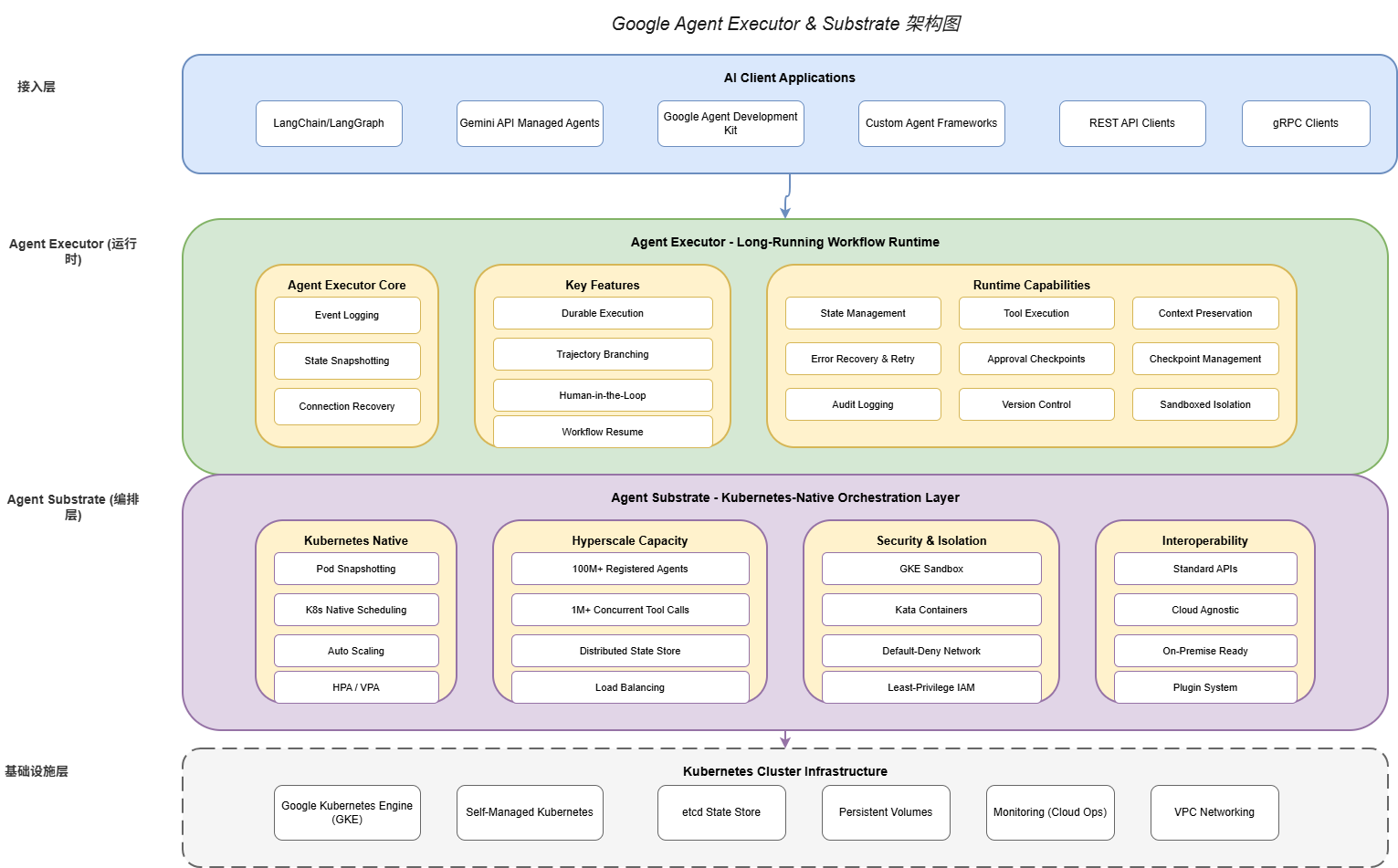
Google Agent Executor and Substrate together form a complete two-layer architecture:
Agent Executor Layer (Execution Layer): Manages individual workflow lifecycle, state persistence, event logging, and human-machine interaction.
Agent Substrate Layer (Orchestration Layer): Manages multi-Agent registration and discovery, scheduling and allocation, elastic scaling, and security isolation.
┌─────────────────────────────────────────────────────────────────┐
│                      AI Client Applications                      │
│        (LangChain / LangGraph / Gemini API / Custom SDK)        │
└────────────────────────────┬────────────────────────────────────┘
                             │
                             ▼
┌─────────────────────────────────────────────────────────────────┐
│                      Agent Executor Layer                         │
│                    (Long-Running Workflow Runtime)               │
│  ┌──────────────┐  ┌─────────────────┐  ┌───────────────────────┐ │
│  │ Event Logger │  │ State Snapshot  │  │ Human-in-the-Loop    │ │
│  └──────────────┘  └─────────────────┘  └───────────────────────┘ │
│  ┌──────────────┐  ┌─────────────────┐  ┌───────────────────────┐ │
│  │Trajectory    │  │ Workflow Resume │  │ Connection Recovery   │ │
│  │Branching     │  │                 │  │                       │ │
│  └──────────────┘  └─────────────────┘  └───────────────────────┘ │
└────────────────────────────┬────────────────────────────────────┘
                             │
                             ▼
┌─────────────────────────────────────────────────────────────────┐
│                      Agent Substrate Layer                       │
│                    (Kubernetes-Native Orchestration)            │
│  ┌──────────────┐  ┌─────────────────┐  ┌───────────────────────┐ │
│  │Pod Snapshot  │  │ K8s Scheduling │  │ Hyperscale Capacity  │ │
│  │Management    │  │                 │  │ (100M+ Agents)        │ │
│  └──────────────┘  └─────────────────┘  └───────────────────────┘ │
│  ┌──────────────┐  ┌─────────────────┐  ┌───────────────────────┐ │
│  │ GKE Sandbox  │  │ Network Policy │  │ Interoperability     │ │
│  │ Kata Cont.   │  │ Default-Deny   │  │ (LangChain/LangGraph)│ │
│  └──────────────┘  └─────────────────┘  └───────────────────────┘ │
└────────────────────────────┬────────────────────────────────────┘
                             │
                             ▼
┌─────────────────────────────────────────────────────────────────┐
│                    Kubernetes Cluster                            │
│              (GKE / Self-Managed / Multi-Cloud)                 │
└─────────────────────────────────────────────────────────────────┘
4.2 Integration with Existing Frameworks
Agent Executor and Substrate are designed for seamless integration with existing Agent development frameworks. Currently supported frameworks include:
LangChain Integration:
from langchain.agents import AgentExecutor as LCAgentExecutor
from google.agent_executor import AgentExecutor, Adapter

# Create Agent Executor adapter
adapter = Adapter(
    executor=AgentExecutor(
        checkpoint_enabled=True,
        event_logging=True
    )
)

# Use LangChain's ReAct Agent
agent = create_langchain_react_agent(
    model=ChatGoogleGenerativeAI(model="gemini-2.0"),
    tools=my_tools,
    prompt=my_prompt
)

# Run through adapter, supporting persistence
chain = LCAgentExecutor(
    agent=agent,
    tools=my_tools,
    adapter=adapter  # Inject Agent Executor capabilities
)

# Execute, supporting interruption and recovery
result = await chain.arun("Analyze this month's sales data")
LangGraph Integration:
from langgraph.graph import StateGraph
from google.agent_executor import AgentExecutor, CheckpointSaver

# Define state graph
graph = StateGraph(SalesAnalysisState)

graph.add_node("research", research_node)
graph.add_node("analyze", analyze_node)
graph.add_node("report", report_node)

graph.set_entry_point("research")
graph.add_edge("research", "analyze")
graph.add_edge("analyze", "report")
graph.set_finish_point("report")

# Compile, enabling Agent Executor checkpoints
compiled_graph = graph.compile(
    checkpoint=CheckpointSaver(
        executor=AgentExecutor(checkpoint_enabled=True)
    )
)

# Run, state automatically persists
async for state in compiled_graph.astream(initial_state):
    print(state)
4.3 Multi-Cloud and Hybrid Deployment Support
Agent Substrate supports various deployment modes:
Pure GKE Deployment: Leverages all GKE advanced features including Autopilot and Security Posture.
Hybrid Cloud Deployment: Agent Substrate’s control plane runs on GKE; the data plane can be deployed to other clouds or on-premises data centers.
Pure On-Premises Deployment: Runs entirely in local Kubernetes clusters, suitable for scenarios with strict data sovereignty requirements.
from agent_substrate.deployment import (
    DeploymentConfig,
    CloudProvider,
    HybridConfig
)

# GKE deployment configuration
gke_config = DeploymentConfig(
    provider=CloudProvider.GKE,
    project="my-gcp-project",
    region="us-central1",
    features=[
        "autopilot",
        "security_posture",
        "binary_authorization"
    ]
)

# Hybrid cloud configuration
hybrid_config = HybridConfig(
    control_plane=DeploymentConfig(
        provider=CloudProvider.GKE,
        project="my-gcp-project",
        region="us-central1"
    ),
    data_planes=[
        DataPlaneConfig(
            provider=CloudProvider.AWS,
            region="us-east-1",
            agent_count=10000
        ),
        DataPlaneConfig(
            provider=CloudProvider.AZURE,
            region="eastus",
            agent_count=10000
        ),
        DataPlaneConfig(
            provider=CloudProvider.SELF_HOSTED,
            location="on-prem-datacenter",
            agent_count=50000
        )
    ],
    data_routing=DataRoutingPolicy(
        prefer_local=True,
        fallback_cloud=CloudProvider.GKE
    )
)
Part 5: Code实战 Examples
5.1 End-to-End Example: Intelligent Customer Service Agent
The following is a complete intelligent customer service Agent example demonstrating how to build production-grade applications combining Agent Executor and Substrate:
import asyncio
from typing import Optional
from dataclasses import dataclass, field
from enum import Enum

from google.agent_executor import AgentExecutor, WorkflowState
from agent_substrate import AgentGroup, ScalingConfig
from langchain_google_genai import ChatGoogleGenerativeAI
from langchain.tools import tool

# ========== Tool Definitions ==========

@dataclass
class CustomerContext:
    """Customer context"""
    customer_id: str
    tier: str  # 'basic', 'premium', 'enterprise'
    account_age_days: int
    previous_tickets: list = field(default_factory=list)

@tool
def lookup_customer(customer_id: str) -> dict:
    """Query customer information"""
    # In actual implementation, call CRM API
    return {
        "customer_id": customer_id,
        "tier": "premium",
        "account_age_days": 365,
        "previous_tickets": ["TICKET-001", "TICKET-002"]
    }

@tool
def get_order_history(customer_id: str) -> list:
    """Get order history"""
    return [
        {"order_id": "ORD-001", "date": "2026-05-01", "amount": 299.99},
        {"order_id": "ORD-002", "date": "2026-05-15", "amount": 149.99}
    ]

@tool
def create_support_ticket(
    customer_id: str,
    subject: str,
    description: str,
    priority: str
) -> str:
    """Create support ticket"""
    ticket_id = f"TICKET-{hash(subject) % 100000}"
    return ticket_id

@tool
def send_email(to: str, subject: str, body: str) -> bool:
    """Send email"""
    return True

# ========== Agent Implementation ==========

class CustomerServiceAgent:
    """Intelligent customer service Agent"""

    def __init__(self):
        # Initialize LLM
        self.llm = ChatGoogleGenerativeAI(
            model="gemini-2.0-pro",
            temperature=0.7
        )

        # Initialize Agent Executor
        self.executor = AgentExecutor(
            checkpoint_enabled=True,
            event_logging=True,
            durable_execution=True
        )

        # Tool list
        self.tools = [
            lookup_customer,
            get_order_history,
            create_support_ticket,
            send_email
        ]

        # Business rules
        self.escalation_threshold = {
            "basic": 500,  # Amount over 500 needs escalation
            "premium": 1000,
            "enterprise": float("inf")  # No escalation
        }

    def _build_system_prompt(self, customer_tier: str) -> str:
        """Build system prompt"""
        tier_prompts = {
            "basic": "You are a professional customer service representative.",
            "premium": "You are a senior customer service agent.",
            "enterprise": "You are an enterprise customer service expert."
        }

        return f"""
{tier_prompts.get(customer_tier, tier_prompts['basic'])}

Workflow:
1. First query customer information to understand background
2. Collect necessary information based on customer issue type
3. Provide solution or create ticket
4. For high-value customers (orders over ${self.escalation_threshold.get(customer_tier, 500)}),
   automatically escalate to senior agent

Communication principles:
- Use friendly, professional tone
- Explain complex issues in simple language
- Never promise what you cannot deliver
"""

    async def handle_customer_request(
        self,
        workflow_id: str,
        customer_id: str,
        request: str
    ) -> dict:
        """Handle customer request"""

        # Get customer context
        customer = lookup_customer.invoke(customer_id)
        customer_context = CustomerContext(
            customer_id=customer_id,
            tier=customer["tier"],
            account_age_days=customer["account_age_days"]
        )

        # Build initial state
        initial_state = {
            "customer": customer_context,
            "request": request,
            "conversation_history": [],
            "escalated": False,
            "resolution": None
        }

        # Create workflow
        workflow = await self.executor.create_workflow(
            workflow_id=workflow_id,
            initial_state=initial_state
        )

        try:
            # Execute processing flow
            result = await self._process_with_retry(workflow)
            return {
                "status": "resolved",
                "workflow_id": workflow_id,
                "result": result
            }
        except HumanApprovalRequired as e:
            # Human approval needed (e.g., refund exceeds threshold)
            return {
                "status": "pending_approval",
                "workflow_id": workflow_id,
                "approval_details": e.details
            }
        except Exception as e:
            return {
                "status": "failed",
                "workflow_id": workflow_id,
                "error": str(e)
            }

    async def _process_with_retry(
        self,
        workflow: WorkflowState,
        max_retries: int = 3
    ) -> dict:
        """Processing logic with retry"""

        for attempt in range(max_retries):
            try:
                # Build prompt
                prompt = self._build_workflow_prompt(workflow.current_state)

                # Call LLM
                response = await self.llm.agenerate([prompt])

                # Parse response and execute tool calls
                actions = self._parse_llm_response(response)

                for action in actions:
                    if action.type == "tool_call":
                        result = await workflow.execute_tool(
                            action.tool_name,
                            action.parameters
                        )
                        workflow.add_to_history(action, result)
                    elif action.type == "escalate":
                        workflow.update_state({"escalated": True})
                    elif action.type == "resolve":
                        workflow.update_state({
                            "resolution": action.resolution
                        })

                # Check if completed
                if workflow.current_state.get("resolution"):
                    return workflow.current_state["resolution"]

            except ToolCallError as e:
                if attempt == max_retries - 1:
                    raise
                # Retry logic
                await asyncio.sleep(2 ** attempt)

        raise MaxRetriesExceededError("Failed after maximum retries")

# ========== Deployment Configuration ==========

def create_production_deployment() -> AgentGroup:
    """Create production deployment configuration"""

    return AgentGroup(
        name="customer-service-prod",
        agent_type="customer-support",
        scaling=ScalingConfig(
            min_replicas=10,
            max_replicas=1000,
            target_concurrent_requests=100,
            scale_up_cooldown=60,
            scale_down_cooldown=300
        ),
        resources=ResourceRequirements(
            requests={"cpu": "1", "memory": "2Gi"},
            limits={"cpu": "4", "memory": "8Gi"}
        ),
        security=SecurityConfig(
            sandbox_enabled=True,
            network_policy="customer-service-netpol",
            service_account="customer-service-sa"
        ),
        persistence=PersistenceConfig(
            enabled=True,
            checkpoint_interval_seconds=30,
            max_checkpoints_per_workflow=100
        )
    )

# ========== Main Program ==========

async def main():
    agent = CustomerServiceAgent()
    deployment = create_production_deployment()

    # Deploy Agent Group
    await deployment.deploy()

    # Handle customer request
    result = await agent.handle_customer_request(
        workflow_id="wf_cs_20260528_001",
        customer_id="CUST-12345",
        request="I want to request a return, order number ORD-002"
    )

    print(f"Processing result: {result}")

if __name__ == "__main__":
    asyncio.run(main())
Part 6: Industry Impact and Future Outlook
6.1 Far-Reaching Impact on AI Engineering
Google’s open-sourcing of Agent Executor and Substrate marks AI Agent engineering entering a new stage:
Lowering Enterprise Barriers: Previously, only large tech companies with strong engineering teams could build production-grade Agent systems. After open-sourcing, small and medium enterprises can also access the same capabilities.
Accelerating Standardization: The open-source community will form standardized interfaces and best practices around these core components, promoting interoperability across the entire industry.
Accelerating Innovation: Developers can focus on application innovation rather than reinventing wheels.
6.2 Ecosystem Evolution Predictions
Short-term (1-2 years):
- Mainstream frameworks like LangChain and LangGraph will deeply integrate Agent Executor
- Cloud providers will offer managed versions of Agent Executor & Substrate
- A large number of vertical domain Agent solutions will emerge
Medium-term (2-5 years):
- Agent runtimes will become a fundamental infrastructure layer for AI applications
- Standard protocols for multi-Agent collaboration will gradually form
- Serverless Agent execution models will become possible
Long-term (5+ years):
- Autonomous Agents will become an important part of enterprise digital workforce
- Agent-to-Agent collaboration will become more automated and intelligent
- Universal Agent runtime standards may emerge
6.3 Technology Evolution Directions
Based on current technology development trajectories, we foresee these evolution directions:
Stronger State Management Capabilities: Including more efficient incremental snapshots, cross-workflow state sharing, and distributed transaction support.
Smarter Resource Scheduling: Machine learning-based adaptive scheduling that automatically optimizes resource allocation based on workload characteristics.
More Comprehensive Security Mechanisms: Including formally verified Agent behaviors, full implementation of zero-trust architecture, and integration of privacy computing technologies.
Richer Developer Tools: Including visual workflow debuggers, real-time state tracing, and performance analyzers.
Conclusion
Google’s open-sourcing of Agent Executor and Substrate is a milestone event in the AI Agent field. These two tools not only solve core challenges in production deployment but also provide a trustworthy technical foundation for the entire industry. With widespread adoption of these tools, we have every reason to believe that large-scale AI Agent deployment will enter the fast lane.
For AI engineers, now is the best time to learn and adopt these technologies. By deeply understanding the design philosophy and implementation details of these tools, we can better build next-generation AI applications and drive artificial intelligence technology toward broader application scenarios.
References
- Google Agent Executor GitHub Repository: https://github.com/google/agent-executor
- Google Agent Substrate GitHub Repository: https://github.com/google/agent-substrate
- Kubernetes Documentation: https://kubernetes.io/docs/
- LangChain Documentation: https://python.langchain.com/
- Gartner AI Agent Governance Framework Report, May 2026
Author’s Note: This article was written based on the latest information as of May 28, 2026. AI technology evolves rapidly; readers are advised to continuously monitor official documentation and community updates for the latest information.