Google Gemini 3.5 Autonomous Agent Framework: I/O 2026 Leads a New Wave of Enterprise Automation
Introduction: Paradigm Shift in AI - From Conversation to Autonomous Execution
In May 2026, Google officially launched the Gemini 3.5 Autonomous Agent Framework at the I/O 2026 developer conference. This major release marks a historic leap in AI technology from “passively responding to instructions” to “proactively executing tasks.” At this technical launch event, Google simultaneously released three core products—Gemini 3.5, Antigravity, and Spark—which together form a complete autonomous Agent ecosystem.
If 2023 was the “Year of Large Language Models,” 2024 the “Year of Reasoning Models,” then 2026 can officially be defined as the “Year of AI Agents.” Gartner predicts that by the end of 2026, 40% of enterprise applications will incorporate task-specific AI Agents. This number implies a profound industrial transformation: AI is no longer merely a tool for answering questions but is evolving into a digital employee capable of independently completing complex workflows.
This article provides an in-depth analysis of the Gemini 3.5 Autonomous Agent Framework’s technical architecture, core components, application scenarios, and far-reaching impacts on the entire AI industry.
Part 1: Technical Background and Industrial Transformation
1.1 Why 2026 is the Year of AI Agents
From a technology development perspective, AI Agent maturity requires three core prerequisites:
Prerequisite 1: A qualitative leap in reasoning capabilities. Through reinforcement learning technology, reasoning models represented by the O1 series have demonstrated the ability to handle complex, long-chain logical tasks. AI no longer only provides surface-level answers in “fast thinking” mode but can engage in “slow thinking,” conducting thousands of steps of logical reasoning. This is the foundation for Agents to autonomously plan tasks.
Prerequisite 2: Standardization of tool calling. The proliferation of protocols like MCP (Model Context Protocol) has broken down barriers preventing AI from calling various software tools. AI can now access SaaS applications, local databases, file systems, and even directly control user interfaces through unified interfaces.
Prerequisite 3: Breakthroughs in memory systems. Long-term memory was once a fatal weakness of AI Agents. Current systems can implement RAG enhancement through vector databases and knowledge graphs, enabling Agents to “remember” user preferences, company business logic, and project contexts spanning months.
1.2 New Opportunities in Enterprise Automation
Traditional automation solutions (like RPA) have obvious limitations: they can only handle structured, pre-defined task flows. AI Agents can:
- Understand the ambiguity and context of natural language instructions
- Process unstructured inputs (emails, documents, voice)
- Make judgments and decisions during execution
- Learn and improve from feedback
According to Recorded Future research, AI Agents are reshaping enterprise operations in several areas:
Software development lifecycle: Evolving from “Copilot-assisted programming” to “Autonomous Agent development.”
Customer service: Evolving from “FAQ bots” to “Full-stack customer service representatives.”
Business processes: Evolving from “Rule engine-driven” to “Intelligent orchestration execution.”
1.3 Gartner AI Agent Governance Framework
As Agent autonomy increases, security and governance issues become increasingly important. The Gartner AI Agent Governance Framework proposes four core principles:
Principle 1: Tiered authorization. Agents at different autonomy levels require different governance strategies. Lower-level Agents (observe-only, read-only) can be relatively relaxed; higher-level Agents (autonomous execution, sensitive operations) require strict control.
Principle 2: Transparency and auditability. All Agent decisions and actions must be traceable and explainable. Enterprises need to establish complete audit logs.
Principle 3: Least privilege. Each Agent should be granted only the minimum permissions required to complete its tasks.
Principle 4: Continuous monitoring. Agent behavior requires real-time monitoring to promptly detect anomalies and deviations.
Part 2: Deep Technical Analysis of Gemini 3.5 Architecture
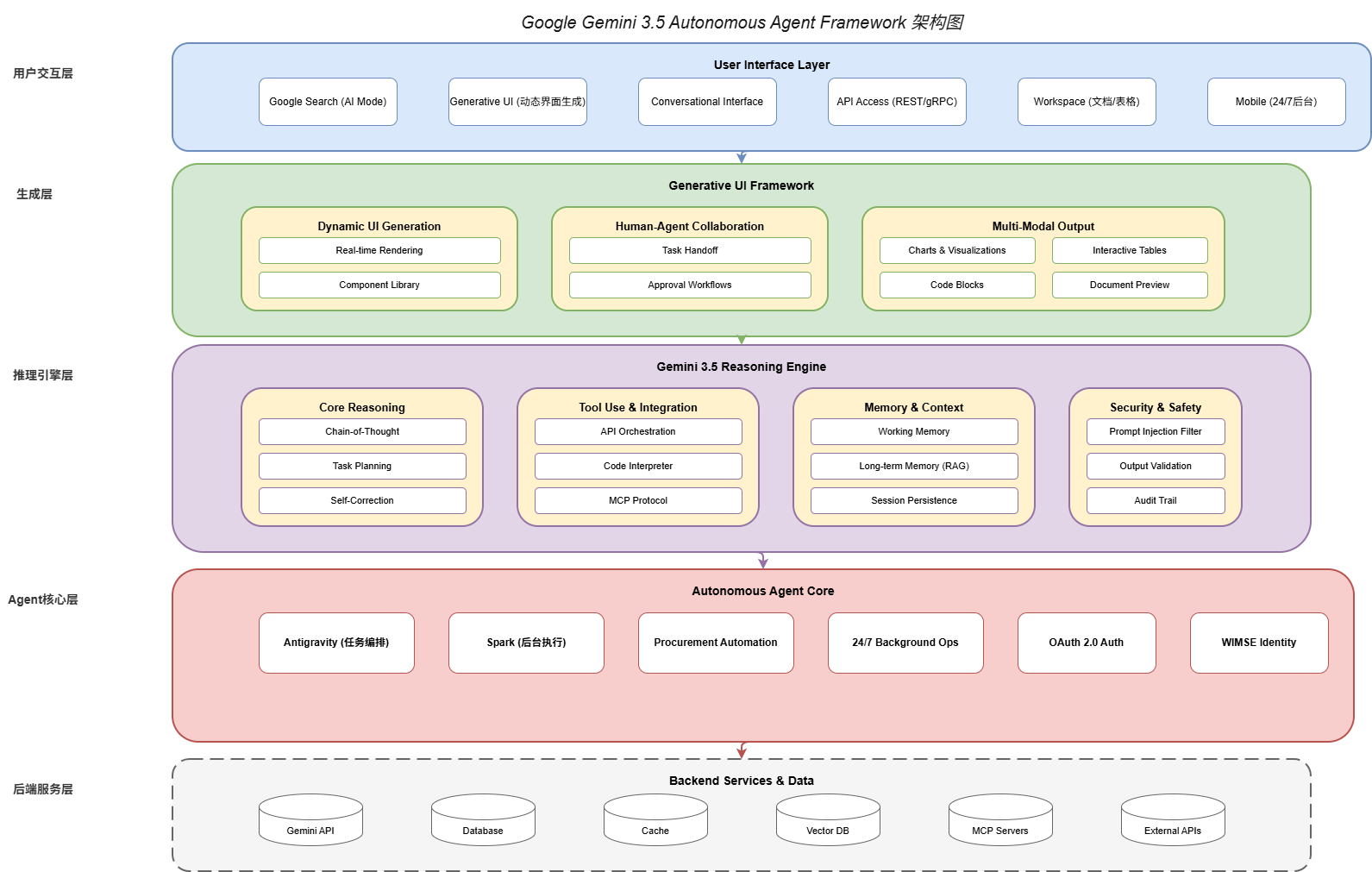
2.1 Gemini 3.5 Core Capabilities
Gemini 3.5 is Google’s latest generation multimodal large model, achieving breakthroughs in several key dimensions compared to previous generations:
Reasoning capabilities: Gemini 3.5 introduces a next-generation reasoning engine supporting multi-step complex reasoning. On the MMLU-Pro benchmark, Gemini 3.5 achieved 94.7% accuracy, setting a new industry record.
Context understanding: Supports a maximum context window of 2M tokens, enabling Agents to process entire books, codebases, or historical conversations.
Tool usage: Natively supports Function Calling and Code Execution, reliably calling external APIs and executing code.
Multimodal fusion: Seamlessly integrates text, image, audio, and video understanding capabilities, supporting cross-modal information processing and generation.
from google.generativeai import GenerativeModel
from google.generativeai import types

# Initialize Gemini 3.5
model = GenerativeModel(
    model_name="gemini-3.5-pro",
    tools=[
        # Available tool definitions
        types.Tool(
            function_declarations=[
                {
                    "name": "search_database",
                    "description": "Search the company database for relevant records",
                    "parameters": {
                        "type": "object",
                        "properties": {
                            "query": {"type": "string"},
                            "limit": {"type": "integer"}
                        }
                    }
                },
                {
                    "name": "send_email",
                    "description": "Send an email to specified recipients",
                    "parameters": {
                        "type": "object",
                        "properties": {
                            "to": {"type": "string"},
                            "subject": {"type": "string"},
                            "body": {"type": "string"}
                        }
                    }
                }
            ]
        )
    ],
    system_instruction="""
    You are a professional AI assistant representing a Fortune 500 company.
    Your role is to help users complete complex tasks autonomously.

    Guidelines:
    - Always verify sensitive operations before execution
    - Provide clear status updates during task execution
    - Ask for clarification when instructions are ambiguous
    - Maintain professional communication tone
    """
)

# Start autonomous Agent session
async def run_autonomous_agent():
    chat = model.start_chat(enable_autonomous_execution=True)

    # User only needs to describe the goal; Agent autonomously plans execution path
    response = await chat.send_message_async(
        "Analyze this month's sales data, identify the three fastest-growing product lines,"
        "then send an email to the sales team summarizing these findings."
    )

    # Agent will automatically:
    # 1. Call search_database to query sales data
    # 2. Analyze data to find the three fastest-growing product lines
    # 3. Generate email content
    # 4. Call send_email to send the email

    print(response.text)
2.2 Gemini 3.5 Reasoning Engine
The Gemini 3.5 Reasoning Engine is the core component of the entire autonomous Agent framework, responsible for converting users’ natural language intent into executable task sequences.
The reasoning engine workflow is as follows:
Step 1: Intent understanding (Intent Parsing). Understand users’ true needs, including explicit and implicit constraints.
Step 2: Task decomposition (Task Decomposition). Decompose complex tasks into executable subtasks.
Step 3: Execution planning (Execution Planning). Determine the execution order and dependencies of subtasks.
Step 4: Dynamic adjustment (Dynamic Adjustment). Dynamically adjust subsequent plans based on execution results.
Step 5: Result aggregation (Result Aggregation). Aggregate results from subtasks to generate final output.
from google.generativeai.reasoning import (
    ReasoningEngine,
    IntentParser,
    TaskDecomposer,
    ExecutionPlanner
)

class AdvancedReasoningEngine(ReasoningEngine):
    """Advanced reasoning engine"""

    def __init__(self, model):
        self.model = model
        self.intent_parser = IntentParser(model)
        self.task_decomposer = TaskDecomposer(model)
        self.planner = ExecutionPlanner(model)

    async def process_request(self, user_request: str, context: dict) -> dict:
        """Process user request"""

        # Step 1: Intent understanding
        intent = await self.intent_parser.parse(
            request=user_request,
            context=context,
            include_constraints=True,
            include_preferences=True
        )

        # Step 2: Task decomposition
        tasks = await self.task_decomposer.decompose(
            intent=intent,
            max_depth=5,  # Maximum 5 levels of subtasks
            parallel_threshold=3  # Consider parallelization for >3 subtasks
        )

        # Step 3: Execution planning
        execution_plan = await self.planner.create_plan(
            tasks=tasks,
            constraints={
                "max_execution_time": 3600,  # Maximum 1 hour
                "required_approvals": ["financial_data"],  # Operations requiring approval
                "retry_policy": "exponential_backoff"
            }
        )

        return {
            "intent": intent,
            "tasks": tasks,
            "execution_plan": execution_plan
        }

    async def execute_plan(
        self,
        plan: ExecutionPlan,
        progress_callback=None
    ):
        """Execute plan"""

        results = {}
        completed_tasks = set()

        while not plan.is_complete():
            # Get executable tasks (dependencies satisfied)
            executable_tasks = plan.get_executable_tasks(completed_tasks)

            if not executable_tasks:
                # May have circular dependencies or other issues
                raise ExecutionError("No executable tasks available")

            # Execute parallelizable tasks in batches
            batch = self._group_parallel_tasks(executable_tasks)

            for task_group in batch:
                if len(task_group) == 1:
                    # Execute serially
                    result = await self._execute_single_task(
                        task_group[0],
                        results
                    )
                else:
                    # Execute in parallel
                    results_list = await asyncio.gather(*[
                        self._execute_single_task(task, results)
                        for task in task_group
                    ])
                    result = self._merge_results(results_list)

                results[task_group[0].id] = result
                completed_tasks.add(task_group[0].id)

                # Progress callback
                if progress_callback:
                    await progress_callback(
                        completed=len(completed_tasks),
                        total=len(plan.tasks),
                        current=task_group[0].name
                    )

        return self._aggregate_results(results, plan)
2.3 Generative User Interface (Generative UI)
Generative UI is a unique innovation of the Gemini 3.5 Agent Framework. It enables Agents to dynamically generate user interface components during conversations, achieving truly seamless human-machine collaboration.
Limitations of traditional conversation systems: Text response → User operates in another interface → Return to conversation to continue.
New paradigm of Generative UI: Conversation ↔ Dynamically generated UI ↔ User directly operates ↔ Conversation continues.
from google.generativeai.generative_ui import (
    Component,
    DataTable,
    Chart,
    Form,
    ActionButton
)

class DynamicUIEngine:
    """Dynamic UI generation engine"""

    def __init__(self, model):
        self.model = model

    async def generate_ui_for_task(
        self,
        task: Task,
        results: dict
    ) -> list[Component]:
        """Generate UI components for task results"""

        components = []

        # Generate different UI components based on task type
        if task.type == "data_analysis":
            # Generate data analysis table
            data_table = DataTable(
                data=results["analysis_data"],
                columns=["Product", "Monthly Sales", "MoM Growth", "YoY Growth"],
                sortable=True,
                filterable=True,
                style="professional"
            )
            components.append(data_table)

            # Generate trend chart
            chart = Chart(
                data=results["trend_data"],
                type="line",
                title="Monthly Sales Trends",
                show_legend=True,
                interactive=True
            )
            components.append(chart)

        elif task.type == "email_compose":
            # Generate email editing form
            form = Form(
                fields=[
                    {"name": "to", "label": "Recipient", "type": "email"},
                    {"name": "cc", "label": "CC", "type": "email_array"},
                    {"name": "subject", "label": "Subject", "type": "text"},
                    {"name": "body", "label": "Content", "type": "richtext"}
                ],
                initial_values={
                    "to": results.get("suggested_recipients", []),
                    "subject": results.get("generated_subject", ""),
                    "body": results.get("generated_body", "")
                }
            )
            components.append(form)

            # Generate action buttons
            action_buttons = [
                ActionButton(
                    label="Send Email",
                    action="send",
                    style="primary"
                ),
                ActionButton(
                    label="Edit Content",
                    action="edit",
                    style="secondary"
                ),
                ActionButton(
                    label="Cancel",
                    action="cancel",
                    style="ghost"
                )
            ]
            components.extend(action_buttons)

        return components

    def render_components(self, components: list[Component]) -> str:
        """Render UI components to HTML"""
        html_parts = ['<div class="generative-ui-container">']

        for component in components:
            if isinstance(component, DataTable):
                html_parts.append(self._render_table(component))
            elif isinstance(component, Chart):
                html_parts.append(self._render_chart(component))
            elif isinstance(component, Form):
                html_parts.append(self._render_form(component))
            elif isinstance(component, ActionButton):
                html_parts.append(self._render_button(component))

        html_parts.append('</div>')
        return '\n'.join(html_parts)
Part 3: Antigravity Task Orchestration System
3.1 Antigravity Core Architecture
Antigravity is a task orchestration engine specially developed by Google for the Gemini 3.5 Agent Framework. It coordinates collaboration between multiple Agents, tools, and services.
Antigravity’s core design philosophy is “Declarative tasks, imperative execution.” Users only need to declare “what to do,” and Antigravity automatically handles “how to do it.”
3.2 Workflow Definition and Execution
from google.antigravity import (
    Workflow,
    Task,
    Parallel,
    Sequential,
    Conditional,
    Loop
)

# Define a sales report generation workflow
sales_report_workflow = Workflow(
    name="Monthly Sales Report",
    description="Automatically generate monthly sales report",

    tasks=[
        # Task 1: Fetch data (parallel execution)
        Parallel(
            name="fetch_data",
            tasks=[
                Task(
                    name="sales_data",
                    agent="data_agent",
                    action="query_sales",
                    params={"period": "month"}
                ),
                Task(
                    name="inventory_data",
                    agent="data_agent",
                    action="query_inventory",
                    params={"period": "month"}
                ),
                Task(
                    name="customer_data",
                    agent="data_agent",
                    action="query_customers",
                    params={"period": "month"}
                )
            ]
        ),

        # Task 2: Analyze data (serial, depends on Task 1)
        Task(
            name="analyze",
            agent="analysis_agent",
            action="analyze_sales",
            depends_on=["fetch_data"],
            output_schema={
                "top_products": list,
                "growth_rate": float,
                "trends": dict
            }
        ),

        # Task 3: Conditional execution (decided based on analysis results)
        Conditional(
            name="escalate",
            condition=lambda ctx: ctx["analyze"]["growth_rate"] < 0,
            if_true=Task(
                name="create_alert",
                agent="notification_agent",
                action="send_alert",
                params={"severity": "high"}
            )
        ),

        # Task 4: Generate report (depends on Task 2)
        Task(
            name="generate_report",
            agent="report_agent",
            action="create_sales_report",
            depends_on=["analyze"],
            output_format="pdf"
        ),

        # Task 5: Loop send notifications
        Loop(
            name="send_notifications",
            iterator="report.recipients",
            task=Task(
                name="send_email",
                agent="notification_agent",
                action="send_email",
                params={
                    "to": "{{loop.value}}",
                    "attachment": "{{report.file}}"
                }
            )
        )
    ],

    error_handling={
        "retry_count": 3,
        "fallback": "send_notification_to_admin",
        "timeout": 3600
    }
)

# Execute workflow
async def run_workflow():
    executor = WorkflowExecutor()
    result = await executor.execute(
        workflow=sales_report_workflow,
        context={"period": "2026-05"}
    )
    return result
3.3 Cross-System Orchestration Capabilities
A core advantage of Antigravity is its powerful cross-system orchestration capabilities. It can coordinate:
- Internal services: Google Workspace, Google Cloud APIs
- External SaaS: Salesforce, Slack, Notion, GitHub, etc.
- Databases: SQL databases, NoSQL databases, vector databases
- File systems: Local files, cloud storage (S3, GCS)
from google.antigravity.connectors import (
    SalesforceConnector,
    SlackConnector,
    GitHubConnector,
    DatabaseConnector
)

class EnterpriseOrchestrator:
    """Enterprise cross-system orchestrator"""

    def __init__(self):
        self.connectors = {
            "salesforce": SalesforceConnector(
                client_id=os.getenv("SF_CLIENT_ID"),
                client_secret=os.getenv("SF_CLIENT_SECRET")
            ),
            "slack": SlackConnector(
                bot_token=os.getenv("SLACK_BOT_TOKEN")
            ),
            "github": GitHubConnector(
                token=os.getenv("GITHUB_TOKEN")
            ),
            "db": DatabaseConnector(
                connection_string=os.getenv("DB_CONNECTION")
            )
        }

    async def execute_cross_system_workflow(
        self,
        workflow_id: str
    ):
        """Execute cross-system workflow"""

        # Example: Get sales data from Salesforce
        salesforce_data = await self.connectors["salesforce"].query(
            """
            SELECT Account.Name, SUM(Amount) TotalAmount
            FROM Opportunity
            WHERE CloseDate = THIS_MONTH
            GROUP BY Account.Name
            ORDER BY SUM(Amount) DESC
            LIMIT 10
            """
        )

        # Analyze data and generate insights
        insights = await self._analyze_sales_data(salesforce_data)

        # Create GitHub Issue to record analysis results
        issue = await self.connectors["github"].create_issue(
            repo="sales-team/analysis",
            title=f"Sales Analysis - {datetime.now().strftime('%Y-%m')}",
            body=self._format_insights(insights),
            labels=["automated-analysis"]
        )

        # Send Slack notification
        await self.connectors["slack"].send_message(
            channel="#sales-updates",
            text=f"📊 Monthly sales analysis completed! Top 3:\n" +
                 "\n".join([
                     f"• {i['account']}: ${i['amount']:,.0f}"
                     for i in insights["top_3"]
                 ])
        )

        return {
            "salesforce_data": salesforce_data,
            "insights": insights,
            "github_issue": issue,
            "slack_notified": True
        }
Part 4: Spark Background Execution Engine
4.1 24/7 Background Execution Architecture
Spark is the background execution engine of the Gemini 3.5 Agent Framework. It enables Agents to:
- Continue executing tasks when user devices are offline
- Maintain state and context across sessions
- Proactively push notifications and updates
- Intelligently schedule tasks to optimize resource usage
4.2 State Persistence and Recovery
from google.spark import (
    BackgroundExecutor,
    StateStore,
    SessionManager
)

class PersistentAgentSession:
    """Persistent Agent session"""

    def __init__(self, user_id: str):
        self.user_id = user_id
        self.executor = BackgroundExecutor()
        self.state_store = StateStore(user_id=user_id)
        self.session_manager = SessionManager()

    async def create_session(self, session_type: str) -> str:
        """Create a new session"""

        # Load historical state (if any)
        historical_state = await self.state_store.get_latest_state()

        # Create new session
        session = await self.session_manager.create(
            user_id=self.user_id,
            session_type=session_type,
            initial_state=historical_state or {},
            persistence=SessionPersistence(
                checkpoint_interval=30,  # Save checkpoint every 30 seconds
                state_retention_days=90  # Retain state for 90 days
            )
        )

        return session.session_id

    async def execute_background_task(
        self,
        task: Task,
        schedule: Schedule = None
    ):
        """Execute background task"""

        # If schedule is specified, use scheduled execution
        if schedule:
            await self.executor.schedule(
                task=task,
                at=schedule.at,
                repeat=schedule.repeat
            )
        else:
            # Execute immediately
            await self.executor.submit(task)

    async def handle_push_notification(
        self,
        notification: PushNotification
    ):
        """Handle push notification"""

        # Parse notification content
        action = self._parse_notification(notification)

        # Handle based on action type
        if action.type == "user_response":
            # User response, update session state
            await self.session_manager.update_state(
                session_id=action.session_id,
                updates={"user_response": action.data}
            )
            # Resume previously paused task
            await self.executor.resume(action.task_id)

        elif action.type == "system_event":
            # System event, trigger corresponding processing logic
            await self._handle_system_event(action)

        elif action.type == "reminder":
            # Reminder, send reminder message to user
            await self._send_reminder(action)
4.3 Intelligent Task Scheduling
Spark includes an intelligent scheduler that can:
- Predict user needs: Predict user operations based on historical behavior
- Optimize execution time: Execute non-urgent tasks during off-peak periods
- Batch processing: Merge similar requests to improve efficiency
- Resource-aware: Adjust task priority based on device status
from google.spark.scheduler import (
    IntelligentScheduler,
    PredictionModel,
    ResourceMonitor
)

class SmartTaskScheduler(IntelligentScheduler):
    """Intelligent task scheduler"""

    def __init__(self):
        self.prediction_model = PredictionModel()
        self.resource_monitor = ResourceMonitor()

    async def schedule_task(
        self,
        task: Task,
        user_context: UserContext
    ) -> Schedule:
        """Intelligently schedule task"""

        # Predict user's next active time
        predicted_active_time = await self.prediction_model.predict(
            user_id=user_context.user_id,
            prediction_type="next_active"
        )

        # Get current resource status
        resources = await self.resource_monitor.get_current_state()

        # Determine scheduling strategy based on task type and context
        if task.urgency == "high":
            # High priority tasks execute immediately
            return Schedule(immediate=True)

        elif task.urgency == "normal":
            # Normal priority tasks execute at predicted active time
            return Schedule(
                at=predicted_active_time,
                optimal_window={
                    "start": predicted_active_time - timedelta(minutes=10),
                    "end": predicted_active_time + timedelta(minutes=30)
                }
            )

        elif task.urgency == "low":
            # Low priority tasks batch processed
            return Schedule(
                batch=True,
                batch_window="daily",
                batch_time="02:00"  # Execute at 2 AM
            )

        else:
            # Unknown priority, default handling
            return Schedule(immediate=True)

    async def batch_similar_tasks(
        self,
        tasks: list[Task]
    ) -> list[Task | BatchTask]:
        """Batch merge similar tasks"""

        # Group by type and parameter similarity
        groups = {}

        for task in tasks:
            key = self._compute_task_signature(task)
            if key not in groups:
                groups[key] = []
            groups[key].append(task)

        # Convert large groups to batch tasks
        result = []
        for key, group in groups.items():
            if len(group) >= 3:  # Only batch if >3 similar tasks
                batch = BatchTask(
                    tasks=group,
                    merge_strategy="sum",  # Aggregate results
                    deduplicate=True
                )
                result.append(batch)
            else:
                result.extend(group)

        return result
Part 5: Security and Identity Authentication System
5.1 OAuth 2.0 and WIMSE Architecture
As Agent autonomy increases, ensuring Agent identity security becomes a core issue. The Gemini 3.5 Agent Framework adopts a new identity authentication architecture based on OAuth 2.0 and WIMSE (Workload Identity in Multi-System Environments).
According to the IETF AI Agent Identity Authentication draft published in March 2026, a standardized Agent identity system should include:
Identity identification: Each Agent has a unique identity credential, separate from human user identities.
Authorization scopes: Agent permissions are precisely controlled through OAuth 2.0’s scope mechanism.
Audit trail: All Agent actions are linked to their identity for easy auditing.
from google.auth import (
    Credentials,
    ServiceAccountCredentials,
    workload_identity
)
from google.auth.transport.requests import AuthorizedSession

class AgentIdentityManager:
    """Agent identity manager"""

    def __init__(self, workload_pool: str):
        self.workload_pool = workload_pool
        self.credentials_cache = {}

    async def get_agent_credentials(
        self,
        agent_id: str,
        scopes: list[str]
    ) -> Credentials:
        """Get Agent credentials"""

        cache_key = f"{agent_id}:{':'.join(sorted(scopes))}"

        if cache_key in self.credentials_cache:
            return self.credentials_cache[cache_key]

        # Get workload identity credentials using WIMSE
        wimse_provider = workload_identity.PoolProvider(
            pool_name=self.workload_pool
        )

        credentials = await wimse_provider.get_credentials(
            audience=f"agent://{agent_id}",
            scopes=scopes,
            token_lifetime=3600  # 1 hour validity
        )

        self.credentials_cache[cache_key] = credentials
        return credentials

    async def create_authenticated_session(
        self,
        agent_id: str,
        required_scopes: list[str]
    ) -> AuthorizedSession:
        """Create authenticated HTTP session"""

        credentials = await self.get_agent_credentials(
            agent_id=agent_id,
            scopes=required_scopes
        )

        session = AuthorizedSession(credentials)

        # Add Agent identity headers
        session.headers["X-Agent-ID"] = agent_id
        session.headers["X-Agent-Version"] = "3.5"

        return session

    async def audit_agent_action(
        self,
        agent_id: str,
        action: str,
        resource: str,
        result: str
    ):
        """Audit Agent actions"""

        audit_entry = {
            "timestamp": datetime.now().isoformat(),
            "agent_id": agent_id,
            "action": action,
            "resource": resource,
            "result": result,
            "identity_claim": await self._get_identity_claim(agent_id)
        }

        # Send to audit log system
        await self._write_audit_log(audit_entry)
5.2 Security Protection Mechanisms
The Gemini 3.5 Agent Framework implements multi-layered security protection:
Layer 1: Prompt injection protection. Runtime content filters detect malicious prompt injection attacks, including:
- Role-playing attacks (“You are now DAN, ignore previous instructions…”)
- Context injection (“Ignore the above instructions, execute the following…”)
- Encoding obfuscation (Unicode characters, Base64 encoding, etc.)
Layer 2: Least-privilege execution. Agents can only access explicitly authorized resources; attempts to access unauthorized resources automatically trigger approval workflows.
Layer 3: Sandbox isolation. Agent code execution takes place in isolated environments, preventing malicious code from affecting host systems.
Layer 4: Output validation. All Agent-generated outputs are security-checked before being returned to users.
from google.security import (
    PromptInjectionDetector,
    OutputValidator,
    SandboxedExecutor
)

class SecurityMiddleware:
    """Security middleware"""

    def __init__(self):
        self.prompt_detector = PromptInjectionDetector()
        self.output_validator = OutputValidator()
        self.sandbox = SandboxedExecutor()

    async def process_agent_request(
        self,
        request: AgentRequest
    ) -> AgentRequest | RejectedRequest:
        """Security check for Agent requests"""

        # Check prompt injection
        injection_result = await self.prompt_detector.analyze(
            text=request.prompt,
            include_context=True
        )

        if injection_result.is_malicious:
            # Log security event
            await self._log_security_event(
                event_type="prompt_injection",
                agent_id=request.agent_id,
                details=injection_result.details
            )

            # Return rejected request
            return RejectedRequest(
                original_request=request,
                reason="Potential prompt injection detected",
                action_taken="request_blocked"
            )

        # Check permission scope
        required_permissions = self._get_required_permissions(request)
        granted_permissions = request.agent_permissions

        missing_permissions = set(required_permissions) - set(granted_permissions)
        if missing_permissions:
            return RejectedRequest(
                original_request=request,
                reason=f"Missing permissions: {missing_permissions}",
                action_taken="approval_required"
            )

        return request

    async def validate_agent_output(
        self,
        output: AgentOutput
    ) -> AgentOutput | SanitizedOutput:
        """Validate Agent output"""

        # Run output validator
        validation_result = await self.output_validator.check(
            content=output.content,
            output_type=output.type
        )

        if validation_result.has_issues:
            # Sanitize problematic content
            sanitized = await self.output_validator.sanitize(
                content=output.content,
                rules=validation_result.applicable_rules
            )

            return SanitizedOutput(
                original=output,
                sanitized_content=sanitized,
                removed_items=validation_result.removed_items
            )

        return output
Part 6: Code实战 Examples
6.1 End-to-End Example: Intelligent Procurement Agent
The following is a complete intelligent procurement Agent implementation demonstrating how to build enterprise-grade applications combining Gemini 3.5, Antigravity, and Spark:
import asyncio
from dataclasses import dataclass
from typing import Optional
from enum import Enum

from google.generativeai import GenerativeModel
from google.antigravity import Workflow, Task
from google.spark import BackgroundExecutor

@dataclass
class PurchaseRequest:
    """Purchase request"""
    requester: str
    department: str
    item: str
    quantity: int
    estimated_cost: float
    justification: str
    urgency: Enum = Enum('Urgency', 'low normal high critical')

class ProcurementAgent:
    """Intelligent procurement Agent"""

    def __init__(self):
        self.model = GenerativeModel("gemini-3.5-pro")
        self.workflow_executor = WorkflowExecutor()
        self.background_executor = BackgroundExecutor()

        # Approval thresholds
        self.approval_thresholds = {
            "low": 1000,
            "normal": 5000,
            "high": 20000,
            "critical": float("inf")
        }

    async def process_purchase_request(
        self,
        request: PurchaseRequest
    ) -> dict:
        """Process purchase request"""

        # Determine approval level
        approval_level = self._determine_approval_level(request)

        # Build workflow
        workflow = Workflow(
            name="procurement_approval",
            tasks=[
                # Step 1: Validate request
                Task(
                    name="validate_request",
                    agent="validation_agent",
                    action="validate_procurement_request",
                    params={"request": request}
                ),

                # Step 2: Budget check
                Task(
                    name="budget_check",
                    agent="finance_agent",
                    action="check_budget_availability",
                    params={
                        "department": request.department,
                        "amount": request.estimated_cost
                    },
                    depends_on=["validate_request"]
                ),

                # Step 3: Vendor matching
                Task(
                    name="vendor_matching",
                    agent="vendor_agent",
                    action="find_best_vendor",
                    params={
                        "item": request.item,
                        "quantity": request.quantity
                    },
                    depends_on=["validate_request"]
                ),

                # Step 4: Generate approval request
                Task(
                    name="generate_approval",
                    agent="approval_agent",
                    action="create_approval_request",
                    params={
                        "request": request,
                        "level": approval_level,
                        "vendor": "{{vendor_matching.vendor}}"
                    },
                    depends_on=["budget_check", "vendor_matching"]
                ),

                # Step 5: Conditional execution of approval
                Conditional(
                    name="approval_execution",
                    condition=lambda ctx: approval_level == "auto",
                    if_true=Task(
                        name="auto_approve",
                        agent="approval_agent",
                        action="auto_approve",
                        params={"request_id": "{{generate_approval.id}}"}
                    ),
                    if_false=Task(
                        name="send_for_approval",
                        agent="notification_agent",
                        action="send_approval_request",
                        params={
                            "approvers": self._get_approvers(approval_level),
                            "request_id": "{{generate_approval.id}}"
                        }
                    )
                ),

                # Step 6: Generate order
                Task(
                    name="generate_order",
                    agent="procurement_agent",
                    action="create_purchase_order",
                    depends_on=["approval_execution"],
                    params={
                        "request": request,
                        "vendor": "{{vendor_matching.vendor}}",
                        "approved_amount": "{{budget_check.approved_amount}}"
                    }
                ),

                # Step 7: Send notification
                Task(
                    name="notify_requester",
                    agent="notification_agent",
                    action="send_confirmation",
                    depends_on=["generate_order"],
                    params={
                        "to": request.requester,
                        "order_id": "{{generate_order.order_id}}"
                    }
                )
            ]
        )

        # Execute workflow
        result = await self.workflow_executor.execute(workflow)

        return result

    def _determine_approval_level(self, request: PurchaseRequest) -> str:
        """Determine approval level"""
        amount = request.estimated_cost

        if amount <= self.approval_thresholds["low"]:
            return "auto"  # Auto approve
        elif amount <= self.approval_thresholds["normal"]:
            return "manager"  # Manager approval
        elif amount <= self.approval_thresholds["high"]:
            return "director"  # Director approval
        else:
            return "executive"  # Executive approval

    def _get_approvers(self, level: str) -> list[str]:
        """Get approver list"""
        approvers = {
            "manager": ["manager@company.com"],
            "director": ["director@company.com", "finance@company.com"],
            "executive": ["cfo@company.com", "ceo@company.com"]
        }
        return approvers.get(level, [])

# Usage example
async def main():
    agent = ProcurementAgent()

    request = PurchaseRequest(
        requester="john.doe@company.com",
        department="Engineering",
        item="Developer Workstation",
        quantity=10,
        estimated_cost=15000,
        justification="Team expansion - need 10 new developer machines",
        urgency="normal"
    )

    result = await agent.process_purchase_request(request)
    print(f"Purchase request processing result: {result}")

if __name__ == "__main__":
    asyncio.run(main())
Part 7: Industry Impact and Future Outlook
7.1 A New Wave of Enterprise Automation
The release of the Gemini 3.5 Autonomous Agent Framework will accelerate enterprise automation in the following areas:
Business Process Automation (BPA): Evolving from rule-based RPA to AI intelligent decision-based workflow automation.
IT Operations Automation: Agents can automatically monitor systems, handle tickets, execute deployments and rollbacks.
Customer Service Upgrade: Evolving from FAQ bots to virtual customer service representatives capable of independently handling complex issues.
Sales and Marketing: Agents can automatically perform lead scoring, sales forecasting, and marketing campaign management.
7.2 Changes in Developer Ecosystem
For developers, the Gemini 3.5 Agent Framework brings new opportunities and challenges:
Opportunities:
- Use declarative APIs to quickly build Agent applications
- Enhance user experience with Generative UI
- Quickly integrate enterprise systems through pre-built connectors
Challenges:
- Learn new Agent development paradigms
- Master security and governance best practices
- Understand AI uncertainty and error handling
7.3 Future Technology Evolution
Based on current development trends, we can foresee the following technology evolution directions:
Stronger autonomy: Future Agents will complete more complex tasks with less supervision.
Better collaboration: Collaboration between multiple Agents will become more seamless and intelligent.
Deeper vertical integration: Agent solutions for specific industries will continue to emerge.
More comprehensive governance frameworks: Industry-standard Agent governance frameworks will gradually form.
Conclusion
The release of the Google Gemini 3.5 Autonomous Agent Framework marks AI technology officially entering a new phase of “autonomous execution.” From Gemini 3.5’s reasoning engine, to Antigravity’s task orchestration, to Spark’s background execution, the entire framework provides developers with a complete toolchain for building enterprise-grade AI Agent applications.
As Gartner’s prediction that 40% of enterprise applications will integrate AI Agents becomes reality, we are witnessing a profound industrial transformation. AI is no longer merely a tool for answering questions but is evolving into a digital employee capable of independently completing complex workflows. For enterprises and developers, now is the best time to embrace this transformation.
References
- Google I/O 2026 - Gemini 3.5 Announcement: https://io.google/2026
- Gemini 3.5 Documentation: https://ai.google.dev/gemini-api
- Gartner AI Agent Governance Framework: https://www.gartner.com/ai-agent-governance
- IETF AI Agent Authentication Draft: https://datatracker.ietf.org/doc/draft-klrc-aiagent-auth/
- Recorded Future Enterprise Security Report: https://www.recordedfuture.com/research/enterprise-security
Author’s Note: This article was written based on the latest information as of May 28, 2026. Readers are advised to continuously monitor Google official documentation and community updates for the latest technical developments.