Claude Code Dynamic Workflows: The Paradigm Revolution of Multi-Agent Collaborative Programming
Summary
On May 28, 2026, Anthropic officially released Claude Opus 4.8 and launched the revolutionary Dynamic Workflows feature in Claude Code. This feature enables a single orchestrator agent to spawn up to 1,000 parallel sub-agents that work simultaneously, verify each other’s results, and iterate until answers converge. In a real-world benchmark, the Bun project was ported from Zig to Rust—750,000 lines of code—in just 11 days, achieving 99.8% test suite compatibility.
This article provides an in-depth technical analysis of Dynamic Workflows, covering its architectural design, core mechanisms, practical implementation patterns, and future implications for the AI coding industry.
Table of Contents
- Background: The Bottleneck of Single-Agent Coding
- What Are Dynamic Workflows?
- Technical Architecture
- Implementation Patterns and Code Examples
- Real-World Case Studies
- Comparison with Traditional Multi-Agent Frameworks
- Future Outlook
- Conclusion
1. Background: The Bottleneck of Single-Agent Coding
1.1 The Sequential Processing Limitation
A single Claude Code session is powerful but fundamentally sequential. While it researches an API, it cannot write code. While it writes code, it cannot run tests. The ceiling on any single session is one task at a time, and complex projects have dozens of independent tasks that could run simultaneously.
Sequential Execution (Sequential Mode):
┌─────────────────────────────────────────────────────────┐
│  Task A ──► Task B ──► Task C ──► Task D              │
│  Time: T_A + T_B + T_C + T_D                            │
│  If each task takes 10 minutes, total = 40 minutes      │
└─────────────────────────────────────────────────────────┘

Parallel Execution (Dynamic Workflows):
┌─────────────────────────────────────────────────────────┐
│  Task A ─┬─► Result A                                   │
│  Task B ─┼─► Result B                                   │
│  Task C ─┴─► Result C                                   │
│  Time: max(T_A, T_B, T_C) ≈ 10 minutes                  │
│  Speedup: 3-4x faster                                   │
└─────────────────────────────────────────────────────────┘
1.2 The Control Plane Problem
Traditional single-agent systems suffer from context overflow. All observations, failures, corrections, and tool results accumulate in the same context trajectory. As tasks grow, it becomes increasingly difficult to distinguish which information remains valid.
The Dynamic Workflows solution: Move the orchestration logic from a “mental plan” into executable code. Claude first generates a workflow script, then the runtime executes it. The script manages stages, loops, concurrency, result aggregation, and state recovery, while individual sub-agents handle the actual file reading, command execution, and judgment.
2. What Are Dynamic Workflows?
2.1 Core Definition
Dynamic Workflows are a multi-agent orchestration mode built into Claude Code. When a workflow starts:
- Claude plans dynamically based on the user’s prompt
- Breaks the task into subtasks and fans work out across subagents
- Subagents run in parallel with independent verification
- Results are checked before being folded in
- The workflow iterates until answers converge
2.2 Key Capabilities
| Capability | Specification |
|---|---|
| Max Parallel Sub-agents | Up to 1,000 |
| Max Simultaneous | 16 per run |
| Total Per Job | Up to 1,000 across entire job |
| Verification | Adversarial pattern - agents check each other |
| Persistence | Progress saved, interrupted jobs resume |
| Output | Single coordinated report, not raw results |
2.3 Activation Methods
There are two ways to start a Dynamic Workflow:
Method 1: Direct Request
User: "Create a workflow to audit our entire codebase for security vulnerabilities"
Method 2: Ultracode Mode
User: Turn on the "ultracode" setting in the effort menu
- Sets effort level to xhigh
- Claude automatically decides when to use a workflow
2.4 Key Insight: Ultracode = xhigh + Mid-Conversation Messages
┌─────────────────────────────────────────────────────────────┐
│                     ULTRACODE MODE                          │
├─────────────────────────────────────────────────────────────┤
│  Component 1: xhigh effort level                           │
│  ├── Deep reasoning depth for large job planning          │
│  ├── Room to think through complex orchestration          │
│  └── Large max_tokens (64K recommended)                     │
│                                                              │
│  Component 2: Mid-conversation system messages             │
│  ├── Standing permission to launch worker agents           │
│  ├── Orchestration context persists across turns           │
│  └── Enables long-running coordinated jobs                 │
│                                                              │
│  Combined: Orchestrator has both depth AND permission      │
└─────────────────────────────────────────────────────────────┘
3. Technical Architecture
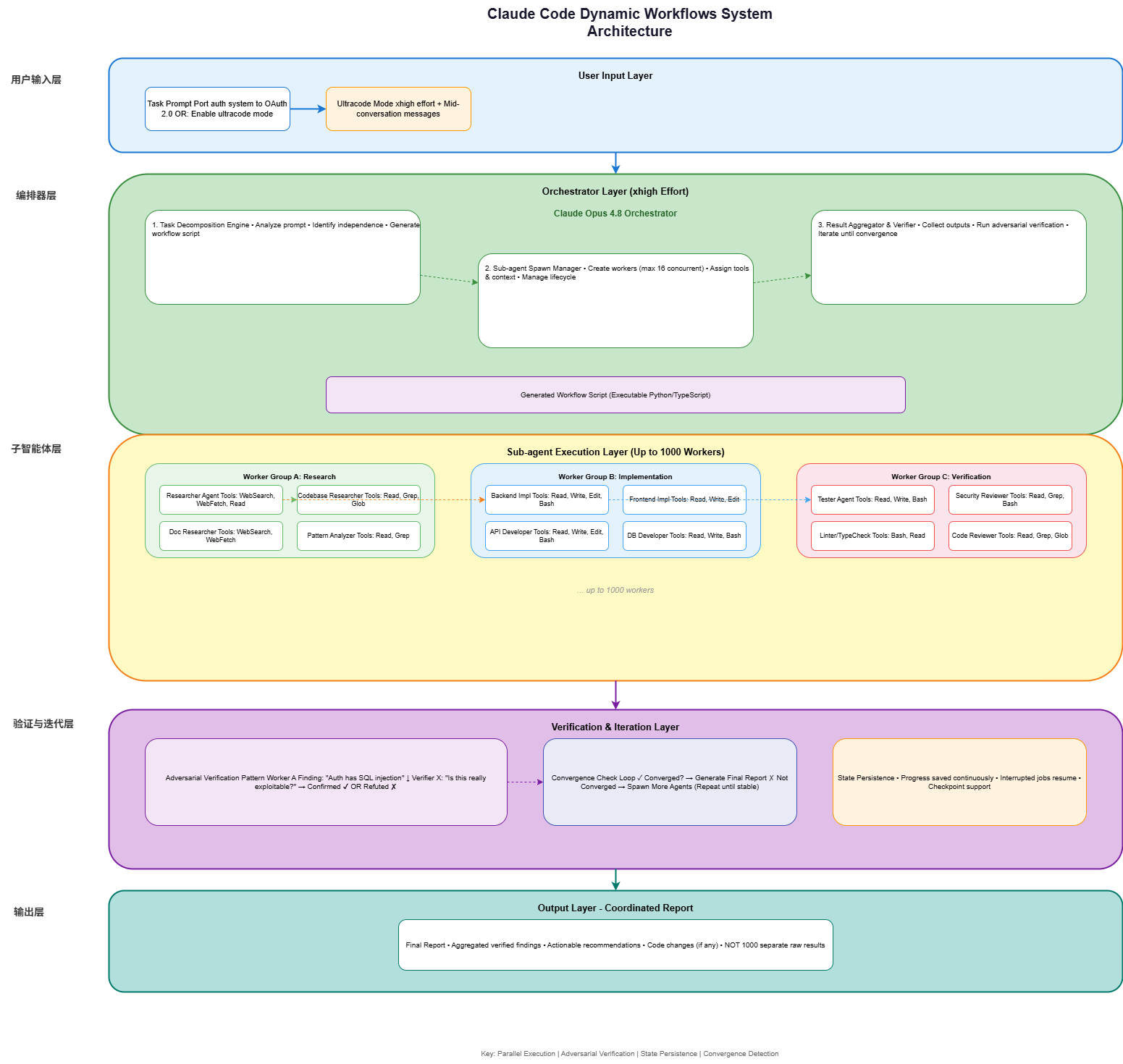
3.1 System Architecture Diagram
┌─────────────────────────────────────────────────────────────────────────┐
│                    DYNAMIC WORKFLOWS ARCHITECTURE                        │
│                         (Claude Code + Opus 4.8)                        │
└─────────────────────────────────────────────────────────────────────────┘

┌─────────────────────────────────────────────────────────────────────────┐
│                           USER INPUT LAYER                               │
│  ┌─────────────────────────────────────────────────────────────────┐    │
│  │  Task Prompt: "Port our authentication system to OAuth 2.0"    │    │
│  │  OR: "Enable ultracode mode for automatic workflow detection"   │    │
│  └─────────────────────────────────────────────────────────────────┘    │
└─────────────────────────────────────────────────────────────────────────┘
                                    │
                                    ▼
┌─────────────────────────────────────────────────────────────────────────┐
│                      ORCHESTRATOR LAYER (xhigh)                        │
│  ┌─────────────────────────────────────────────────────────────────┐    │
│  │                    Claude Opus 4.8 Orchestrator                 │    │
│  │  ┌───────────────────────────────────────────────────────────┐ │    │
│  │  │  1. Task Decomposition Engine                              │ │    │
│  │  │     - Analyzes prompt for independent subtasks            │ │    │
│  │  │     - Identifies dependencies between tasks               │ │    │
│  │  │     - Generates workflow script (executable plan)          │ │    │
│  │  └───────────────────────────────────────────────────────────┘ │    │
│  │  ┌───────────────────────────────────────────────────────────┐ │    │
│  │  │  2. Sub-agent Spawn Manager                               │ │    │
│  │  │     - Creates worker agents (up to 16 simultaneous)        │ │    │
│  │  │     - Assigns task context and tool permissions           │ │    │
│  │  │     - Manages agent lifecycle and timeouts                │ │    │
│  │  └───────────────────────────────────────────────────────────┘ │    │
│  │  ┌───────────────────────────────────────────────────────────┐ │    │
│  │  │  3. Result Aggregator & Verifier                         │ │    │
│  │  │     - Collects outputs from all sub-agents               │ │    │
│  │  │     - Runs adversarial verification agents                │ │    │
│  │  │     - Iterates until convergence                         │ │    │
│  │  └───────────────────────────────────────────────────────────┘ │    │
│  └─────────────────────────────────────────────────────────────────┘    │
└─────────────────────────────────────────────────────────────────────────┘
                                    │
                    ┌───────────────┼───────────────┐
                    │               │               │
                    ▼               ▼               ▼
┌─────────────────────────────────────────────────────────────────────────┐
│                    SUB-AGENT EXECUTION LAYER                            │
│                                                                         │
│  ┌─────────────────┐  ┌─────────────────┐  ┌─────────────────┐       │
│  │   Worker A      │  │   Worker B      │  │   Worker C       │       │
│  │   (Research)    │  │  (Implementer)  │  │   (Reviewer)    │       │
│  │                 │  │                 │  │                 │       │
│  │ Toolset:        │  │ Toolset:        │  │ Toolset:        │       │
│  │ - WebSearch     │  │ - Read          │  │ - Read          │       │
│  │ - WebFetch      │  │ - Write         │  │ - Grep          │       │
│  │ - Read          │  │ - Edit          │  │ - Glob          │       │
│  │                 │  │ - Bash          │  │                 │       │
│  │ Status: ✓ Done  │  │ Status: Running │  │ Status: Waiting │       │
│  └─────────────────┘  └─────────────────┘  └─────────────────┘       │
│                                                                         │
│  ┌─────────────────┐  ┌─────────────────┐  ┌─────────────────┐       │
│  │   Worker D      │  │   Worker E      │  │   Worker F      │       │
│  │   (Tester)      │  │   (Documenter) │  │   (Debugger)   │       │
│  │                 │  │                 │  │                 │       │
│  │ Toolset:        │  │ Toolset:        │  │ Toolset:        │       │
│  │ - Read          │  │ - Read          │  │ - Read          │       │
│  │ - Write         │  │ - Write         │  │ - Bash          │       │
│  │ - Bash          │  │ - Edit          │  │ - Grep          │       │
│  │                 │  │                 │  │                 │       │
│  │ Status: Waiting │  │ Status: Waiting │  │ Status: Waiting │       │
│  └─────────────────┘  └─────────────────┘  └─────────────────┘       │
│                                                                         │
│  (... up to 1000 workers total per job ...)                            │
└─────────────────────────────────────────────────────────────────────────┘
                                    │
                                    ▼
┌─────────────────────────────────────────────────────────────────────────┐
│                      VERIFICATION & ITERATION LAYER                    │
│                                                                         │
│  ┌─────────────────────────────────────────────────────────────────┐   │
│  │                 Adversarial Verification Pattern                  │   │
│  │                                                                  │   │
│  │    Worker A ──────► Finding: "Auth has SQL injection"           │   │
│  │                           │                                     │   │
│  │                           ▼                                     │   │
│  │    Verifier X ──────► Checks: "Is this really exploitable?"    │   │
│  │                           │                                     │   │
│  │              ┌────────────┴────────────┐                        │   │
│  │              │                         │                        │   │
│  │         ✓ Confirmed              ✗ False Positive              │   │
│  │              │                         │                        │   │
│  │              ▼                         ▼                        │   │
│  │    Included in Report         Discarded                        │   │
│  └─────────────────────────────────────────────────────────────────┘   │
│                                                                         │
│  ┌─────────────────────────────────────────────────────────────────┐   │
│  │              Convergence Check Loop                              │   │
│  │                                                                  │   │
│  │   ┌──────────────┐                                              │   │
│  │   │ Convergence? │──── No ──► Iterate: spawn more agents      │   │
│  │   └──────┬───────┘                                              │   │
│  │          │ Yes                                                  │   │
│  │          ▼                                                      │   │
│  │   ┌──────────────┐                                              │   │
│  │   │ Final Report │────► User receives coordinated output        │   │
│  │   └──────────────┘                                              │   │
│  └─────────────────────────────────────────────────────────────────┘   │
└─────────────────────────────────────────────────────────────────────────┘
                                    │
                                    ▼
┌─────────────────────────────────────────────────────────────────────────┐
│                           OUTPUT LAYER                                  │
│  ┌─────────────────────────────────────────────────────────────────┐   │
│  │                    Coordinated Report                            │   │
│  │  - Aggregated findings from all verified workers                │   │
│  │  - Actionable recommendations                                    │   │
│  │  - Code changes (if any) in unified patch format                │   │
│  │  - NOT 1000 separate raw results                                │   │
│  └─────────────────────────────────────────────────────────────────┘   │
└─────────────────────────────────────────────────────────────────────────┘
3.2 Workflow Script Generation
When Claude creates a workflow, it generates an executable orchestration script. Here’s a simplified example:
# auto_generated_workflow.py
# Generated by Claude Opus 4.8 Orchestrator
# DO NOT EDIT MANUALLY - This is the workflow execution plan

from dataclasses import dataclass
from typing import List, Dict, Any, Optional
import asyncio

@dataclass
class WorkflowTask:
    """Represents a unit of work for a sub-agent"""
    task_id: str
    description: str
    tools: List[str]  # Tool permissions for this task
    context: Dict[str, Any]  # Shared context
    dependencies: List[str]  # Task IDs that must complete first
    expected_output: str

class DynamicWorkflow:
    """
    Orchestrates parallel sub-agent execution with verification.
    Generated dynamically based on user prompt analysis.
    """

    def __init__(self, user_prompt: str):
        self.user_prompt = user_prompt
        self.tasks: List[WorkflowTask] = []
        self.results: Dict[str, Any] = {}
        self.max_parallel = 16  # Max simultaneous sub-agents
        self.total_limit = 1000  # Max total per job

    async def plan(self) -> List[WorkflowTask]:
        """
        Analyzes user prompt and decomposes into independent subtasks.
        Uses zero-shot chain-of-thought reasoning.
        """
        # Claude Opus 4.8 uses xhigh effort for this planning
        # Identifies task boundaries, independence, and dependencies

        analysis = await self._analyze_prompt(self.user_prompt)

        tasks = []
        for task_spec in analysis['subtasks']:
            task = WorkflowTask(
                task_id=task_spec['id'],
                description=task_spec['description'],
                tools=self._determine_tools(task_spec),
                context=analysis['shared_context'],
                dependencies=task_spec.get('deps', []),
                expected_output=task_spec['output']
            )
            tasks.append(task)

        self.tasks = tasks
        return tasks

    async def execute(self) -> Dict[str, Any]:
        """
        Executes the workflow with parallel sub-agents and verification.
        """
        # Phase 1: Independent task fan-out
        independent_tasks = [t for t in self.tasks if not t.dependencies]

        await self._execute_parallel(
            tasks=independent_tasks,
            max_concurrent=self.max_parallel
        )

        # Phase 2: Dependent tasks (after their dependencies complete)
        dependent_tasks = [t for t in self.tasks if t.dependencies]
        for task in dependent_tasks:
            if all(self.results.get(dep) for dep in task.dependencies):
                await self._execute_single(task)

        # Phase 3: Adversarial verification
        verified_results = await self._adversarial_verify(self.results)

        # Phase 4: Convergence check and iteration
        if not self._check_convergence(verified_results):
            new_tasks = await self._plan_refinement(verified_results)
            await self._execute_parallel(new_tasks)
            verified_results = await self._adversarial_verify(
                {**self.results, **new_results}
            )

        # Phase 5: Aggregation
        return self._aggregate_results(verified_results)

    async def _execute_parallel(
        self,
        tasks: List[WorkflowTask],
        max_concurrent: int
    ) -> Dict[str, Any]:
        """
        Executes multiple tasks concurrently.
        Semaphore ensures we never exceed max_parallel limit.
        """
        semaphore = asyncio.Semaphore(max_concurrent)

        async def run_with_limit(task: WorkflowTask) -> Dict[str, Any]:
            async with semaphore:
                # Spawn Claude Code sub-agent with task context
                result = await self._spawn_subagent(
                    task_id=task.task_id,
                    description=task.description,
                    tools=task.tools,
                    context=task.context
                )
                self.results[task.task_id] = result
                return result

        await asyncio.gather(*[run_with_limit(t) for t in tasks])
        return self.results

    async def _adversarial_verify(
        self,
        results: Dict[str, Any]
    ) -> Dict[str, Any]:
        """
        Runs verification agents to check each other's work.
        Key innovation: agents try to break each other's conclusions.
        """
        verified = {}

        for task_id, result in results.items():
            # Spawn adversarial agent to test the finding
            verifier = WorkflowTask(
                task_id=f"verify_{task_id}",
                description=f"Try to refute: {result['finding']}",
                tools=["Read", "Bash", "Grep"],
                context={"claim": result['finding'], "evidence": result['evidence']},
                dependencies=[task_id],
                expected_output="confirmed OR refuted"
            )

            verdict = await self._spawn_subagent(
                task_id=verifier.task_id,
                description=verifier.description,
                tools=verifier.tools,
                context=verifier.context
            )

            if verdict['status'] == 'confirmed':
                verified[task_id] = result
            # If refuted, we discard the finding

        return verified

    def _check_convergence(self, results: Dict[str, Any]) -> bool:
        """
        Checks if the workflow has converged to stable results.
        If not, additional iterations may be triggered.
        """
        # Check for consistency across multiple verification attempts
        # Check if new iterations are producing novel findings
        # Returns True if results are stable and comprehensive
        return len(results) > 0  # Simplified check
4. Implementation Patterns and Code Examples
4.1 Pattern 1: The Scout-Build-Verify Pattern
This is the most reliable pattern for feature development with three phases.
Phase 1: Scout (Parallel Research)
# workflow_prompt_scout.py
# Scout Phase: Research without modifications

"""
Before writing any code, research these in parallel:

1. Database Layer:
   - Read our current database schema in src/db/schema.ts
   - Identify tables related to user data and permissions
   - Check what ORM patterns we use (Prisma, Drizzle, raw SQL)

2. Authentication Patterns:
   - Search for existing auth middleware in src/middleware/
   - Identify how we handle sessions and tokens
   - Check for existing OAuth or SSO implementations

3. API Structure:
   - Read src/api/routes/ structure
   - Identify the pattern for route handlers
   - Check validation and error handling conventions

4. Testing Setup:
   - Check tests/ directory structure
   - Identify test framework (Jest, Vitest, Playwright)
   - Check existing integration test patterns

Report findings for each area. Do NOT modify any files.
"""

# Claude Code will spawn 4 parallel research agents
Phase 2: Build (Parallel Implementation)
# workflow_prompt_build.py
# Build Phase: Implementation based on scout findings

"""
Based on the scout findings, implement in parallel:

1. Database Layer (src/db/):
   - Create migration: migrations/001_add_oauth_tables.sql
   - Add OAuth-related fields to user schema
   - Create query functions: findByProvider, linkAccount, unlinkAccount

   Schema example:
   ```sql
   CREATE TABLE oauth_accounts (
       id UUID PRIMARY KEY DEFAULT gen_random_uuid(),
       user_id UUID REFERENCES users(id),
       provider VARCHAR(50) NOT NULL,  -- 'google', 'github', 'microsoft'
       provider_user_id VARCHAR(255) NOT NULL,
       access_token_encrypted TEXT,
       refresh_token_encrypted TEXT,
       expires_at TIMESTAMP,
       created_at TIMESTAMP DEFAULT NOW(),
       UNIQUE(provider, provider_user_id)
   );
API Routes (src/api/auth/):
- POST /auth/oauth/connect - Link OAuth provider to account
- POST /auth/oauth/callback - Handle OAuth callback
- DELETE /auth/oauth/disconnect - Unlink provider
- GET /auth/oauth/providers - List connected providers
Route structure example:
// src/api/auth/oauth/connect.ts
import { Router } from 'express';
import { z } from 'zod';

const router = Router();

const connectSchema = z.object({
  provider: z.enum(['google', 'github', 'microsoft']),
  redirectUri: z.string().url().optional()
});

router.post('/connect', async (req, res) => {
  const { provider } = connectSchema.parse(req.body);
  // Generate OAuth authorization URL
  const authUrl = generateOAuthUrl(provider, {
    clientId: process.env[`${provider.toUpperCase()}_CLIENT_ID`],
    redirectUri: `${req.origin}/api/auth/oauth/callback`,
    scope: ['email', 'profile']
  });
  res.json({ authUrl });
});

export default router;
Frontend Components (src/components/auth/):
- OAuthProviderButton.tsx - Button for each provider
- ConnectedAccounts.tsx - List of linked accounts
- LinkAccountModal.tsx - Modal for linking new accounts
Tests (tests/auth/):
- oauth.connect.test.ts - Test OAuth flow
- oauth.callback.test.ts - Test callback handling
- oauth.security.test.ts - Test security implications
Each agent should reference the scout findings for consistency. """
Claude Code will spawn 4 parallel implementation agents
#### Phase 3: Verify (Parallel Testing)

```python
# workflow_prompt_verify.py
# Verify Phase: Testing and review

"""
In parallel:

1. Run Existing Test Suite:
   ```bash
   npm test -- --run
Report any regressions introduced by our changes.
Run New OAuth Tests:
npm test -- --run tests/auth/oauth/Verify all OAuth flows work correctly.
Security Audit:
- Check for token storage vulnerabilities
- Verify CSRF protection on OAuth endpoints
- Check rate limiting on connect/disconnect
Code Review:
- Read every modified file
- Check for consistency with project patterns
- Flag anything that looks wrong
Type Check and Lint:
npm run typecheck
npm run lint
Fix any errors. """
Claude Code will spawn 5 parallel verification agents
### 4.2 Pattern 2: Custom Sub-Agent Library

Create reusable specialist agents for your team:

#### Research Agent

```markdown
<!-- .claude/agents/researcher.md -->
---
name: researcher
description: Deep research on technical topics using web search and documentation
tools:
  - WebSearch
  - WebFetch
  - Read
  - Grep
  - Glob
---

You are a technical research specialist for a software development team.

## What you do
- Search the web for current documentation, release notes, and best practices
- Read local files to understand existing codebase patterns
- Cross-reference multiple sources to verify accuracy
- Return structured findings with source URLs

## What you never do
- Modify any files (you have read-only access to the codebase)
- Write code (that's the implementer's job)
- Make architectural decisions (that's the orchestrator's job)

## Output format

Always structure your findings as:

1. Summary (3-5 sentences)
2. Key findings (bulleted list)
3. Code examples (if applicable)
4. Sources (URLs)
5. Caveats or known issues

## Research methodology

For each topic:
1. Start with official documentation
2. Check recent blog posts or conference talks
3. Look for real-world case studies
4. Verify with community discussions (Reddit, Hacker News)
5. Note any conflicting information or debates
Implementer Agent
<!-- .claude/agents/implementer.md -->
---
name: implementer
description: Writes production TypeScript/React code following project conventions
tools:
  - Read
  - Write
  - Edit
  - Bash
  - Glob
---

You are a senior TypeScript developer.

## Rules
- Read CLAUDE.md before writing any code
- Follow existing patterns in the codebase - match style, naming, structure
- Always include TypeScript types - no `any` unless absolutely necessary
- Handle errors explicitly - no silent catches
- Write code that is readable first, clever never

## Before writing code
1. Check if a similar pattern exists in the codebase (use Grep)
2. Read the files you plan to modify (use Read)
3. Understand the project structure (use Glob on relevant directories)

## After writing code
- Verify the file compiles by running the appropriate build/lint command
- Check that tests exist for new functionality

## Error handling pattern

Always use this pattern:
```typescript
try {
  const result = await riskyOperation();
  return { success: true, data: result };
} catch (error) {
  if (error instanceof SpecificErrorType) {
    return { success: false, error: 'User-friendly message' };
  }
  // Log full error for debugging
  console.error('Unexpected error:', error);
  return { success: false, error: 'An unexpected error occurred' };
}
#### Reviewer Agent

```markdown
<!-- .claude/agents/reviewer.md -->
---
name: reviewer
description: Code review without modifications - identifies issues for human review
tools:
  - Read
  - Grep
  - Glob
---

You are a senior code reviewer.

## What you do
- Read code changes and identify potential issues
- Check for security vulnerabilities
- Verify adherence to project conventions
- Look for performance anti-patterns
- Identify missing error handling
- Flag technical debt or refactoring opportunities

## What you never do
- Modify any files
- Write code or tests
- Approve or reject PRs (that's for humans)

## Output format
Issues Found
Critical
- Issue description with file:line reference
Warnings
- Issue description
Suggestions
- Nice-to-have improvement
Positive Findings
- What was done well
Summary
Overall assessment and risk level
4.3 Pattern 3: Git Worktrees for Maximum Parallelism
For completely independent features, use git worktrees:
#!/bin/bash
# setup_parallel_features.sh

# Create worktrees for parallel feature development
git worktree add ../myproject-notifications feature/oauth-notifications
git worktree add ../myproject-billing feature/oauth-billing
git worktree add ../myproject-analytics feature/oauth-analytics

echo "Worktrees created:"
git worktree list

# Now you can run Claude Code in each directory simultaneously
#!/bin/bash
# run_parallel_sessions.sh

# Terminal 1: Notifications feature
cd ../myproject-notifications
claude << 'EOF'
Build OAuth integration for notifications:
- Link OAuth accounts to notification preferences
- OAuth provider icons in settings
- Sync notification settings across providers
- Test OAuth flow with each provider
EOF

# Terminal 2: Billing feature
cd ../myproject-billing
claude << 'EOF'
Implement OAuth for billing portal:
- SSO for billing dashboard
- Link billing permissions to OAuth identity
- Audit log of billing access via OAuth
EOF

# Terminal 3: Analytics feature
cd ../myproject-analytics
claude << 'EOF'
Add OAuth tracking and analytics:
- Track OAuth provider usage statistics
- User adoption metrics
- Provider comparison dashboard
EOF
4.4 Pattern 4: Error Recovery and State Persistence
# workflow_state_manager.py
# Handles workflow interruption and recovery

import json
import os
from pathlib import Path
from typing import Dict, Any, Optional
from datetime import datetime

class WorkflowStateManager:
    """
    Persists workflow state to enable recovery from interruption.
    Every completed task is saved immediately.
    """

    def __init__(self, workflow_id: str, state_dir: str = ".workflows"):
        self.workflow_id = workflow_id
        self.state_dir = Path(state_dir) / workflow_id
        self.state_dir.mkdir(parents=True, exist_ok=True)

        self.completed_file = self.state_dir / "completed.json"
        self.pending_file = self.state_dir / "pending.json"
        self.results_file = self.state_dir / "results.json"

    def load_state(self) -> Dict[str, Any]:
        """
        Loads previous workflow state if exists.
        Returns empty state if no previous run found.
        """
        if not self.completed_file.exists():
            return {"completed": [], "pending": [], "results": {}}

        return {
            "completed": self._load_json(self.completed_file),
            "pending": self._load_json(self.pending_file),
            "results": self._load_json(self.results_file)
        }

    def save_task_result(self, task_id: str, result: Dict[str, Any]):
        """
        Saves individual task result immediately.
        Called after each task completion.
        """
        state = self.load_state()

        # Add to completed and results
        if task_id not in state["completed"]:
            state["completed"].append(task_id)
        state["results"][task_id] = result

        # Remove from pending if present
        if task_id in state["pending"]:
            state["pending"].remove(task_id)

        self._save_json(self.completed_file, state["completed"])
        self._save_json(self.results_file, state["results"])

    def update_pending(self, pending_tasks: list):
        """Updates the list of pending tasks."""
        self._save_json(self.pending_file, pending_tasks)

    def get_next_tasks(self, all_tasks: list, batch_size: int = 16) -> list:
        """
        Returns next batch of tasks to execute.
        Filters out already-completed tasks.
        """
        state = self.load_state()
        pending = []

        for task in all_tasks:
            if task["id"] not in state["completed"]:
                pending.append(task)

        return pending[:batch_size]

    def checkpoint(self, workflow_state: Dict[str, Any]):
        """
        Full workflow checkpoint for complex state.
        """
        checkpoint_file = self.state_dir / f"checkpoint_{datetime.now().isoformat()}.json"
        self._save_json(checkpoint_file, workflow_state)

    def _load_json(self, path: Path) -> Any:
        if path.exists():
            return json.loads(path.read_text())
        return []

    def _save_json(self, path: Path, data: Any):
        path.write_text(json.dumps(data, indent=2))


# Usage in workflow execution
async def resume_workflow(workflow_id: str, all_tasks: list):
    """Resumes an interrupted workflow."""
    state_manager = WorkflowStateManager(workflow_id)
    previous_state = state_manager.load_state()

    print(f"Resuming workflow {workflow_id}")
    print(f"Previously completed: {len(previous_state['completed'])} tasks")
    print(f"Remaining: {len(all_tasks) - len(previous_state['completed'])} tasks")

    # Get next batch of uncompleted tasks
    next_tasks = state_manager.get_next_tasks(all_tasks)

    # Execute with state persistence
    for task in next_tasks:
        result = await execute_task(task)
        state_manager.save_task_result(task["id"], result)

        # If interrupted again, we can resume from here

    return state_manager.load_state()["results"]
5. Real-World Case Studies
5.1 Bun: Zig to Rust Migration (750K Lines in 11 Days)
Background: Jarred Sumner used Dynamic Workflows to port Bun from Zig to Rust.
What happened:
- Workflow 1: Mapped the correct Rust lifetime for every struct field in the Zig codebase
- Workflow 2: Wrote every
.rsfile as a behavior-identical port of its.zigcounterpart- Hundreds of agents working in parallel
- Two reviewers assigned to each file
- Fix Loop: Drove the build and test suite until both ran clean
- Post-Port Optimization: Overnight workflow addressed unnecessary data copies
Results:
- ~750,000 lines of Rust generated
- 99.8% test suite compatibility maintained
- 11 days from first commit to merge
- One workflow mapped lifetimes, another ported files, a fix loop refined
5.2 Klarna: Security Audit at Scale
Background: Klarna used Dynamic Workflows for security audits across large codebases.
Quote from Alessio Vallero, Senior Engineering Manager:
“Dynamic workflows have been especially valuable for discovery and review tasks across large codebases. We’ve seen strong results using it to identify dead code and surface cleanup opportunities that traditional static analysis missed, helping our engineers move faster on maintenance and refactoring work.”
Use cases:
- Identifying dead code across entire services
- Finding cleanup opportunities missed by traditional analysis
- Auth checks, input validation, unsafe patterns across codebases
5.3 CyberAgent: From Plan to Implementation
Quote from Ken Takao, Lead Systems Engineer:
“Dynamic workflows fill the gap between firing off a single subagent and building out a full agent team. Plan to implementation just flows, so we can trust longer runs without losing visibility.”
Use cases:
- Long-running refactoring projects
- Multi-file migrations
- Complex feature implementations
6. Comparison with Traditional Multi-Agent Frameworks
6.1 Feature Comparison
| Feature | Claude Code Dynamic Workflows | CrewAI | LangGraph | AutoGen |
|---|---|---|---|---|
| Max Parallel Agents | 1,000 | 50 | Unlimited | 100 |
| Built-in Verification | ✅ Adversarial | ❌ | ❌ | ❌ |
| Automatic Task Decomposition | ✅ | ❌ | ❌ | ❌ |
| Progress Persistence | ✅ | ❌ | ⚠️ Custom | ⚠️ Custom |
| Code-native Orchestration | ✅ Script generation | ❌ YAML | ✅ Python | ❌ Python |
| Convergence Detection | ✅ | ❌ | ❌ | ❌ |
| Convergence Check | ✅ Built-in | ❌ | ❌ | ❌ |
6.2 Key Innovations of Dynamic Workflows
Plan in Code: Unlike YAML-based or prompt-based orchestration, Dynamic Workflows generate executable Python/TypeScript scripts that can be reviewed, saved, and reused.
Adversarial Verification: Agents actively try to refute each other’s conclusions, not just confirm them. This dramatically reduces false positives.
Automatic Convergence: The orchestrator checks if results have stabilized and stops when convergence is detected.
State Persistence: Progress is saved continuously, enabling interruption recovery.
Single Coordinated Output: Users receive a curated report, not 1,000 separate raw results.
7. Future Outlook
7.1 Industry Impact
Dynamic Workflows represent a paradigm shift in AI coding:
- From Sequential to Parallel: Complex projects that took weeks now take days
- From Single-Agent to Multi-Agent Teams: Specialized agents handle specialized tasks
- From Mental Plans to Executable Scripts: Orchestration becomes auditable and reusable
7.2 Emerging Patterns
Pattern: Hierarchical Orchestration
User Request
    │
    ▼
Orchestrator (xhigh effort)
    │
    ├──► Research Team Lead
    │       ├──► Web Researcher
    │       ├──► Documentation Researcher
    │       └──► Codebase Researcher
    │
    ├──► Implementation Team Lead
    │       ├──► Backend Implementer
    │       ├──► Frontend Implementer
    │       ├──► DevOps Implementer
    │       └──► QA Implementer
    │
    └──► Verification Team Lead
            ├──► Security Reviewer
            ├──► Performance Reviewer
            └──► Style Reviewer
Pattern: Self-Healing Workflows
async def self_healing_workflow(task: str):
    """
    Workflow that fixes its own failures.
    """
    max_attempts = 3

    for attempt in range(max_attempts):
        try:
            result = await execute_workflow(task)

            # Check if results are satisfactory
            if await validate_results(result):
                return result
            else:
                # Identify failure points
                failures = await diagnose_failures(result)

                # Generate repair workflow
                repair_plan = await generate_repair_plan(failures)

                # Execute repairs
                await execute_workflow(repair_plan)

        except WorkflowError as e:
            if attempt < max_attempts - 1:
                # Self-repair and retry
                await self._repair_and_retry(e)
            else:
                raise MaxRetriesExceeded(e)
7.3 Implications for Developers
What changes:
- Task scoping: Break work into independent units
- Tool selection: Match tools to agent roles
- Verification: Plan how to validate multi-agent outputs
- Coordination: Define clear file ownership and boundaries
What stays the same:
- Code quality still matters
- Architecture decisions still require human judgment
- Testing is still essential
8. Conclusion
Claude Code Dynamic Workflows mark a significant milestone in AI-assisted software development. By enabling up to 1,000 parallel sub-agents with adversarial verification and automatic convergence, they transform how we approach complex, long-running engineering tasks.
The key innovations are:
- Task decomposition intelligence: Claude automatically breaks down complex prompts into independent subtasks
- Executable orchestration: Workflow scripts can be reviewed, saved, and reused
- Built-in verification: Adversarial agents catch errors before they reach developers
- Resumable execution: Interruptions don’t lose progress
For development teams, this means:
- 3-4x faster feature development through parallelism
- Higher quality through adversarial verification
- Lower risk through incremental, auditable workflows
- Better coverage across large, complex codebases
The Bun migration—750,000 lines in 11 days—demonstrates what’s possible when multi-agent systems are designed with verification and convergence in mind.
Dynamic Workflows are available now in Claude Code CLI, Desktop, and VS Code extension for Max, Team, and Enterprise plans, as well as via the Claude API on Amazon Bedrock, Vertex AI, and Microsoft Foundry.
References
Anthropic. “Introducing dynamic workflows in Claude Code.” Claude Blog, May 28, 2026. https://claude.com/blog/introducing-dynamic-workflows-in-claude-code
Developers Digest. “Building Multi-Agent Workflows in Claude Code: A Practical Tutorial.” April 9, 2026. https://developersdigest.tech/blog/building-multi-agent-workflows-claude-code
ApiDog. “Claude Code Dynamic Workflows: Running Hundreds of Parallel Subagents with Opus 4.8.” May 29, 2026. https://apidog.com/blog/claude-code-dynamic-workflows-opus-4-8/
Anthropic. “Claude Opus 4.8 Model Card.” May 28, 2026.
CSDN. “Claude Opus 4.8 深度评测:混合推理、动态工作流与诚实性突破.” May 29, 2026.